TROUBLESHOOTING (CD
SECTION)
When the
CD
does not function
When the CD section does not operate When the objective lens of the optical pickup is dirty, this section may not operate. Clean
the objective lens, and check the playback operation. When this section does not operate even after the above step is taken,
check the following items. Remove the cabinet and follow the troubleshooting instructions.
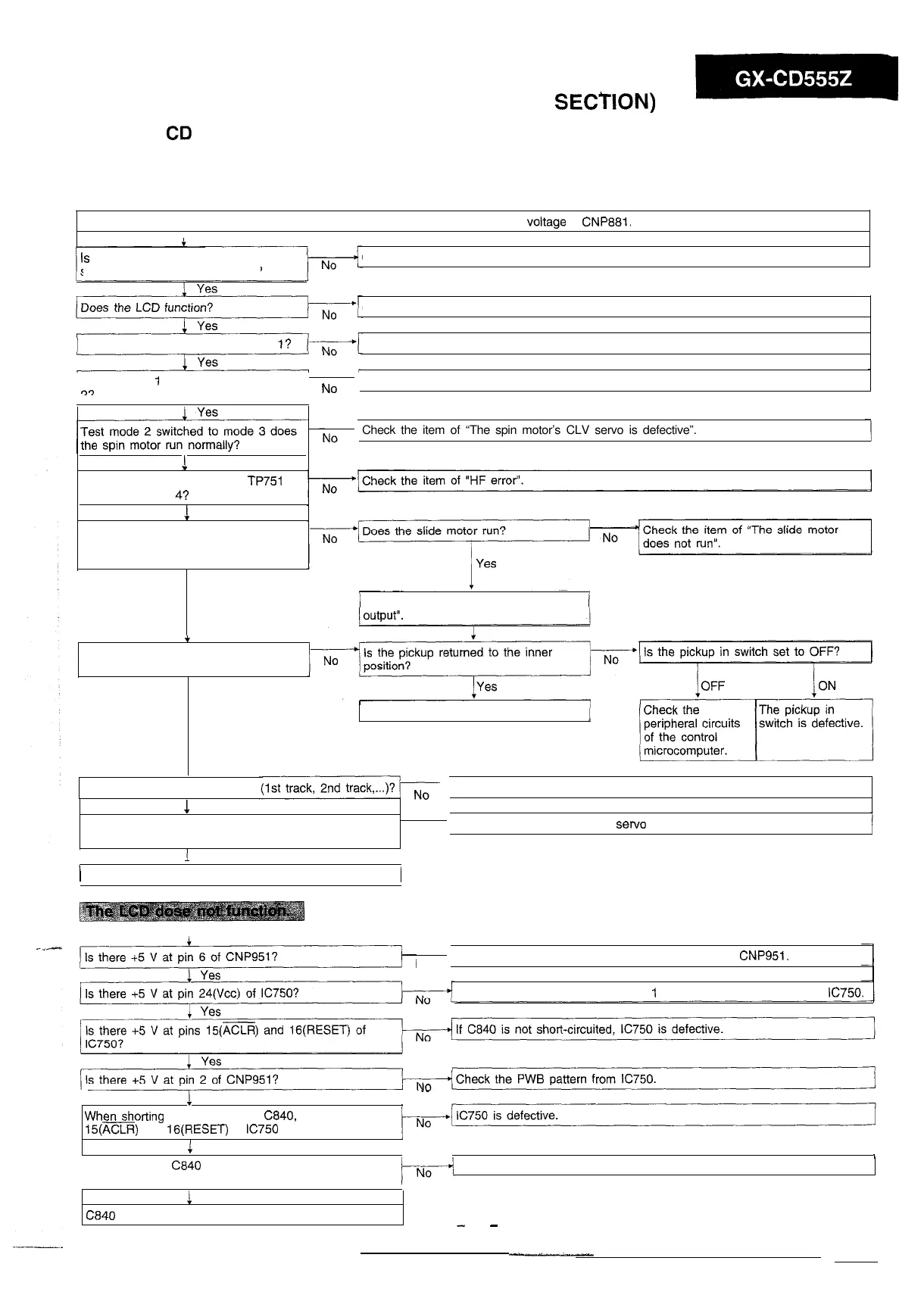
Set a disc, turn on the power, set the FUNCTION switch to CD, and check the voltage of
CNP881.
Is
the voltage as shown in the
schematic diagram being output?
Check the power circuit of the main unit.
Check the item of “The LCD does not function”.
Does the laser go on in test mode
l?
Check the item of “The laser does not go on”.
Is test mode
1
switched to test mode
q9
No
Check the item of “Does not focus”.
Check the item of “The spin motor’s CLV servo is defective”.
1
Yes
Is the output of pin 3 (HF) of
TP751
flat in test mode
4?
1
Yes
When the pickup moves to a track
using the UP/DOWN button in test
mode 5, is there audio output?
Yes
Check the item of “There is no audio
t
When the power is turned off and then
on, is the unit initialized?
Yes
The pickup in switch is defective (ON).
.
Does the disc track up in order
1
Yes
Check the item of “Track searching is impossible”.
Does the disc play back several ten seconds even
after starting playback?
1
Yes
No
Check the item of “The slide servo does not function”.
/
Normal
No
Check the PWB patterns from pin 1 of CNP881 to
CNP951.
Check the PWB patterns from pin I of CNP881 to pin 24 (Vcc) of
IC750.
!
Yes
Whenshorting the both ends of
C840,
do the pins
15(ACLR)
and
lG(RESET)
of
IC750
read 0 V?
1
Yes
.-
/
When shorting C840 for a moment, does the LCD
function?
Check the LCD PWB of CD.
! Yes
C840
is defective.
-
33
-



 To Next Page