EasyManua.ls Logo

Sharp CD-G15000 - User Manual

Sharp CD-G15000
48 pages
Print Icon
To Next Page IconTo Next Page
Loading...
06/1/5 CD-G15000_FR.fm
TINSZA128AWZZ
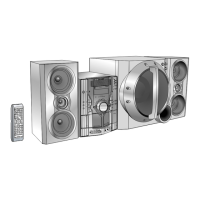
MINI COMPONENT SYSTEM
MODEL
CD-G15000
SPEAKER SYSTEM
MODEL
CP-G15000
OPERATION MANUAL
Thank you for purchasing this SHARP product.
To obtain the best performance from this product, please
read this manual carefully. It will guide you in operating your
SHARP product.
CD-G15000
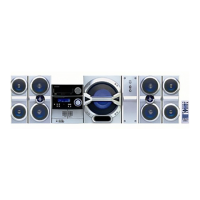
CD-G15000 Mini Component System consisting of CD-G15000
(main unit) and CP-G15000 (front speaker system).
CP-G15000
CP-G15000 Speaker System consisting of GBOXSA133AWM1
(rear speaker system) and CP-SW15000 (active subwoofer).
Accessories
Please confirm that the following accessories are included.
Note:
Only the above accessories are included.
Remote control 1
(RRMCGA090AWSA)
AM loop antenna 1
(QANTL0010AWZZ)
FM antenna 1
(92LFANT1535A)
Wire for front speaker 2
(QCNWHA003AWZZ)
Wire for rear speaker 2
(QCNWHA004AWZZ)
Subwoofer cable 1
(QCNWGA003AWPZ)
Red
Black

Grey
Black

Other manuals for Sharp CD-G15000

Questions and Answers

  • M
    Megan GravesJul 29, 2025
    What to do if the Sharp CD-G15000 remote control does not operate?
    • P
      porrJul 29, 2025
      If your Sharp Stereo System remote control isn't working, check if the unit is plugged in, ensure the batteries have the correct polarity and aren't dead. Also, verify that you're not too far away or at an extreme angle and that the remote control sensor isn't exposed to strong light.
  • N
    Nicholas MartinezAug 1, 2025
    Why does my Sharp CD-G15000 Stereo System radio make unusual noises continuously?
    • W
      wmcphersonAug 2, 2025
      If your Sharp Stereo System is making unusual noises continuously, especially when the radio is on, try moving the unit away from your TV or computer. Also, ensure the FM antenna or AM loop antenna is placed properly, and move the antenna away from the AC power cord if it's located nearby.
  • W
    Willie HuynhAug 6, 2025
    What to do if there is condensation inside my Sharp CD-G15000?
    • C
      Catherine WellsAug 6, 2025
      If you experience condensation inside your Sharp Stereo System, it's likely due to sudden temperature changes or operation in a very humid environment. Leave the power on with no disc (or cassette) in the unit until normal playback is possible, which usually takes about an hour. Before using the unit, wipe off any condensation on the transmitter with a soft cloth.
  • P
    Paul RobinsonAug 10, 2025
    Why is there no sound coming from my Sharp CD-G15000 Stereo System?
    • J
      Justin PattersonAug 10, 2025
      If your Sharp Stereo System isn't producing any sound, check if the volume level is set to "0", if headphones are connected, and if the speaker wires are properly connected.
  • L
    lmartinAug 15, 2025
    What to do if Sharp CD-G15000 playback sounds are skipped, or stopped in the middle of a track?
    • K
      Katie SilvaAug 15, 2025
      If the Sharp Stereo System playback sounds are skipping or stopping, it might be due to excessive vibrations near the unit, a dirty disc, or condensation inside the unit.
  • M
    Marvin AdamsAug 19, 2025
    What to do if Sharp Stereo System playback does not start or stops in the middle?
    • J
      jlopezAug 19, 2025
      If playback doesn't start, stops midway, or isn't working right on your Sharp Stereo System, make sure the disc isn't loaded upside down, meets the required standards, and isn't distorted or scratched.
  • R
    Randall HamiltonAug 23, 2025
    What to do if a button is pressed and the Sharp CD-G15000 Stereo System does not respond?
    • J
      Jennifer CarsonAug 23, 2025
      If your Sharp Stereo System doesn't respond when you press a button, set the unit to the power stand-by mode and then turn it back on. If the unit still malfunctions, reset it. (Refer to page 44.)

Summary

Important Safety Instructions

Precautions

General Precautions

General advice on placement, environment, and handling to ensure safe operation.

System Connections

Antenna Connection

Instructions for connecting FM and AM antennas for radio reception.

Speaker Connection

Guides on connecting front and rear speaker systems to the main unit.

Subwoofer Connection

Instructions for connecting the active subwoofer to the main unit.

AC Power Connection

Steps for connecting the unit to the AC power outlet and initial setup.

Remote Control Operation

Battery Installation

Step-by-step guide for installing batteries in the remote control.

Subwoofer Control

Subwoofer Power Switch

How to turn the active subwoofer unit on and off.

General Unit Control

Volume Adjustment

How to control the main unit's and remote's volume.

Listening to a CD or MP3;WMA Disc

CD or MP3;WMA Disc Playback

Various Disc Functions

Explains basic playback controls like Play, Stop, Pause, and Track navigation.

MP3;WMA Navigation (Only for MP3;WMA Files)

File Search by Folder;Title

Searching and playing MP3/WMA files based on folder or title information.

Listening to the Radio

Tuning Radio Stations

Instructions for tuning into AM and FM radio stations.

Timer and Sleep Operation

Timer Playback;Recording Setup

Guide for setting up automatic playback or recording at a specific time.

Sleep Operation

How to set the unit to automatically turn off after a specified period.

Troubleshooting Chart

General Troubleshooting

Solutions for common problems with the main unit.

CD Player Issues

Troubleshooting specific problems encountered with the CD player.

Cassette Deck Issues

Solutions for problems related to the cassette deck operation.

Tuner Issues

Troubleshooting common problems experienced with the radio tuner.

Remote Control Issues

Troubleshooting steps for when the remote control is not functioning correctly.

Memory Reset Procedure

How to clear all stored settings and reset the unit to factory defaults.

Maintenance

Cleaning Tape Handling Parts

Instructions for cleaning the tape heads, capstans, and pinch rollers.

Cleaning CD Pickup Lens

How to clean the laser lens of the CD player for proper function.

Sharp CD-G15000 Specifications

General IconGeneral
BrandSharp
ModelCD-G15000
CategoryStereo System
LanguageEnglish

Related product manuals