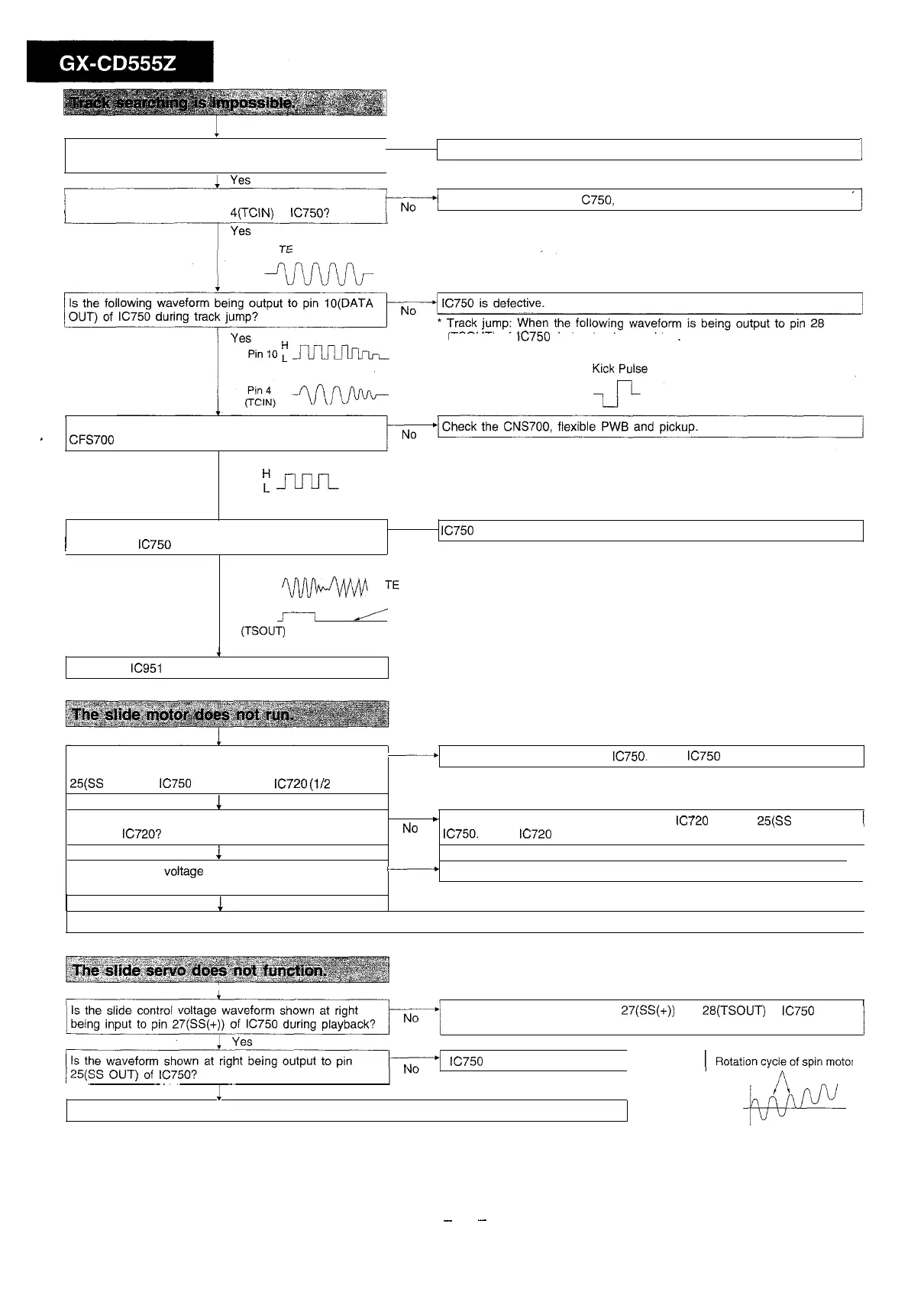
Does the slide motor run in the test mode using the
UP/DOWN button?
No
l
Check the item of “The slide motor does not run”.
I
During normal playback track searching, is the following
waveform being input to pin
4(TCIN)
of
IC750?
Check the connection of
C750,
etc.
(TSOUT) of
IC750
during track searching.
Is the following waveform being output to pin 16 of
’
CFS700
during track jump?
Yes
Fm
Is the following waveform being output to pin 28
1
(TSOUT) of
IC7.50
during track searching?
l
IC750
is defective.
No
Yes
Pin28
m
(TSOUT)
After generating a kick pulse,
A
does a waveform appear like this?
vv
Check the
IC951
and the LCD PWB of CD.
When the UP/DOWN button is pressed in the test
-
Check the peripheral parts of
IC750.
If OK,
IC750
is defective.
mode, is the slide feed signal being output between pin
No
25(SS
OUT) of
IC750
and pin 13 of
IC720
(l/2
Vcc)?
1
Yes
Is the slide feed signal being output between pins 3
.
p
Check the connection between pin 13 of
IC720
and pin
25(SS
OUT) of
1
and 5 of
IC720?
No
IC750.
If OK,
IC720
is defective.
1
Yes
Is the slide feed voltage being supplied to the both
ends of the slide motor?
M
Check the CNP720 and CNS720.
No
1
1
Yes
Check the slide motor. Supply 2.0 VDC to the slide motor terminal, and if the slide motor does not function, it is defective.
1
Is the slide control voltage waveform shown at right
Check the parts between pins
27(SS(+))
and
28(TSOUT)
of
IC750
and
being input to pin
27(SS(+))
of
IC750
during playback? then the connection of PWB pattern.
fizz/
lC750 is defective.
(
Rotatio;;;t;;r
’
Is the waveform shown at right being output to pin
i
Yes
The slide servo system is not defective. Check again from the beginning.
Voltage differs according to
disc eccentricity
-
36
-



 To Next Page