HT-DP4000
4
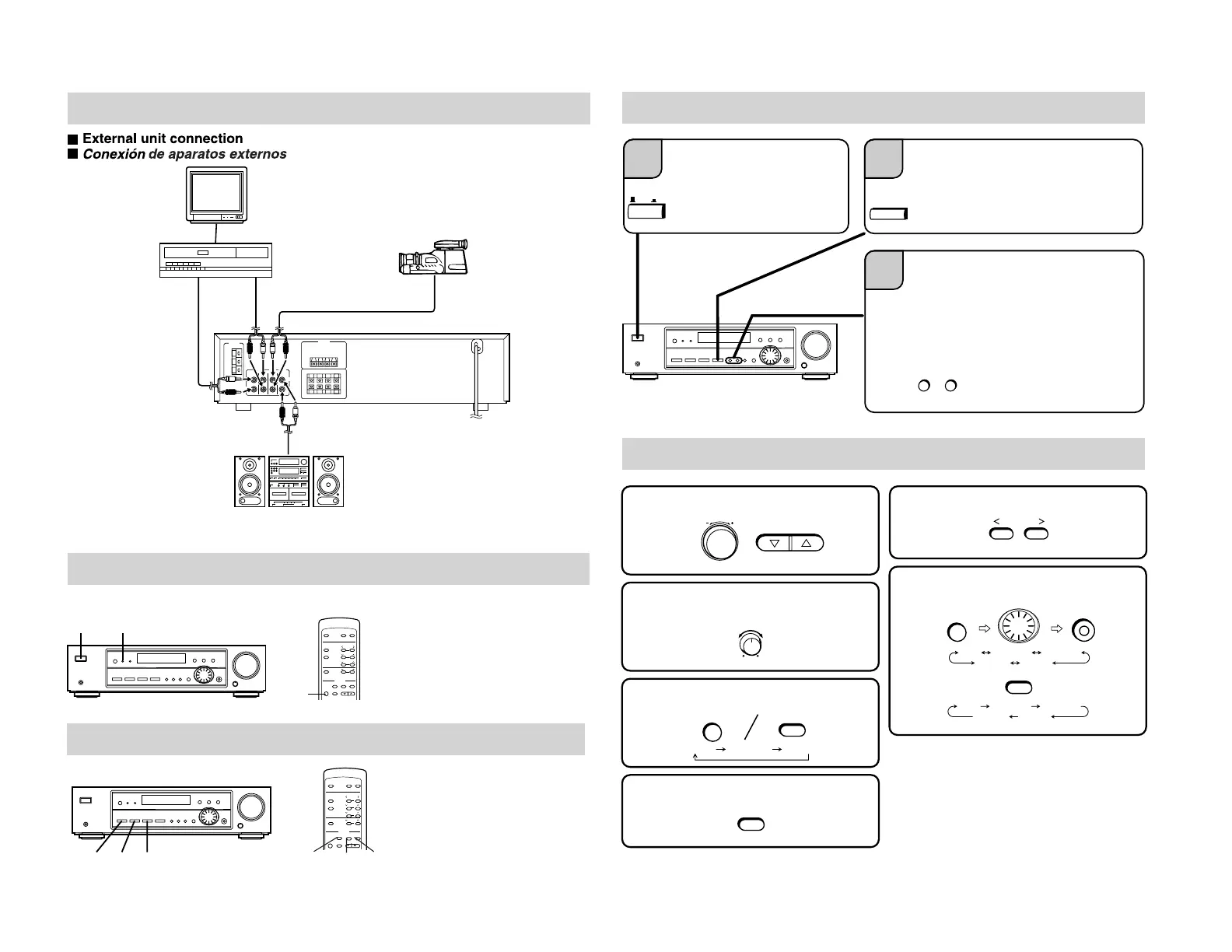
Turning the power on and off /
Conexión y desconexión de la alimentación
STAND-BY
As long as the ST AND-BY indicator is lit, you can
turn the power on or put the unit in the stand-by
mode, using the POWER button on the remote
control.
Mientras el indicador ST AND-BY esté encendido,
podrá conectar la alimentación o establecer el
aparato en el modo de reserva empleando el botón
POWER del controlador remoto.
TV
Televisor
To the audio input jacks
A las tomas de entrada de audio
VCR
Videograbadora
To the audio output jacks
A las tomas de salida de audio
To the audio output jacks
A las tomas de salida de audio
To the audio output jacks
A las tomas de salida de audio
Camcorder
Videocámara
Stereo
Equipo estéreo
POWER
VCR-1 VCR-2 AUX
VCR-1 VCR-2 AUX
POWER
5 Switch the audio signals /
Cambio entre señales de audio
6 Listening to the radio /
Audición de la radio
Press the TUNING (UP or DOWN)
button to tune in to the desired
station.
Pulse el botón TUNING (por arriba
o abajo) para sintonizar la emisora
deseada.
3
Set the POWER button on
the main unit to ON.
Ajuste el botón POWER
de la unidad principal en
ON.
1
Press the TUNER (BAND) button
to select "FM ST" ,"FM"or "AM".
Pulse el botón TUNER (BAND) para
seleccionar "FM ST", "FM", o "AM".
2
POWER
OFF ON
TUNER
(BAND)
TUNING
DOWN UP
7 Sound control /
Control del sonldo
EQUALIZER
FLAT HEAVY 1 HEAVY 2
SOFT 2 SOFT 1
EQUALIZER
ENTER
FLAT HEAVY 1 HEAVY 2
SOFT 2 SOFT 1
BALANCE
MUTE
X-BASS
BASS 1 BASS 2 BASS OFF
X-BASS
VOLUME
VOLUME
SUB WOOFER
VOLUME
MIN MAX
Volume
Volumen
Subwoofer volume
Volumen del altavoz de subgraves
Extra bass (X-BASS)
Graves extra (X-BASS)
Muting
Silenciamiento
Balance
Balance
Pre-programmed equalizer
Ecualizador preprogramado
– 6 –



 To Next Page