EasyManua.ls Logo

Sharp JC-K99 - Page 4

Sharp JC-K99
Print Icon
To Next Page IconTo Next Page
To Previous Page IconTo Previous Page
Loading...
CASSETTE
OPERATION
OPEN
a;e
towlHiGH
NORM
OUTPUT
LEVEL
@
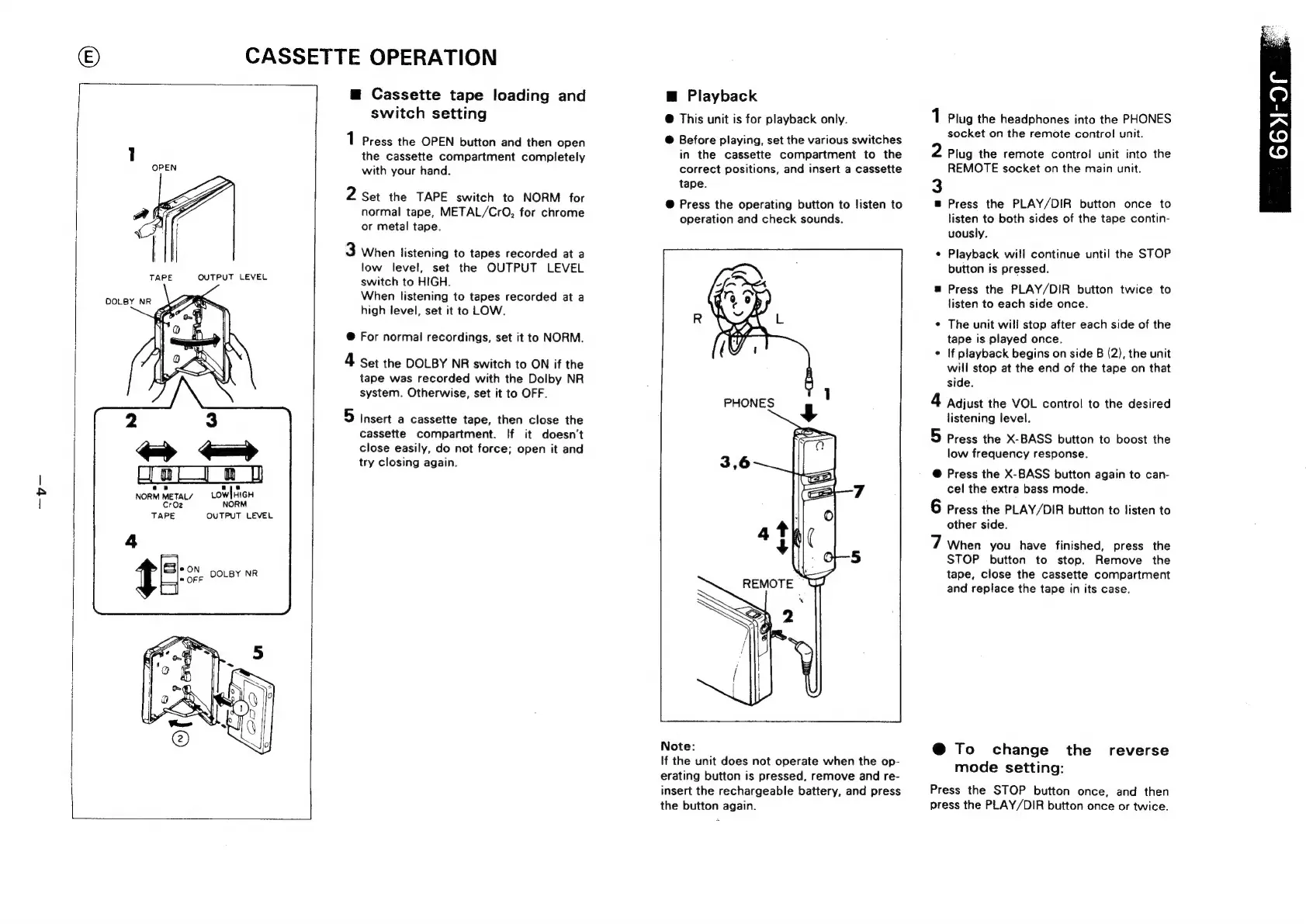
Cassette
tape
loading
and
switch
setting
1
Press
the
OPEN
button
and
then
open
the
cassette
compartment
completely
with
your
hand.
2
Set
the
TAPE
switch
to
NORM
for
normal
tape,
METAL/CrO,
for
chrome
or
metal
tape.
3
When
listening
to
tapes
recorded
at
a
low
level,
set
the
OUTPUT
LEVEL
switch
to
HIGH.
When
listening
to
tapes
recorded
at
a
high
level,
set
it
to
LOW.
@
For
normal
recordings,
set
it
to
NORM.
4
Set
the
DOLBY
NR
switch
to
ON
if
the
tape
was
recorded
with
the
Dolby
NR
system.
Otherwise,
set
it
to
OFF.
5
Insert
a
cassette
tape,
then
close
the
cassette
compartment.
If
it
doesn't
close
easily,
do
not
force;
open
it
and
try
closing
again.
@
Playback
@
This
unit
is
for
playback
only.
@
Before
playing,
set
the
various
switches
in
the
cassette
compartment
to
the
correct
positions,
and
insert
a
cassette
tape.
@
Press
the
operating
button
to
listen
to
operation
and
check
sounds.
Note:
If
the
unit
does
not
operate
when
the
op-
erating
button
is
pressed,
remove
and
re-
insert
the
rechargeable
battery,
and
press
the
button
again.
1
Plug
the
headphones
into
the
PHONES
socket
on
the
remote
control
unit.
2
Plug
the
remote
control
unit
into
the
REMOTE
socket
on
the
main
unit.
3
=
Press
the
PLAY/DIR
button
once
to
listen
to
both
sides
of
the
tape
contin-
uously.
Playback
will
continue
until
the
STOP
button
is
pressed.
=
Press
the
PLAY/DIR
button
twice
to
listen
to
each
side
once.
¢
The
unit will
stop
after
each
side
of
the
tape
is
played
once.
¢
If
playback
begins
on
side
B
(2),
the
unit
will
stop
at
the
end
of
the
tape
on
that
side.
4
Adjust
the
VOL
control
to
the
desired
listening
level.
5
Press
the
X-BASS
button
to
boost
the
low
frequency
response.
@
Press
the
X-BASS
button
again
to
can-
cel
the
extra
bass
mode.
6
Press
the
PLAY/DIR
button
to
listen
to
other
side.
7
When
you
have
finished,
press
the
STOP
button
to
stop.
Remove
the
tape,
close
the
cassette
compartment
and
replace
the
tape
in
its
case.
@
To
change
the
reverse
mode
setting:
Press
the
STOP
button
once,
and
then
press
the
PLAY/DIR
button
once
or
twice.

Related product manuals