EasyManua.ls Logo

Sharp LC-20S1M - Page 19

Sharp LC-20S1M
76 pages
Print Icon
To Next Page IconTo Next Page
To Previous Page IconTo Previous Page
Loading...
19
LC-20S1M
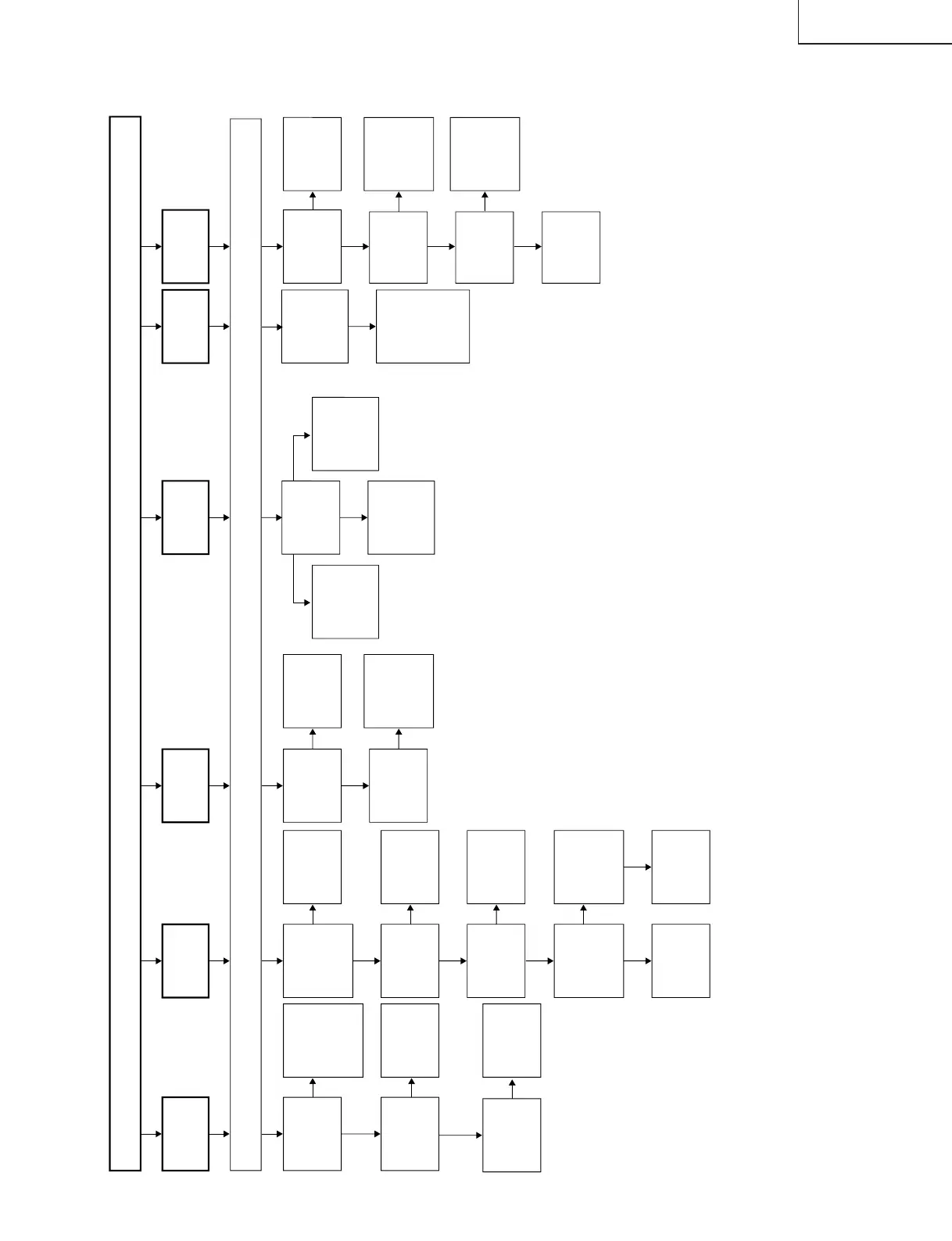
TROUBLE SHOOTING TABLE (Continued)
Check all the settings on the microprocessor s adjust process menu.
Are inputs
and outputs
of IC801 as
specified?
Does the DPS
test pattern
appear?
Does the
video decoder
test pattern
appear?
Check IC3401,
IC3402 and its
peripheral
parts.
Check
IC1201, its
peripheral
circuits and
the LCD
panel.
Check IC801
and its
peripheral
circuits.
Are inputs and
outputs of
IC3401, IC3402
as specified?
Check IC3401,
IC3402 and its
peripheral
parts.
Is input at Pin
(73) of IC801
as specified?
Check IC801,
AV1 line and
their
peripheral
parts.
Are inputs and
outputs of
Q1602, Q1604
and Q1606 as
specified?
Check Q1602,
Q1604, Q1606
and its
peripheral
parts.
Is output at
pins (57)~(59)
of IC1601
normal?
Check the R,
G and B line.
Is input at
pin (21) of
IC1601
normal?
Check V2V0
line and its
peripheral
parts.
Check IC1601
and its
peripheral
parts.
Is input at
Pins (1), (2),
(3) and (75)
of IC801 as
specified?
Check J3402,
DVD-Y line,
PB line, PR
line and
peripheral
parts.
Are voltages
at Pins (6),
(7) and (9) of
tuner as
specified?
Check the
power line.
Is output at
Pin (19) of
tuner as
specified?
Check the
tuner and its
peripheral
parts.
Is input at Pin
(5) of IC3402
as specified?
Check the
line in
question.
Check IC3402
and its
peripheral
parts.
Is Pin (4) of
IC3402 at H?
Is Pin (48) of
IC2001 at H?
Check the
line in
question.
Which S
terminal input
does not
work?
Check
SC3412, pin
(1) of IC3401
and the
related line.
Check
SC3411, pin
(16) of IC3401
and the
related line.
Check input
pins (72) and
(73) of IC801,
IC3401 and the
related line.
S terminal for AV1
S terminal for AV1 and AV2
S terminal
for AV2
No picture
No picture
at all
No VIDEO
1 or 2
output
No TELE
TEXT
output
No S
VIDEO
output
No
COMPONENT
output
No TV
output
Yes
No
Yes
No
No
No
Yes
No
No
Yes
Yes
No
No
Yes
No
Yes
No
Yes
No
No
Yes
Yes
No
Yes

Related product manuals