LOCATION OF USERS CONTROL (Continued)
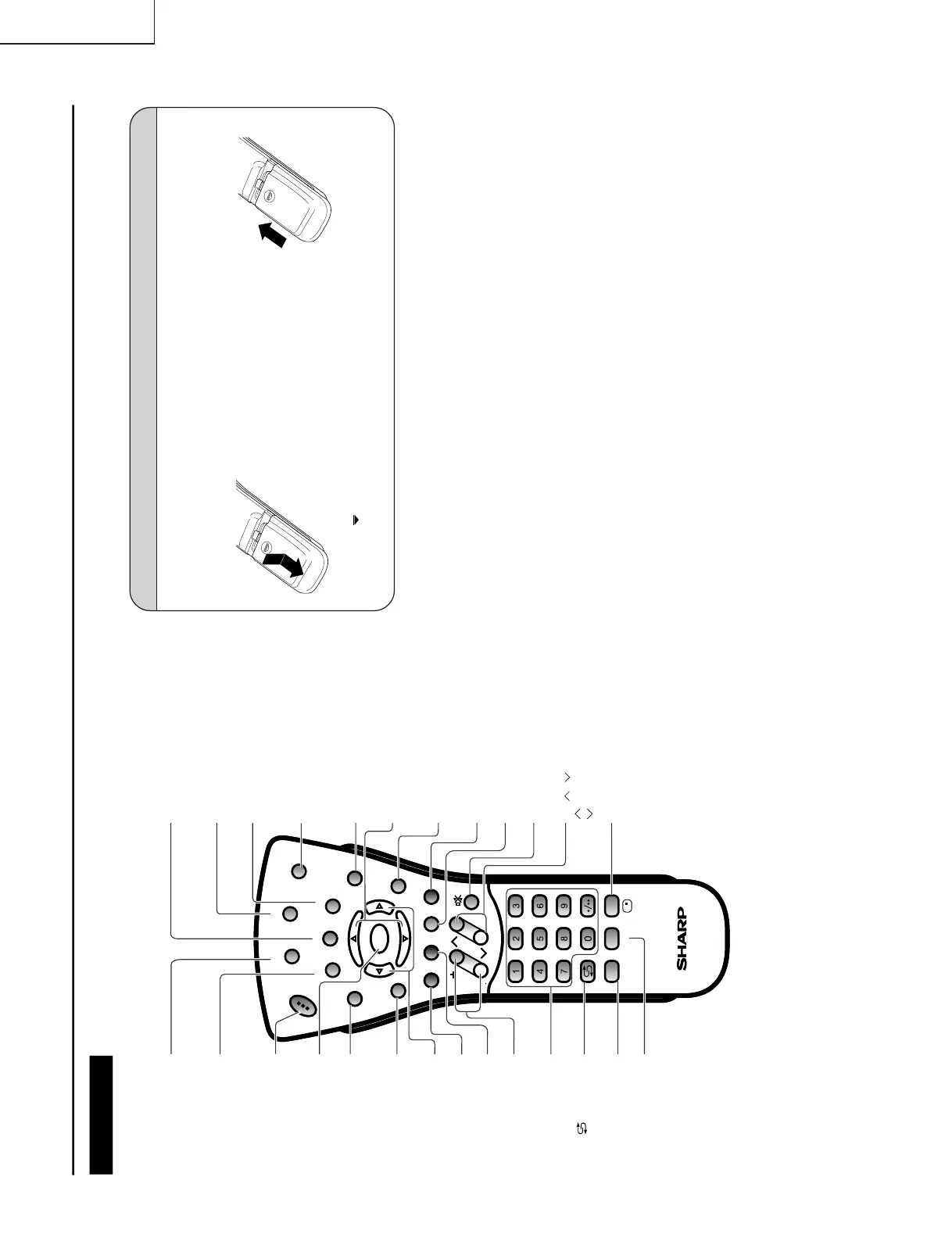
Remote control
MENU
Displa ys the TV menu.
SUBTITLE
Displays the Teletext
Subtitle directly.
HOLD
Temporarily holds the
current Teletext page.
MUTE
Switches the sound on and off.
Yellow
Cyan
CHANNEL SELECT
OK
VOL (+)/(
-
)
(FLASHBACK)
Returns to the previous
channel.
Red
Upwards/Downwards
Selection, zoom display
function (Teletext mode)
END
TEXT
Displa ys the Teletext mode
screen.
POWER
MPX
Switches Audio
mode.
REVEAL
Displa ys hidden inf ormation
such as solutions to r iddles
and puzzles .
Right / Left Selection
SUBPAGE
Displa ys the Teletext
Subpage directly .
TV/VIDEO
Switches the input source
between AV1, AV2, COMPONENT
and TV mode.
BRIGHT
Selects the brightness
of the display.
Green
CH
MENU
E
M
T
CHVOL
MENU
SLEEP DIS.MODE
OKMPX
SUBTITLE END
HOLD
SUBPAGE
REVEAL
TEXTBRIGHT
TV/VIDEOPOWER
SLEEP
DIS.MODE
DISPLAY
Press: Displays received channel
for 10 seconds. Channel
indicator reduces in size
after about 10 seconds.
Press again: Display disappears.
CH ( )/( )
Selects next higher channel.
Selects next lower channel.
Batteries for Remote Control
Before using the LCD TV set for the first time, install two (“AAA” size, UM/SUM-4) batteries (supplied).
When the batteries become depleted and the remote control fails to operate, replace the batteries with
new (“AAA” size, UM/SUM-4) batteries.
1
Open the battery
cover.
2
Insert two (“AAA” size,
UM/SUM-4) batteries.
3
Close the battery
cover.
Slide the cover while
pressing the ( ) part.
Position the positive and
negative ends of the
batteries as indicated in the
compartment.
Engage the claw on the
cover into the battery
housing and slide shut.
Ë
ËË




 To Next Page