24
LC-26D43U
PC Set
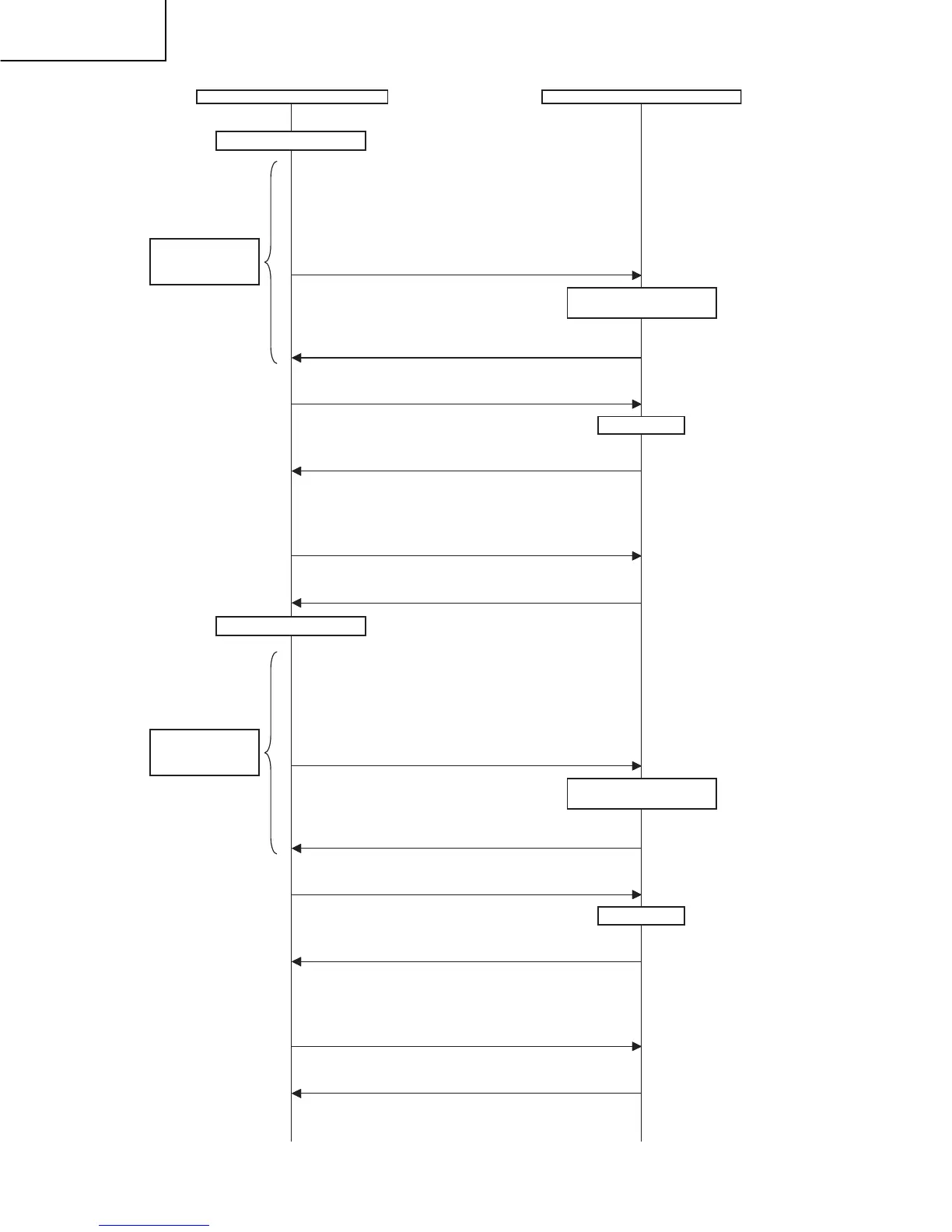
Adjust RB to the target xy values.
MG5RXXXX
MG5BXXXX
* XXXX indicates the adjusted values between 0000 and 1023
(4 digit decimal number with zero fill).
* G is fixed.
* The default adjustment value of RGB is the parameter value
of the LEV5 command multiplied by 2.
Adjustment values are set.
OK
Repeat until RGB
become the target
values.
The adjustment value is
reflected in the image.
Start measurement
Adjustment gradation setting (point 4 = 120 gradation adjustment*)
LEV40120
Adjustment values are set.
OK
Correction of G value
MG4G0480
When G is changed at gradation 6, calculate the ratio of the
change and set the following value to XXXX: (the value set with
LEV4) x 2 x (the ratio).
Adjustment values are set.
OK
Pattern display
Adjust RB to the target xy values.
MG4RXXXX
MG4BXXXX
* XXXX indicates the adjusted values between 0000 and 1023
(4 digit decimal number with zero fill).
* G is fixed.
* The default adjustment value of RGB is the parameter value of
the LEV4 command multiplied by 2.
Adjustment values are set.
OK
Repeat until RGB
become the target
values.
The adjustment value is
reflected in the image.
Adjustment gradation setting (point 3 = 84 gradation adjustment*)
LEV30084
Adjustment values are set.
OK
Correction of G value
MG3G0336
When G is changed at gradation 6, calculate the ratio of the
change and set the following value to XXXX: (the value set with
LEV3) x 2 x (the ratio).
Adjustment values are set.
OK
Pattern display
Start measurement








 To Next Page