26
LC-26D43U
5. Factory settings
After making the factory settings.pull off the AC cord.
NOTE: Do not turn on the power once the factory settings have been made. Otherwise the factory setting must be made again.
6. Software version
The software version will be reported at the Conversion Judgment Meeting. Possible modifications that will follow will be reported using the Modifica-
tions Report.
* Main microprocessor
* Monitor microprocessor
* EDID data (HDMI/analo
RGB)
1 Factory settings Finally pull off the AC cord. • Move the cursor to the [INDUSTRY INIT] line. Using the
[VOL+/-] keys. set this item ON and press the [ENT] key.
The version confirm window appears on the green
screen. When [SUCCESS] appears at the top, the fac-
tory settings are complete.(If an error occurs.[ERROR]
appears on the red screen.)
• Finally turn off AC power. .
The following settings are returned to the factory ones.
1) User settings
2) Channel data (broadcast frequencies,etc.)
3) Password setting
4) Operation time
5) Automatic installation flag
6) V-CHIP block setting
PC Set
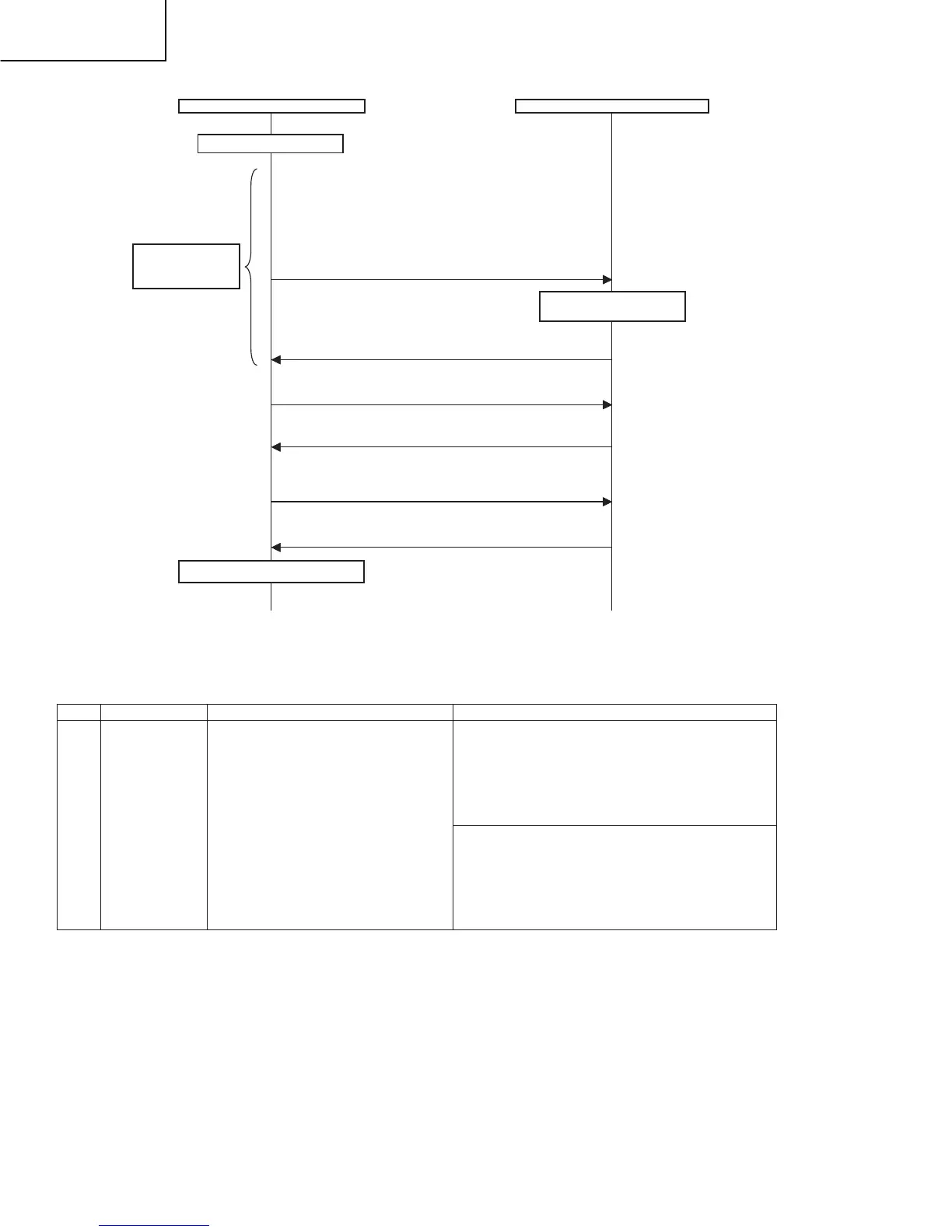
Adjust RB to the target xy values.
MG1RXXXX
MG1BXXXX
*XXXX indicates the adjusted values between 0000 and 1023
(4 digit decimal number with zero fill).
* G is Fixed.
* The default adjustment value of RGB is the parameter value of
the LEV1 command multiplied by 2.
Adjustment values are set.
OK
Repeat until RGB
become the target
values.
The adjustment value is
reflected in the image.
Writing of adjusted values
MSET0003
Deletion is complete.
OK
Deleting adjustment patterns
MSET0000
Writing is complete.
OK
Start measurement
Completion of adjustment
Adjustment item
Adjustment conditions
Adjustment procedure









 To Next Page