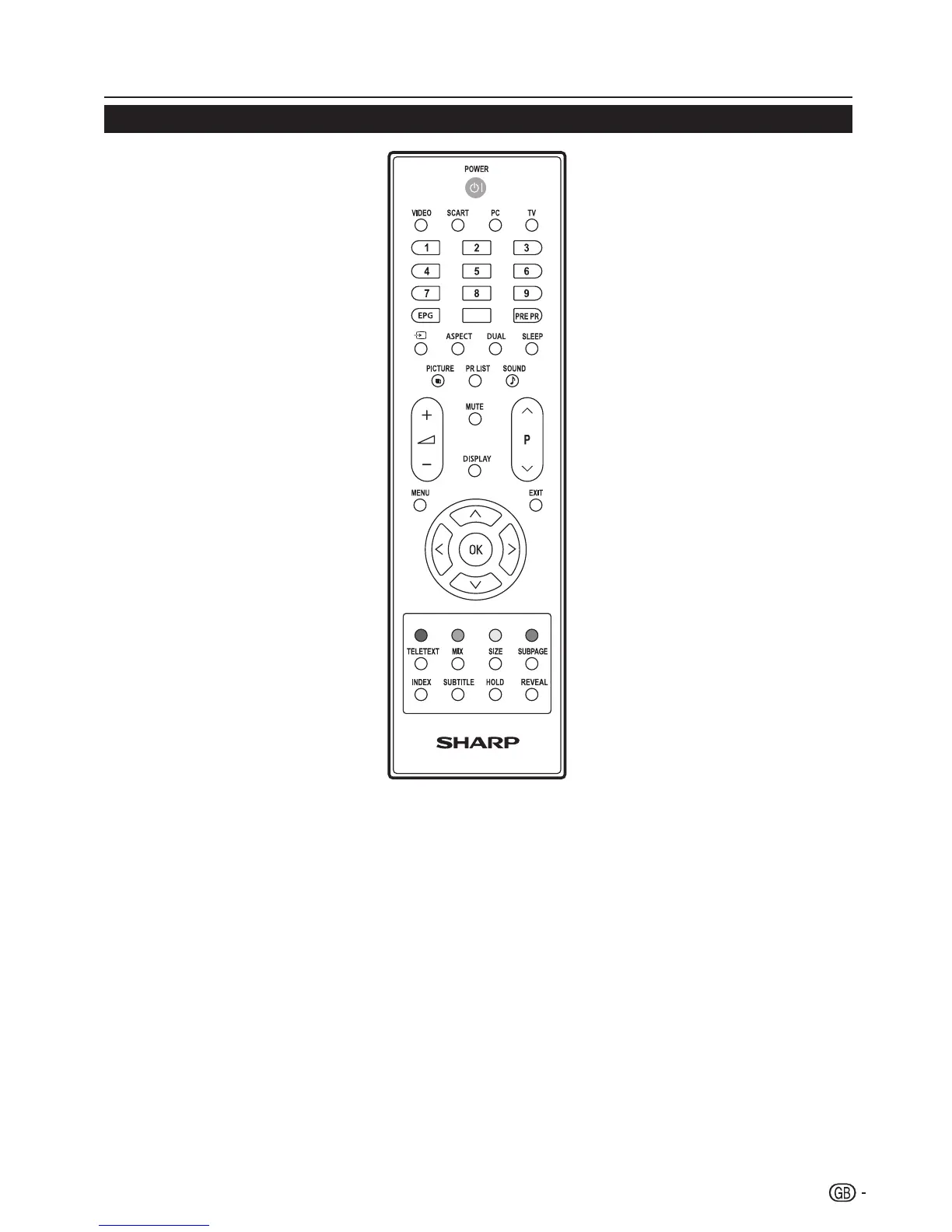
POWER
Press to turn the LCD TV on or enter
standby mode�
VIDEO
Press this button you could select YPbPr,
Side AV, HDMI 1, HDMI 2, HDMI 3�
SCART
Press this button you could select
SCART 1, SCART 2�
PC
Press to direct to the PC mode�
TV
Press to direct to the TV mode�
0-9 DIGIT BUTTONS
To select a TV channel directly�
EPG
Press this button to display electronic
program guide in TV mode�
PRE PR
To display the previous selected TV channel�
b (INPUT SOURCE)
Select an input source�
ASPECT
Change the aspect ratio; please refer to
Picture format section� (see page 18)
DUAL
Select MONO, STEREO, DUAL 1 and
DUAL 2 for ATV channel� Select Audio
language for DTV channel�
SLEEP
Press to turn the LCD TV off within an
amount of time� (5-180 minutes�)
PICTURE
Press to set the LCD TV to a predefined
picture setting�
User / Cinema / Sport / Vivid / Hi-Bright
PR LIST
Press to display a list of channels� Then
press Red button to select the Digital or
Analogue channel list�
SOUND
Press to set the LCD TV to a predefined
sound setting�
Off / Rock / Pop / Live / Dance / Techno
/ Classic / Soft
i (+/-)
Press to adjust the volume�
P (</>)
Press to select the channel�
MUTE
Press to toggle audio on and off�
You can also press i (+/-) to
restore the previous volume level�
DISPLAY
Press to display the current signal
status, including input source/
channel audio mode�
MENU
Press to activate the LCD TV OSD�
Press again to exit the LCD TV
OSD�
EXIT
Press to exit LCD TV OSD�
OK
Press to activate a setting�
oœpπ
Press oœpπ
to navigate and confirm your selection�
R/G/Y/B (COLOUR BUTTON)
Press buttons to select the pictures with
various colours of text� Different channels
display different functions�
TELETEXT
Press this button to activate Teletext� Press
again to turn off Teletext�
MIX
Press this button to activate Teletext with TV�
SIZE
Press this button to change the font size: Full
screen, Top half and Bottom half�
SUBPAGE
To select the subpage when the current page
contains subpage(s)� (see page 11)
INDEX
Press this button to return to page 100 or the
index page; and then press 0 to 9� The teletext
page will be numbered and added to the page
you select or the secondary item�
SUBTITLE
For DTV, press it to select subtitle setting�
Off / On / On during mute
For ATV, please activate Teletext to select
subtitle page�
HOLD
Press this button to stop the scrolling of pages�
The text decoder stops receiving data�
REVEAL
Reveal hidden information such as answers to
a quiz�
Remote control unit
3






 To Next Page