LC-32/40/46LE705E/S, LU705E/S, LX705E, LC-52LE705E/S
1 – 2
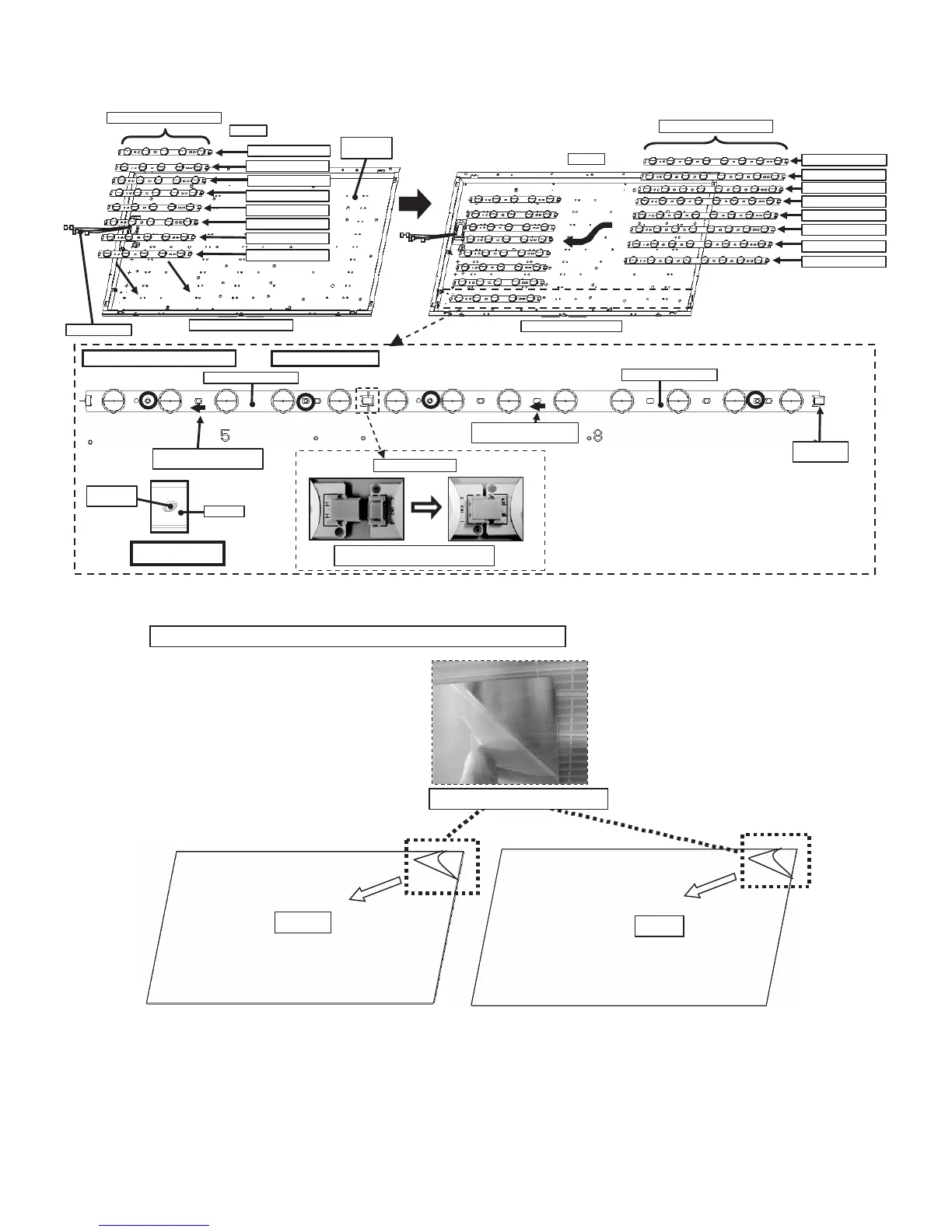
2. Handling notes (32 inch models).
1. Set and connect LED-PWBs.
2. Peel off the lamination film of LENS SHEET on the both sides.
RUNTKA655WJ01 / WJ02
RUNTKA658WJ01 / WJ02
Top Side
Bottom Side (C-PWB s ide)
RUNTKA655WJ01
RUNTKA655WJ02
RUNTKA655WJ01
RUNTKA655WJ02
RUNTKA655WJ01
RUNTKA655WJ02
RUNTKA655WJ01
RUNTKA655WJ02
INSIDE of
BL-CHASSIS
WIRE HARNESS
Top Side
Bottom Side (C-PWB side)
RUNTKA658WJ01
RUNTKA658WJ02
RUNTKA658WJ01
RUNTKA658WJ02
RUNTKA658WJ01
RUNTKA658WJ02
RUNTKA658WJ01
RUNTKA658WJ02
*Same for other 7 lines.
Connect LED-PWBs
Set and connect LED-PWBs
Boss fitting
(showing in blue circles)
RUNTKA655WJ01/02
RUNT KA658WJ01/02
LED-PWB
Boss of
BL-CHASSIS
TERMINATOR
is Attached
LED-PWB set direction
(arrow m ark to harnes s s ide)
LED-PWB set direction
(arrow mark to harness side)
Insert th e conne c t or horizont ally mu t u ally.
Do not add inadequate power.
FRONT
BACK
Peel off the lamination film of LENS SHEET on the both sides.
Peel off the lamination film.





 To Next Page