Part Names
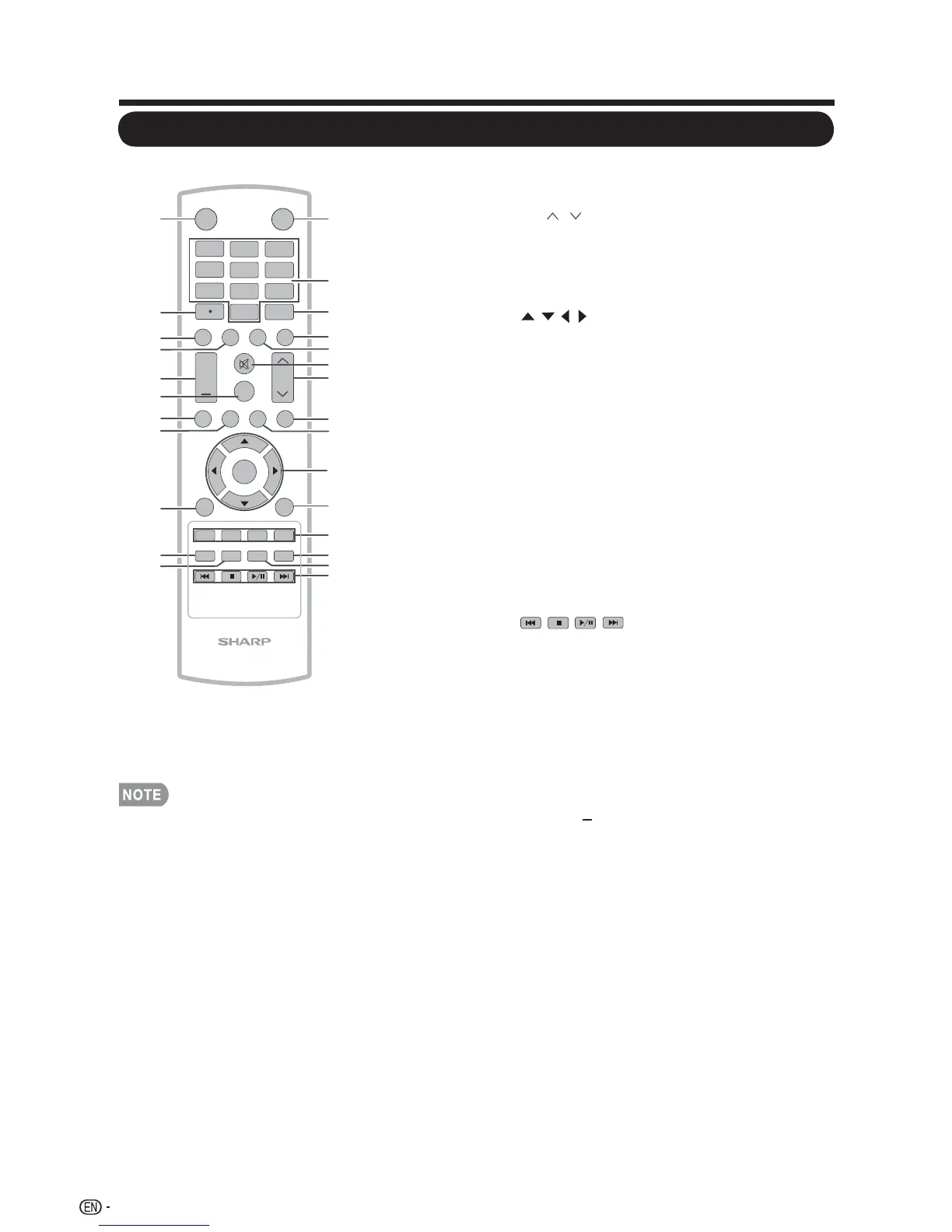
When using the remote control unit, •
point it at the TV.
POWER:
1
Switch the power on or enters
standby mode. (See page 19.)
3
INPUT: Select a TV input source.
(See page 25.)
4
5
• (DOT): (See page 25.)
6
DISPLAY: Display the current channel
(or input source) information on the screen.
7
VOL / : Set the volume. (See page 25.)
AUDIO: Display the MTS/SAP setting
menu. (See page 26-27.)
SURROUND: Display the surround setting
menu. (See page 26.)
FREEZE: Set the still image. Press again to
return to normal screen.
EXIT: Turn off the menu screen.
ENT: Jumps to a channel after selecting
with the 0–9 buttons.
MENU: Display the menu screen.
CH
/ : Select the channel.
(See page 25.)
VIEW MODE: Select the Picture Mode.
(See page 28.)
FLASHBACK: Press to switch to the
previously tuned channel or external input
mode. Press again to switch back to the
currently tuned channel or external input
mode.
SLEEP:25 Allows you to set a time when the
TV automatically switches to standby. This
display will disappear after a few seconds,
and the sleep timer automatically starts
counting down. (See page 25.)
RETURN: Return to the previous menu
screen.
1
INPUT
3
4
5
6
7
8
9
0
ENT
1
2
DISPLAY FREEZE
FLASHBACK
MUTE
SURROUND
TV USB
PC
MENU
FAVORITE CH
SLEEP CC VIEWMODEAV MODE
AUDIO
VOL CH
+
NRUTERTIXE
LCDTV
GJ221
ABCD
ENTER
2
3
4
5
6
7
8
9
10
11
12
13
14
15
16
17
18
19
20
21
22
23
24
25
26
POWER
MUTE: Mute the sound. (See page 25.)
TV: Direct switch TV source.
USB: Direct switch USB source.
CC: Display captions during closed-caption
source.(See page 27.)
:Only for USB .
2 0–9: Set the channel.
/
, ENTER:Select a desired item
on the screen. (See page 31.)
//
FAVORITE CH:
A, B, C, D: Select 4 preset favorite channels
in 4 different categories. (See page 34 for
details.) While watching, you can toggle the
selected channels by pressing A, B, C and D.
AV MODE: Select an adjusted picture
settings. ( Standard, Movie, Power Saver
User, Dynamic) (See page 26.)
8
9
10
11
12
13
14
15
16
17
18
19
20
21
22
23
24
26
PC: Direct switch PC source.
16
+
Remote Control Unit




 To Next Page