EasyManua.ls Logo

Sharp LC-40LE431U - Lock, System Lock, and Rating Settings

Sharp LC-40LE431U
40 pages
Print Icon
To Next Page IconTo Next Page
To Previous Page IconTo Previous Page
Loading...
On-Screen
Display
Menu
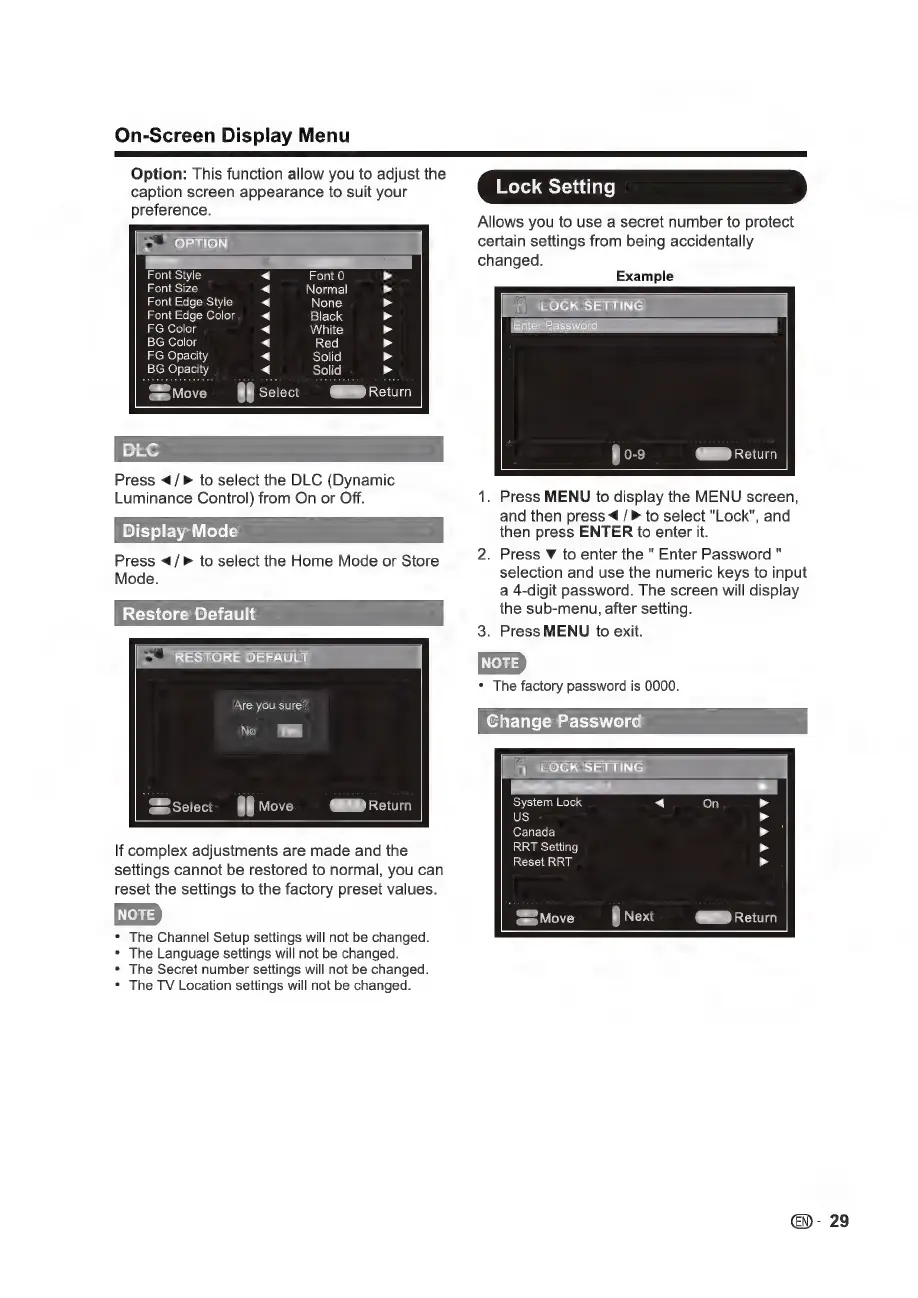
Option:
This
function
allow
you
to
adjust
the
caption
screen
appearance
to
suit
your
preference.
=>"
OPTION
e
Font
Style
Font
Size
Font
Edge
Style
Font
Edge
Color
Font
0
Normal
None
Black
White
Red
Solid
FG
Color
BG
Color
FG
Opacity
BG
Opacity
AAAAAAAA
AAAAAA
AA
MENO
Return
ae
Select
Press
</>
to
select
the
DLC
(Dynamic
Luminance
Control)
from
On
or
Off.
Display
Mode
Press
</>
to
select
the
Home
Mode
or
Store
Mode.
Restore
Default
>"
RESTORE
DEFAULT
Are you
sure?
If
complex
adjustments
are
made
and
the
settings
cannot
be
restored
to
normal,
you
can
reset
the
settings
to
the
factory
preset
values.
*
The
Channel
Setup
settings
will
not
be
changed.
*
The
Language
settings
will
not
be
changed.
*
The
Secret
number
settings
will
not
be
changed.
e
The
TV
Location
settings
will
not
be
changed.
Lock
Setting
Allows
you
to
use
a
secret
number
to
protect
certain
settings
from
being
accidentally
changed.
Example
LOCK
SETTING
Enter
Password
CERD
Return
1.
Press
MENU
to
display
the
MENU
screen,
and
then
press
4
to
select
"Lock",
and
then
press
ENTER
to
enter
it.
2.
Press
Y
to
enter
the
"
Enter
Password
"
selection
and
use
the
numeric
keys
to
input
a
4-digit
password.
The
screen
will
display
the
sub-menu,
after
setting.
3.
Press
MENU
to
exit.
*
The
factory
password
is
0000.
Change
Password
LOCK
SETTING
System
Lock
US
Canada
RRT
Setting
Reset
RRT
-
29

Other manuals for Sharp LC-40LE431U

Related product manuals