EasyManua.ls Logo

Sharp LC-40LE431U - Page 34

Sharp LC-40LE431U
40 pages
Print Icon
To Next Page IconTo Next Page
To Previous Page IconTo Previous Page
Loading...
On-Screen
Display
Menu
.,
AUTO
SCAN
REICH
Foound
:
MENO
Return
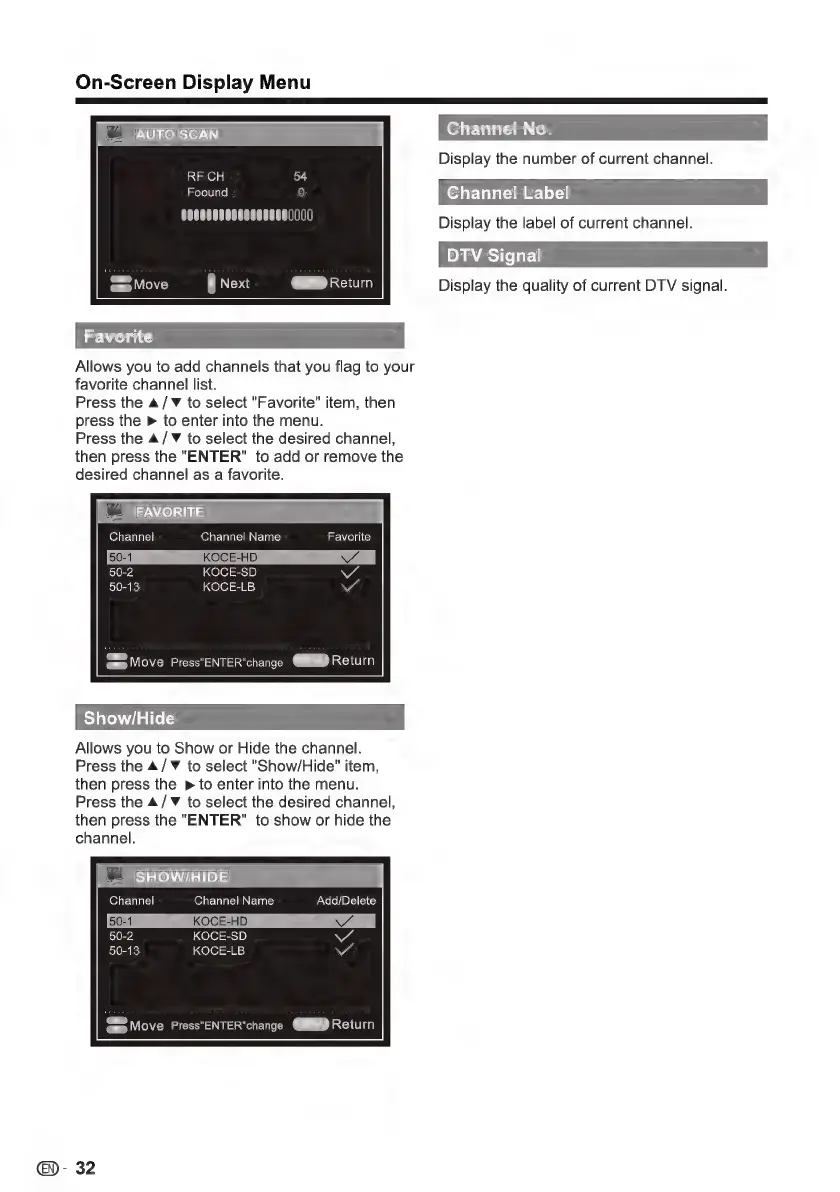
Allows
you
to
add
channels
that
you
flag
to
your
favorite
channel
list.
Press
the
A
/
Y
to
select
"Favorite"
item,
then
press
the
»
to
enter
into
the
menu.
Press
the
A
/
Y
to
select
the
desired
channel,
then
press
the
"ENTER"
to
add
or
remove
the
desired
channel
as
a
favorite.
|=
FAVORITE
Channel
Channel
Name
50-1
KOCE-HD
50-2
KOCE-SD
50-13
KOCE-LB
Favorite
«em»
Move
Press"ENTER"change
MIEND
Return
Show/Hide
Allows
you
to
Show
or
Hide
the
channel.
Press
the
A
/
Y
to
select
"Show/Hide"
item,
then
press
the
»
to
enter
into
the
menu.
Press
the
A
/
Y
to
select
the
desired
channel,
then
press
the
"ENTER"
to
show
or
hide
the
channel.
+
SHOW/HIDE
Channel
Channel
Name
50-1
KOCE-HD
50-2
KOCE-SD
50-13
KOCE-LB
Add/Delete
€)-
32
Display
the
number
of
current
channel.
Channel
Label
Display
the
label
of
current
channel.
DTV
Signal
Display
the
quality
of
current
DTV
signal.

Other manuals for Sharp LC-40LE431U

Related product manuals