LC-60E77UN/LC-65E77UM/LC-C6077UN/LC-C6577UM
4 – 2
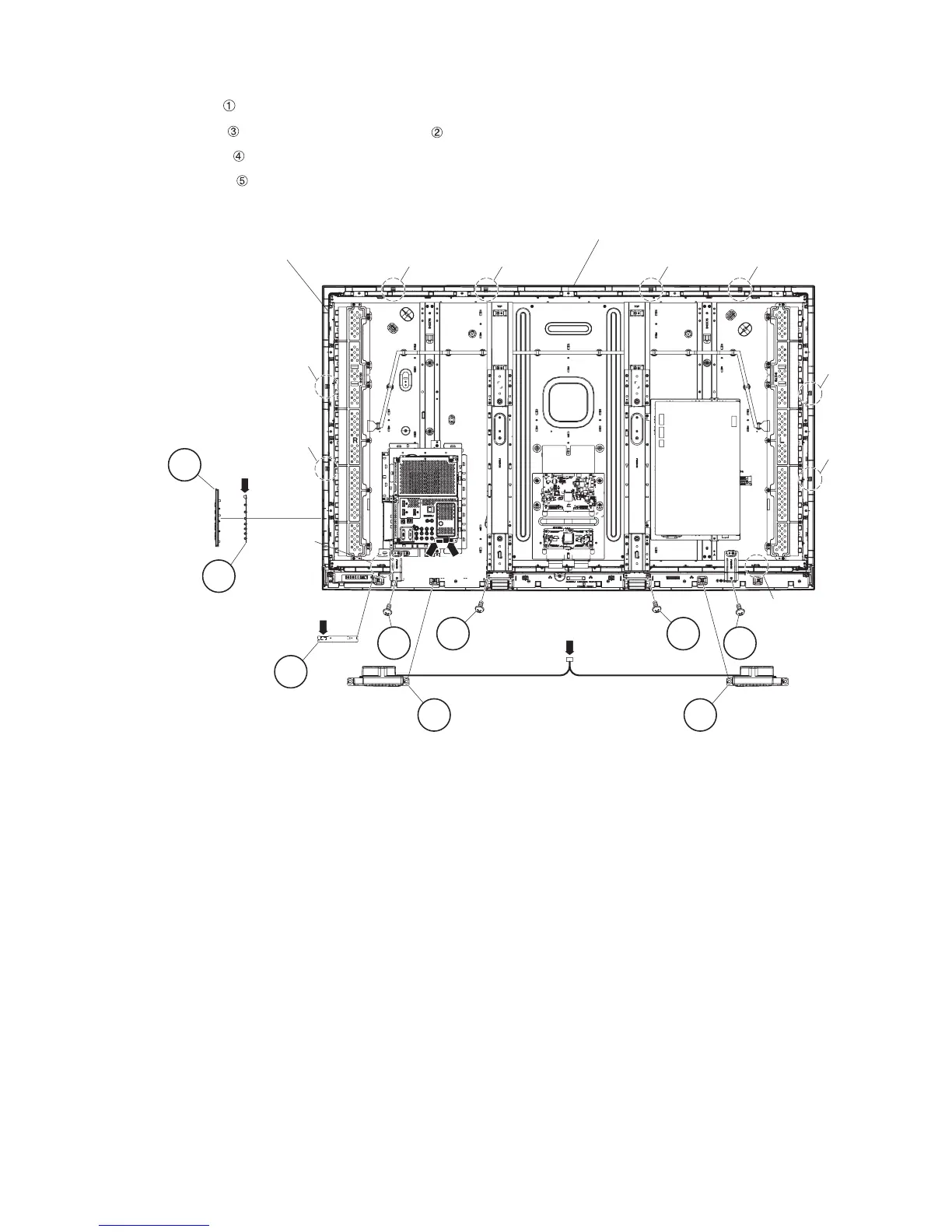
2. Removing of Speaker-L/R, KEY Unit, R/C, LED Unit, Front Cabinet Ass’y.
1. Disconnect the following connectors from the MAIN Unit. (RA, SP)
2. Detach the Speaker-L/R .
3. Disconnect the KEY Unit from the KEY Button Cover Ass’y and disconnect the connection cord from the KM Connector.
4. Detach the R/C, LED Unit . (RA)
5. Remove the 4 lock screws and 10 Hooks and detach the Front Cabinet Ass’y
1 1Speaker-R
Hook
Speaker-L
Hook
Front Cabinet Ass'y
LCD Panel Module Unit Ass'y
Hook Hook
Hook
Hook
Hook
Hook
Hook
Hook
4R/C,LED Unit
3KEY Unit
2
KEY Button
Cover Ass'y
[KM]
[RA]
[RA] [SP]
[SP]
5 5
5 5






 To Next Page