11
SETTING THE CLOCK
1 Press the POWER button to turn the power on.
2 Press the CLOCK button.
DISC TOC
TRACK
MEMORY
RANDOM
TOTAL
REMAIN
RECkHz
MHz SLEEP
3 Within 5 seconds, press the ENTER button.
DISC TOC
TRACK
MEMORY
RANDOM
TOTAL
REMAIN
RECkHz
MHz SLEEP
4 Press the or button to select the time
display mode.
DISC TOC
TRACK
MEMORY
RANDOM
TOTAL
REMAIN
"0:00" →The 24-hour display will appear.
→(0:00 - 23:59)
"12:00 AM" →The 12-hour display will appear.
→(AM or PM 12:00 - 11:59)
"0:00 AM" →The 12-hour display will appear.
→(AM or PM 0:00 - 11:59)
● Note that this can only be set when the unit is
first installed or it has been reset (see page 40).
5 Press the ENTER button.
DISC TOC
TRACK
MEMORY
RANDOM
TOTAL
REMAIN
RECkHz
MHz SLEEP
6 Adjust the hour by pressing the or button.
DISC TOC
TRACK
MEMORY
RANDOM
TOTAL
REMAIN
RECkHz
MHz SLEEP
● When the button is pressed once, the time will
increase by 1 hour. When the
button is pressed
once, the time will decrease by 1 hour.
● When the 12-hour display selected, “
AM
” will
change to “
PM
” automatically.
7Press the ENTER button.
DISC TOC
TRACK
MEMORY
RANDOM
TOTAL
REMAIN
RECkHz
MHz SLEEP
8 Adjust the minutes by pressing the or
button.
DISC TOC
TRACK
MEMORY
RANDOM
TOTAL
REMAIN
RECkHz
MHz SLEEP
● When the button is pressed once , the time
will increase by 1 minute. When the
button is
pressed once, the time will decrease by 1 minute.
● The hour setting will not advance even if min-
utes advance from "59" to "00".
9 Press the ENTER button.
DISC TOC
TRACK
MEMORY
RANDOM
TOTAL
REMAIN
RECkHz
MHz SLEEP
● The clock starts operating from "0" seconds.
(Seconds are not displayed.)
To see the time display:
Press the CLOCK button.
● The time display will appear for about 5 seconds
even if stand-by mode.
Note:
● The clock display will flash on and off at the push
of the CLOCK button when the AC power supply
is restored after a power failure occurs or after
the AC power cord is disconnected.
If this happens, follow the procedure below to
change the clock time.
To change the clock time:
1
Press the CLOCK button.
2
Within 5 seconds, press the ENTER button.
3
Perform steps 6 - 9 above.
To change the time display mode:
1
Reset the microcomputer (see page 40).
2
Perform steps 1 - 9 above.
In this example, the clock is set for the
24-hour (0:00) system.
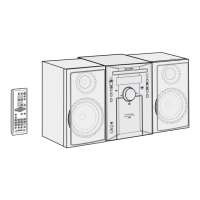
4,6,8
2
1
3,5,7,9



 To Next Page