02/12/18 MD_MT290H_UK_4.fm
32
MD-MT290H
Useful Features
-Checking Displays-
Checking Displays
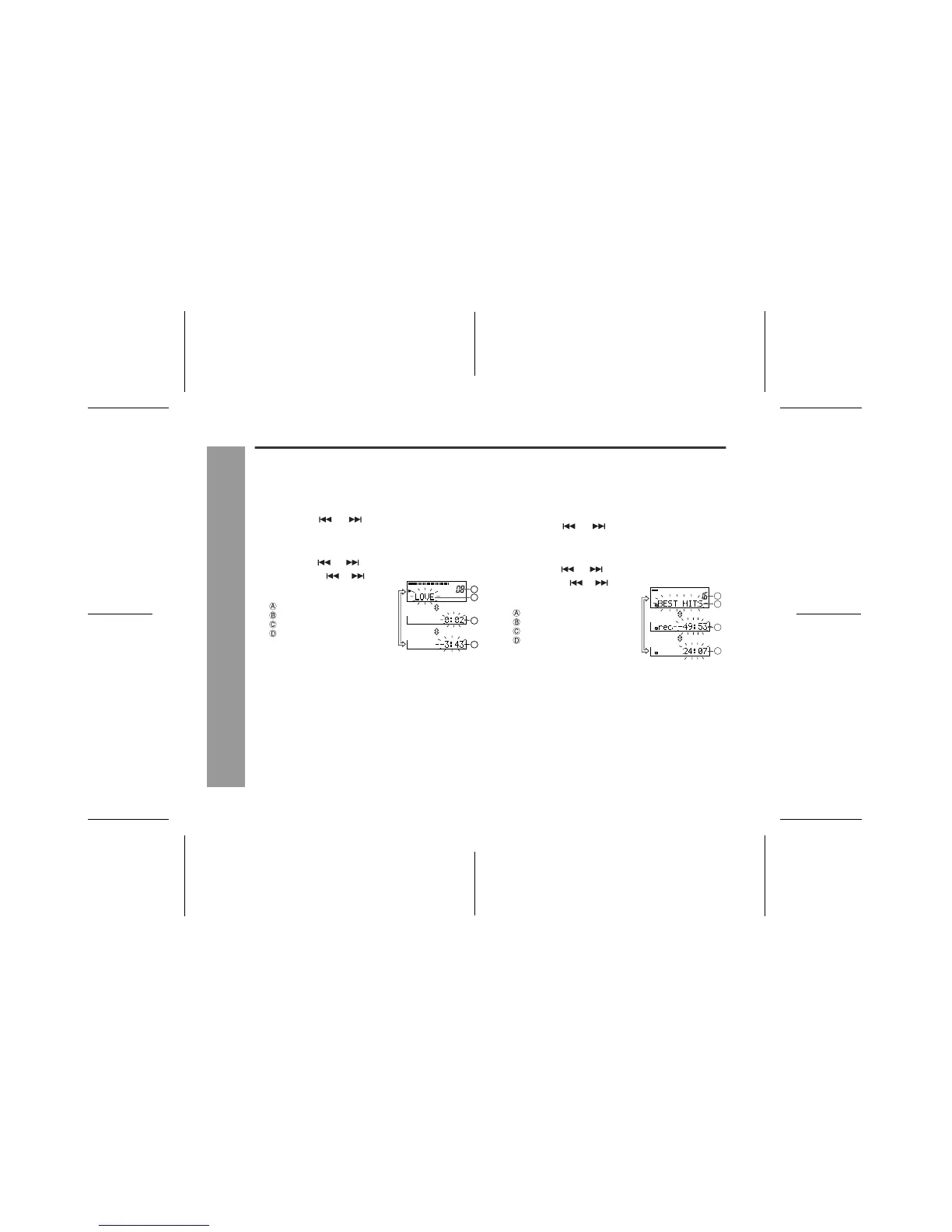
! To check the elapsed time and remain-
ing time of the track
Notes:
"
Complete the operation within 7 seconds whilst select-
ing the menus.
"
If the disc name or the track name was not originally
recorded on the MiniDisc, "NO NAME" will be dis-
played.
"
Elapsed playback time and remaining playback time
may be different from the actual time.
"
The selected display will not change even after the
disc is replaced.
! To check the remaining recording time
and the total playing time
1
During playback, press the MENU/ENTER
button.
2
Press the or button repeatedly to se-
lect "DISPLAY".
3
Press the MENU/ENTER button.
4
Press the or button.
Each time the or button
is pressed, the display will
change as follows.
Track number
Track name
Elapsed playback time
Remaining playback time
A
B
C
D
1
Whilst in the stop mode, press the MENU/
ENTER button.
2
Press the or button repeatedly to se-
lect "DISPLAY".
3
Press the MENU/ENTER button.
4
Press the or button.
Each time the or button
is pressed, the display will
change as follows.
Total number of tracks
Disc name
Remaining recording time
Total playing time
"
Remaining recording time varies depending on the set
recording mode.
"
Remaining recording time will not be displayed with a
playback only MiniDisc.
D
C
A
B
A
B



 To Next Page