MX-2300/2700 N/G MX-PNX1A/B/C/D 7 – 4
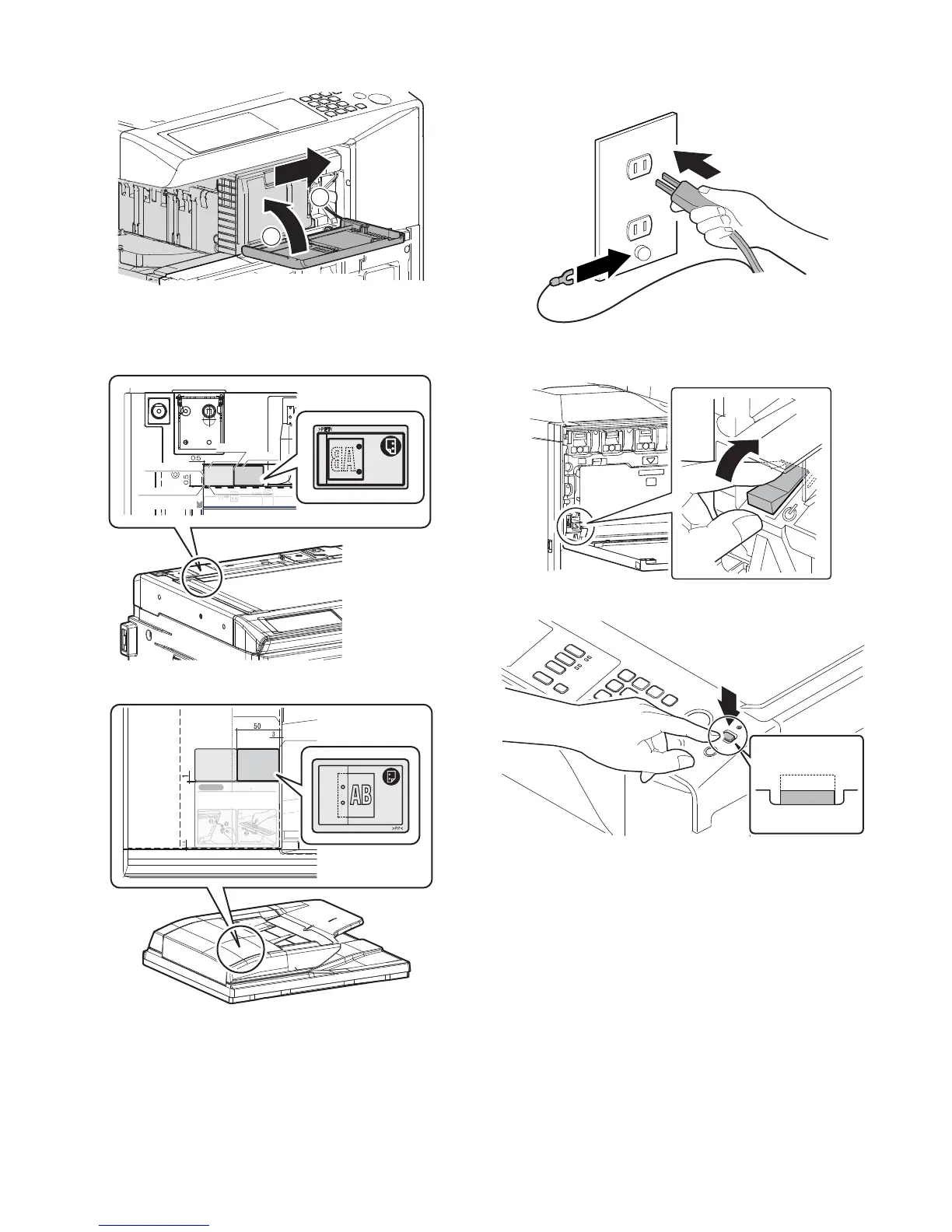
16) Slide the inner finisher to the original position, and close the
front cover.
C. Punch position label attachment
1) Attach the label to the position indicated in the figure.
[For scanner] (package part No. 1)
[For RSPF] (package part No. 2)
D. Turn on the power of the main unit
1) Connect the earth cord, and insert the power plug of the main
unit into the power outlet.
2) Open the front cabinet.
Turn ON the power switch in the front cabinet of the main unit.
3) Turn ON the power switch on the operation panel.
2
1
Label attachment reference
*Cornerofthe
"upper cabinet rear"
Corner R end fitting
Corner R end fitting
No clearance
Second label
First label
R2.5 connection line
Edge line R 2.5
CAUTION
Cleaning of the document scan section
When streaks appear on copy or scan
images, open the automatic document
feed unit and clean the document scan
section with the glass cleaner (accessory).
Document scan section
ON
ON
ON



 To Next Page