34
12
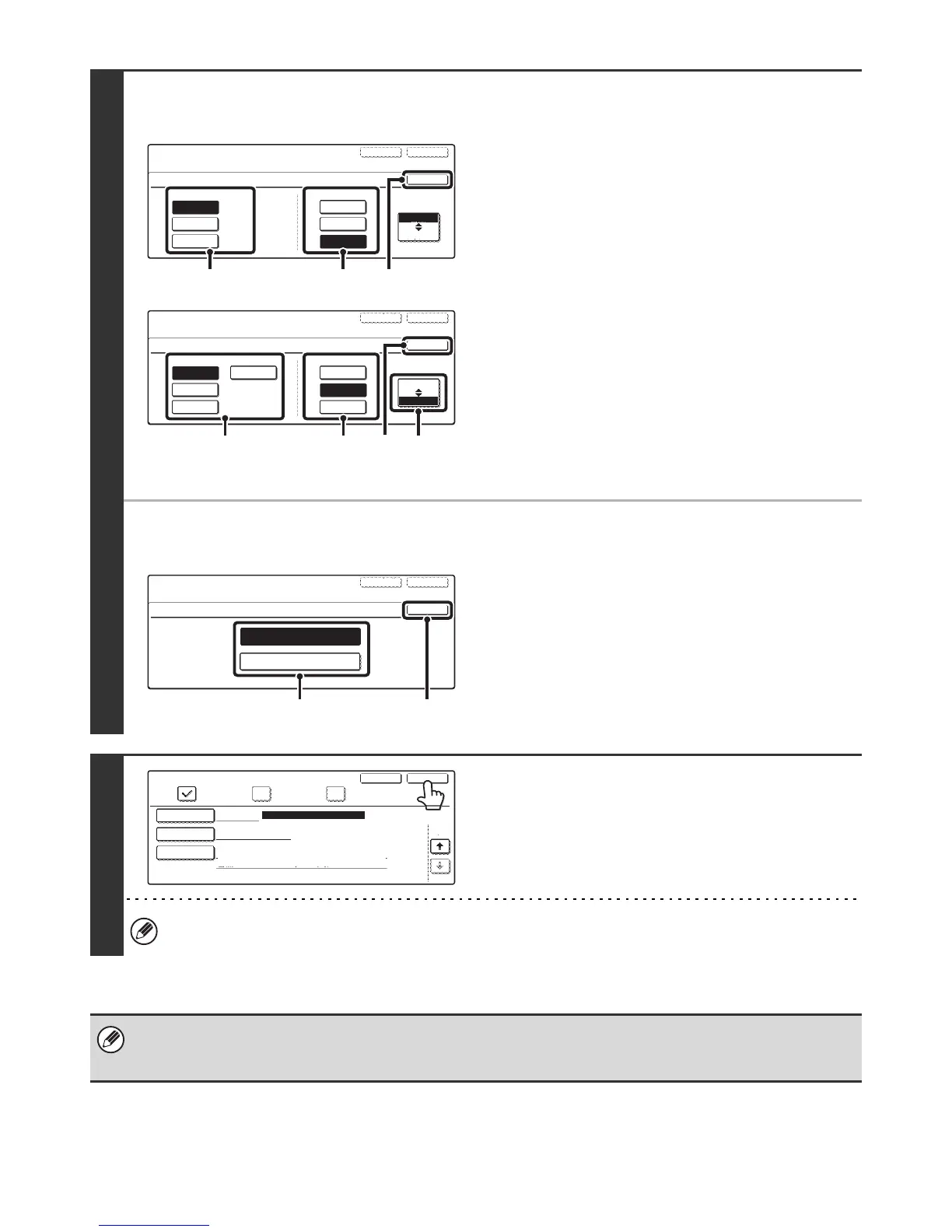
● To set the format
E-mail
Scanning in Mono 2
(1) Touch the desired file type key.
(2) Touch the desired compression mode key.
(3) Touch the [OK] key.
Scanning in colour/greyscale
(1) Change the mode to Colour/Greyscale
mode.
Colour/Greyscale mode is selected when the
[Colour/Grey] key is highlighted.
(2) Touch the desired file type key.
(3) Touch the desired compression ratio key.
(4) Touch the [OK] key.
● To set the compression mode
Internet Fax
(1) Touch the desired compression mode key.
(2) Touch the [OK] key.
13
Touch the [Exit] key.
To store another one-touch key...
Touch the [Next] key and repeat the procedure from step 5.
• A total of 999 one-touch keys and group keys can be stored.
• It will not be possible to store destinations for a function if this has been prohibited using "Disable Registering Destination
from Operation Panel" (page 107) in the system settings (administrator).
Direct Address / Individual
File Type
No.001
File Format
OK
ExitNext
PDF
Encrypt PDF
TIFF
MMR(G4)
None
Compression Mode
MH(G3)
Colour/Grey
B/W
(3)(1) (2)
Direct Address / Individual
File Type
No.001
File Format
OK
ExitNext
PDF
Encrypt PDF
TIFF
Medium
Low
High
B/W
JPEG
Compression Ratio
Colour/Grey
(4) (1)(2) (3)
ExitNext
Direct Address / Individual
No.001
Compression Mode
MMR(G4)
MH(G3)
(2)(1)
OK
Direct Address / Individual
Key Name
Exit
2/2
AAA AAA
Next
File Format
Colour/Grey : PDF/Medium
B/W : PDF/MMR(G4)
Registration is completed.
Search Number
001
E-mail Internet Fax
Fax





 To Next Page