MX3500N SIMULATION 7 – 119
55
55-1
Purpose
Setting
Function (Purpose)
Used to set the engine soft SW.
Section
PCU
Item
Operation (Specifications)
Operation/Procedure
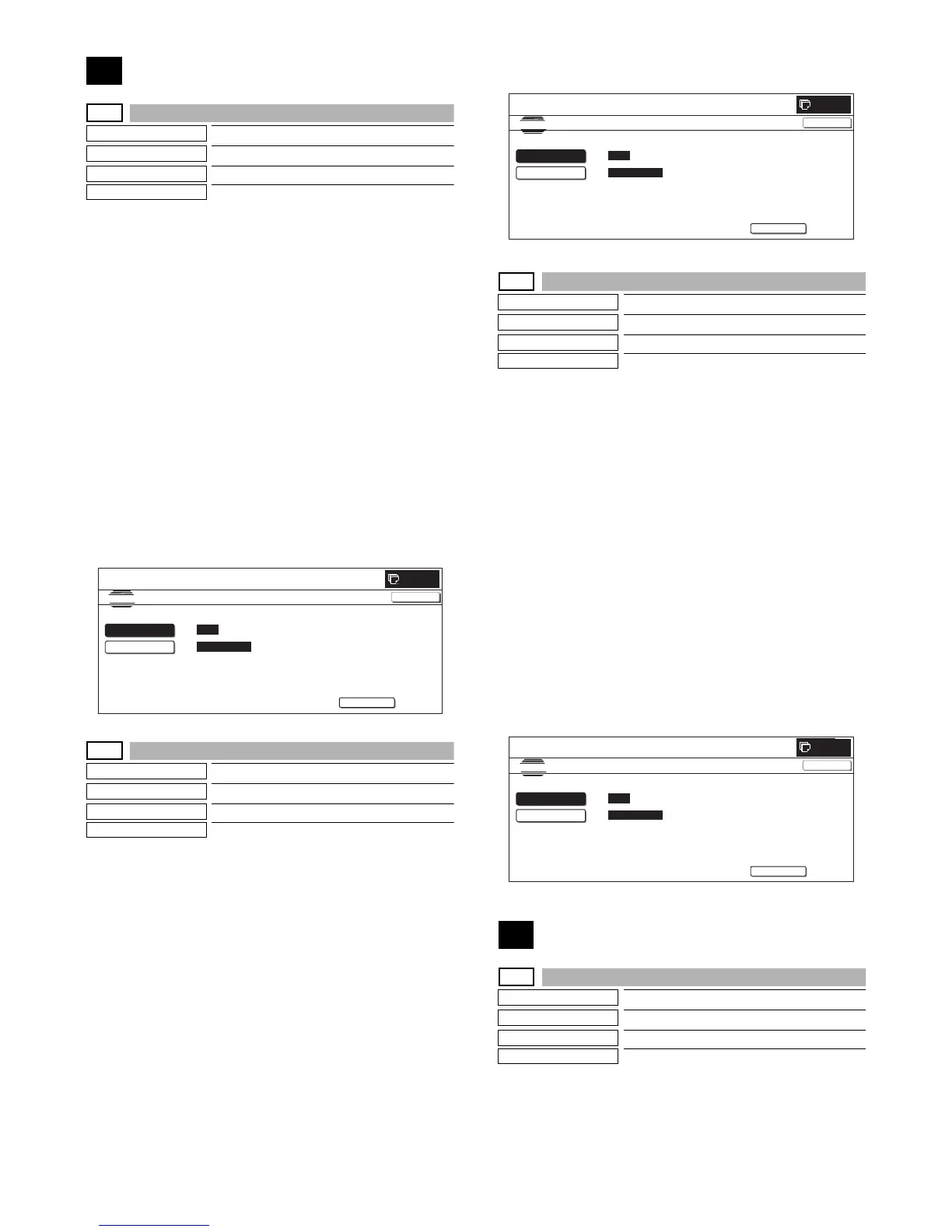
1) When the machine enters Simulation 55-01, the screen on the
right is displayed.
* On the initial screen, [SW-NO.] button is highlighted.
2) With [SW NO.] button highlighted, enter the SW number with
10-key.
* Press [C] key to clear the entered values.
3) Press [DATA] button.
[DATA] button is highlighted and the current set value is dis-
played.
4) With [DATA] button highlighted, enter the bit data with 10-key.
When 10-key corresponding to the bit is pressed, the bit data
display is switched as shown below.
[1] → [0]
[0] → [1]
* Entry of 1 to 8 only is effective.
5) When [EXECUTE] button is pressed, the currently entered
data are set.
After completion of setting, [EXECUTE] button returns to the
normal display.
55-2
Purpose
Setting
Function (Purpose)
Used to set the scanner soft SW
Section
Scanner
Item
Operation (Specifications)
Operation/Procedure
1) When the machine enters Simulation 55-02, the screen on the
right is displayed.
* On the initial screen, [SW-NO.] button is highlighted.
2) With [SW NO.] button highlighted, enter the SW number with
10-key.
* Press [C] key to clear the entered values.
3) Press [DATA] button.
[DATA] button is highlighted and the current set value is dis-
played.
4) With [DATA] button highlighted, enter the bit data with 10-key.
When 10-key corresponding to the bit is pressed, the bit data
display is switched as shown below.
[1] → [0]
[0] → [1]
* Entry of 1 to 8 only is effective.
5) When [EXECUTE] button is pressed, the currently entered
data are set.
After completion of setting, [EXECUTE] button returns to the
normal display.
55-3
Purpose
Setting
Function (Purpose)
Used to set the controller soft SW.
Section
MFP
Item
Operation (Specifications)
Operation/Procedure
1) When the machine enters Simulation 55-03, the screen on the
right is displayed.
* On the initial screen, [SW-NO.] button is highlighted.
2) With [SW NO.] button highlighted, enter the SW number with
10-key.
* Press [C] key to clear the entered values.
3) Press [DATA] button.
[DATA] button is highlighted and the current set value is dis-
played.
4) With [DATA] button highlighted, enter the bit data with 10-key.
When 10-key corresponding to the bit is pressed, the bit data
display is switched as shown below.
[1] → [0]
[0] → [1]
* Entry of 1 to 8 only is effective.
5) When [EXECUTE] button is pressed, the currently entered
data are set.
After completion of setting, [EXECUTE] button returns to the
normal display.
56
56-1
Purpose
Data transfer
Function (Purpose)
Used to execute data transfer.
Section
MFP
Item
Data transfer
Operation/Procedure
1) Select an item of data transfer.
* The selected button is highlighted and "ENABLE" is dis-
played in the corresponding display section.
SIMULATION NO.55-01
TEST
ENGINE SOFT SW. SETTING
CLOSE
EXECUTE
SW NO.
AAA
(SW No.1-16)
DATA 12345678
12345678
:
:
0
SIMULATION NO.55-02
TEST
SCANNER SOFT SW. SETTING.
CLOSE
EXECUTE
SW NO.
AAA
(SW No.1-16)
DATA
12345678
12345678
㧦
㧦
0
SIMULATION NO.55-03
TEST
MFP SOFT SW. SETTING.
CLOSE
EXECUTE
SW NO.
AAA
(SW No.1-16)
DATA
12345678
12345678
㧦
㧦
0



 To Next Page