MX3500N SIMULATION 7 – 129
* If no button is selected for standard reset, [EXECUTE] but-
ton grays out.
* Two or more items can be selected for standard reset.
2) Press [EXECUTE] button.
[EXECUTE] button is highlighted and [YES] and [NO] buttons
become active.
3) Press [YES] button.
The scanner color balance standard value reset is executed.
[YES] button is highlighted.
* When [NO] button or [EXECUTE] button is pressed, [EXECUTE]
button returns to the normal display, and [YES] and [NO] buttons
gray out.
* The restored data are saved to EEPROM and RAM.
* During the scanner color balance standard value reset, [EXE-
CUTE] and [YES] buttons are highlighted.
* After completion of the scanner color balance standard value
reset delete, [EXECUTE] button returns to the normal display
and [YES] and [NO] buttons gray out.
<Standard value reset item> * MX-3500N/4500N
<Standard value reset item> * MX-3501N/4501N
63-6
Purpose
Adjustment/Setup/Operation data output/
Check (Display/Print)
Function (Purpose)
Used to scan the engine color balance auto
adjustment pattern and to display the sam-
pling result.
Section
Image process (ICU)
Item
Image quality (Color balance)
Operation/Procedure
1) Put the chart self-printed with SIM46-21 on the glass table,
and press [EXECUTE] button. Sampling is started. (When
[EXECUTE] button is pressed during execution, the operation
is interrupted.)
* During sampling, [EXECUTE] button is highlighted.
* The sampling value of each patch from the high density side
is displayed as the result.
When [K][C][M][Y] button is pressed on the sampling result
display screen, the data of each color are displayed.
Only one color button can be selected. (In the initial screen,
[K] is selected.)
* After completion of sampling, [EXECUTE] button returns
to the normal display.
63-7
Purpose
Setting
Function (Purpose)
Used to display and register the engine
auto density adjustment scanner target
value (for servicing).
Section
Image process (ICU)
Item
Image quality (Color balance)
Operation/Procedure
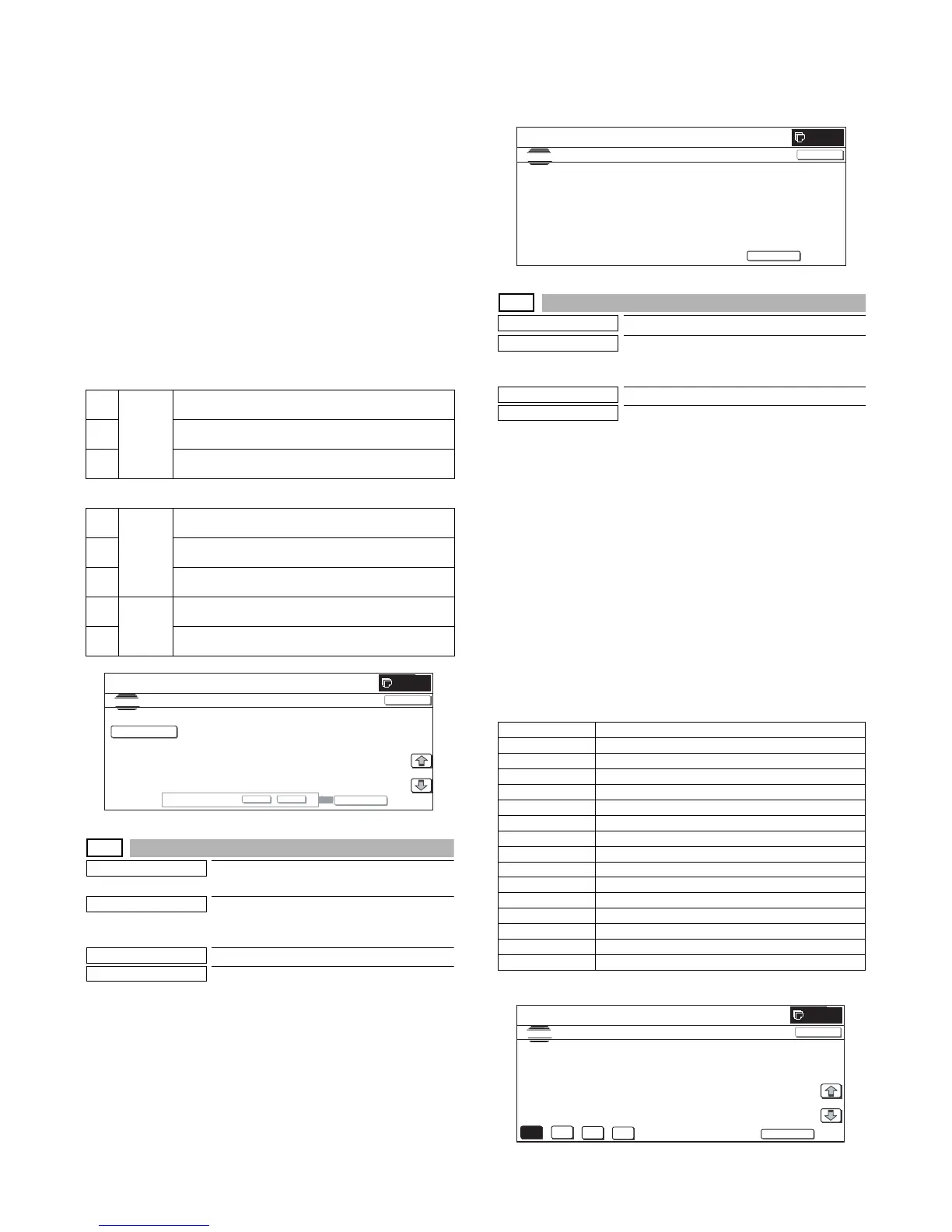
1) When the machine enters Simulation 63-07, the following
screen is displayed.
* Press [K][C][M][Y] button to display the data of each color.
Only one color button can be selected. The selected button
is highlighted. (In the initial screen, [K] is selected.)
2) When [SETUP] button is pressed, the display is shifted to the
sampling start screen.
Put the chart self-printed with SIM46-21 on the glass table,
and press [EXECUTE] button. [EXECUTE] button is high-
lighted and the sampling screen is displayed.
3) After completion of sampling, the sampling result is displayed.
When [REPEAT] button is pressed, the display is shifted to the
sampling start screen.
4) When [OK] button is pressed, the displayed result of sampling
is saved to EEPROM and RAM as the target value.
<Display data content>
* BASE is displayed only on the sampling result display screen.
1
SIDE A
(OC)
Copy gamma correction 1 and color correction
coefficient
2 TWAIN gamma correction 1 and color correction
coefficient
3 Auto adjustment gamma correction 1 and color
correction coefficient
1
SIDE A
(OC)
Copy gamma correction 1 and color correction
coefficient
2 TWAIN gamma correction 1 and color correction
coefficient
3 Auto adjustment gamma correction 1 and color
correction coefficient
1
SIDE B
(DSPF)
Copy gamma correction 1 and color correction
coefficient
2 TWAIN gamma correction 1 and color correction
coefficient
ARE YOU SURE?
ES
NO
EXECUTE
0
SIMULATION
NO.63
05
TEST
STANDARD SCAN NER GAMMA SETUP
1/1
SIDE A㧔OC㧕
CLOSE
Display data Display content
B Point B target value
C Point C target value
D Point D target value
E Point E target value
F Point F target value
G Point G target value
H Point H target value
I Point I target value
J Point J target value
K Point K target value
L Point L target value
M Point M target value
N Point N target value
O Point O target value
BASE Base sampling value
0
SIMULATION
NO.63
06
TEST
ENGINE COLOR BALANCE CHART READING
CLOSE
EXECUTE
SET THE CHART ON PLATEN A ND TOUCH [EXECUTE]
K
C
M
Y
SETUP
SIMULATION
NO.63
㧙
07
TEST
SCANNER TARGET OF COLOR CALIB SETUP:SERVICE
#B: 91, #C 2944, #D: 3227, #E: 5822, #F: 8600
#G: 28935, #H: 54344, #I: 86968, #J: 122678, #K: 151198
#L: 169731, #M: 195950, #N: 201249, #:O: 207112
1/1
0
CLOSE



 To Next Page