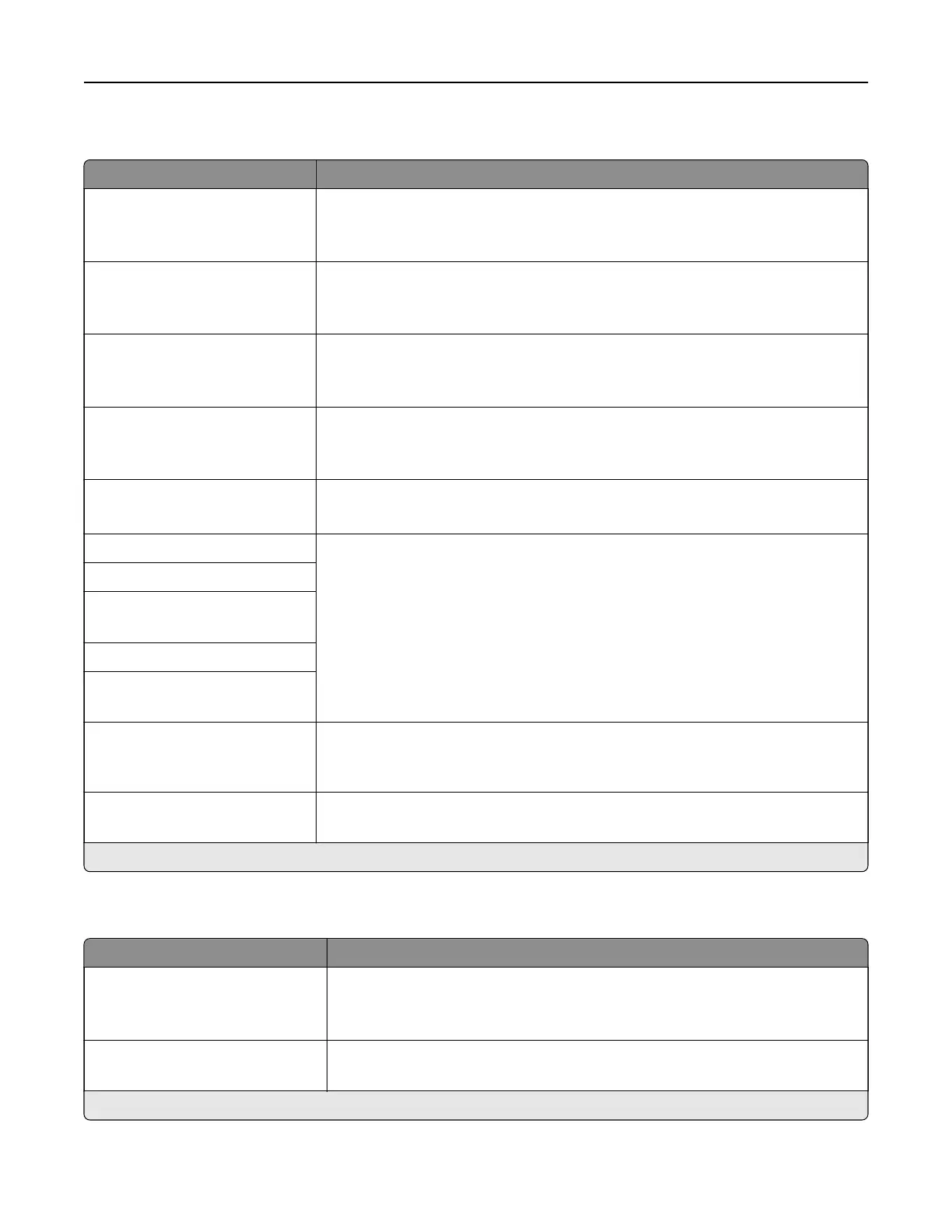
HTTP/FTP Settings
Menu item Description
Enable HTTP Server
O
On*
Access the Embedded Web Server to monitor and manage the printer.
Enable HTTPS
O
On*
Configure the Hypertext Transfer Protocol Secure (HTTPS) settings.
Force HTTPS Connections
On
O*
Force the printer to use the HTTPS connections.
Enable FTP/TFTP
O
On*
Send files using FTP.
Local Domains Specify domain names for HTTP and FTP servers.
Note: This menu item appears only in the Embedded Web Server.
HTTP Proxy IP Address Configure the HTTP and FTP server settings.
Note: HTTP Proxy IP Address and FTP Proxy IP Address appear only in the
Embedded Web Server.
FTP Proxy IP Address
HTTP Default IP Port
1–65535 (80*)
HTTPS Device Certificate
FTP Default IP Port
1–65535 (21*)
Timeout for HTTP/FTP
Requests
1–299 (30*)
Specify the amount of time before the server connection stops.
Retries for HTTP/FTP Requests
1–299 (3*)
Set the number of retries to connect to the HTTP/FTP server.
Note: An asterisk (*) next to a value indicates the factory default setting.
ThinPrint
Menu item Description
Enable ThinPrint
O
On*
Print using ThinPrint.
Port Number
4000–4999 (4000*)
Set the port number for the ThinPrint server.
Note: An asterisk (*) next to a value indicates the factory default setting.
Understanding the printer menus 99


 To Next Page