Login by CAC card
Make sure that the CAC card reader is correctly connected to the machine and then
perform authentication.
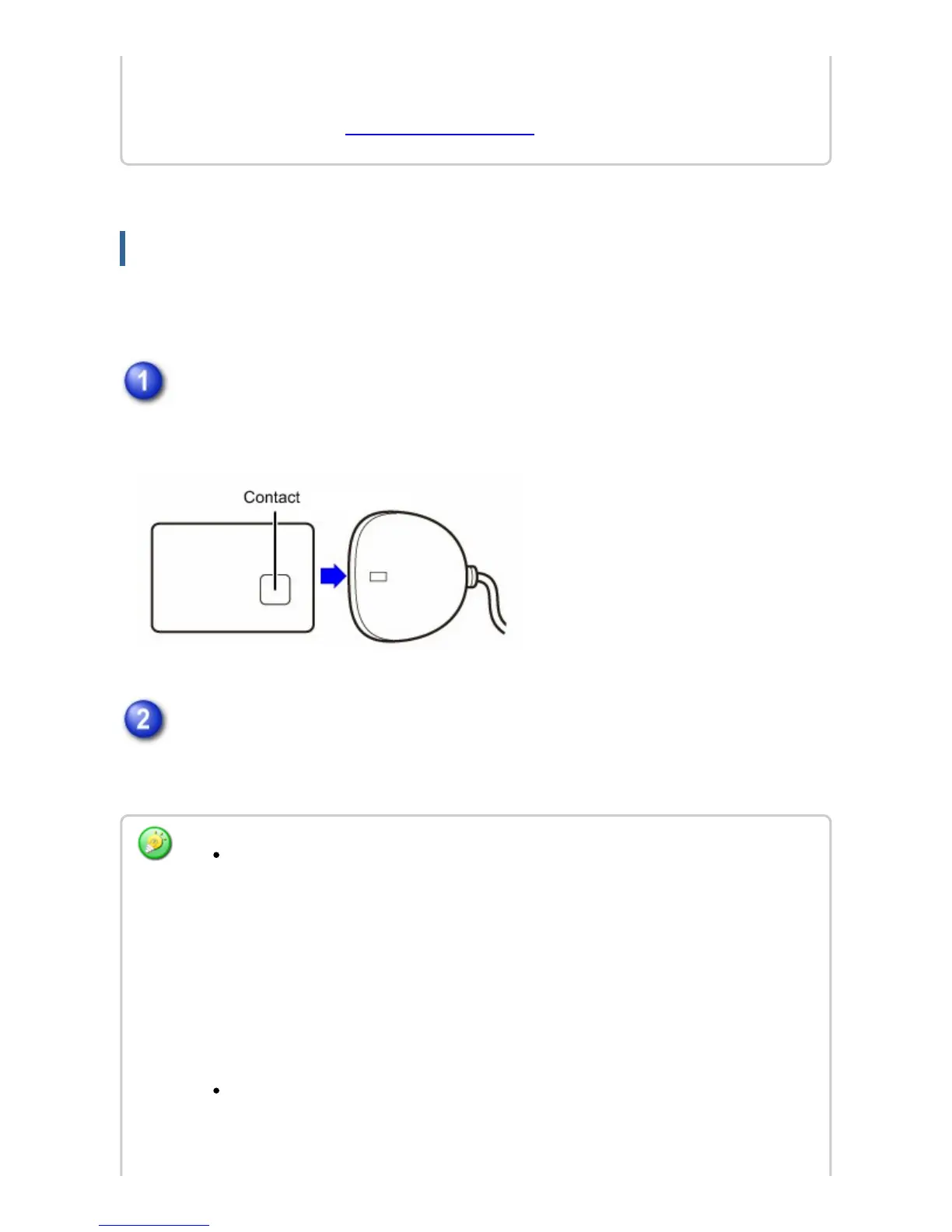
Insert the CAC card into the CAC card reader.
Insert the card with the contact facing up.
Enter the password for the CAC card, then tap the [OK] key.
After the message "Authentication in progress. Please wait." appears, login is
completed.
[User Control] → [User Count] → [CAC Configuration Settings] in the Web page
menu. (Administrator rights are required.)
For details, see "CAC Configuration Settings" .
If you enter an incorrect password…
If you enter an incorrect password three times in a row, password entry using that
CAC card will not be possible.
Contact the administrator of the machine.
The CAC card will become locked if the correct password is not entered
usually after 3 attempts. (The 3 attempts are part of the Card functionality
not the MFP. For the exact number of attempts please consult your
administrator).
To perform authentication using an LDAP server…
If user authentication is performed by network authentication using an LDAP server
or directory service (Active Directory, etc.), domain server authentication can be
USER'S MANUAL | MX-M365N/MX-M465N/MX-M565N USER'S ... http://siica.sharpusa.com/portals/0/downloads/Manuals/MX-M365N-M...
198 of 1441 3/17/2016 7:14 AM



 To Next Page