Operation
Windows
Printing multiple pages on one page
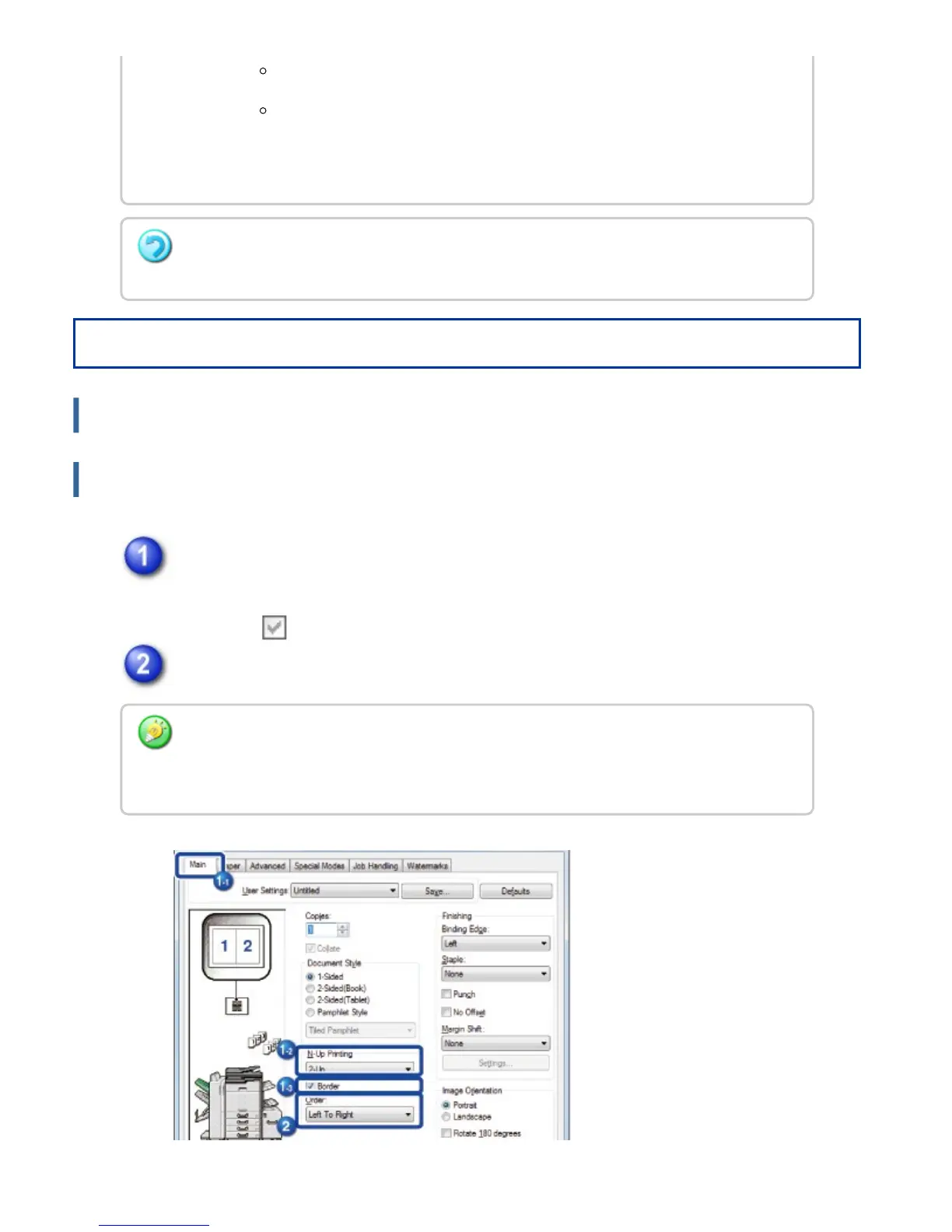
Click the [Main] tab and select the number of pages per sheet.
If you wish to print borderlines, click the [Border] checkbox so that the
checkmark appears.
Select the order of the pages.
In a Macintosh environment, the page orders are displayed as selections.
In a Macintosh environment, the number of pages that can be printed on
a single sheet is 2, 4, 6, 9, or 16. Printing 8 pages on one sheet is not
supported.
The function for printing only the first page in the original size can be used only when the
PCL6 printer driver is installed.
When you are using the PCL6 printer driver, you can print multiple pages on one sheet
without changing the original size. Click the [Compatibility] button on the [Advanced] tab
and click the [100% N-Up] checkbox.
USER'S MANUAL | MX-M365N/MX-M465N/MX-M565N USER'S ... http://siica.sharpusa.com/portals/0/downloads/Manuals/MX-M365N-M...
429 of 1441 3/17/2016 7:14 AM



 To Next Page