Select "Binding Edge".
The [2 Staples] option in the "Staple" menu should be selected when a saddle
finisher is installed.
Macintosh
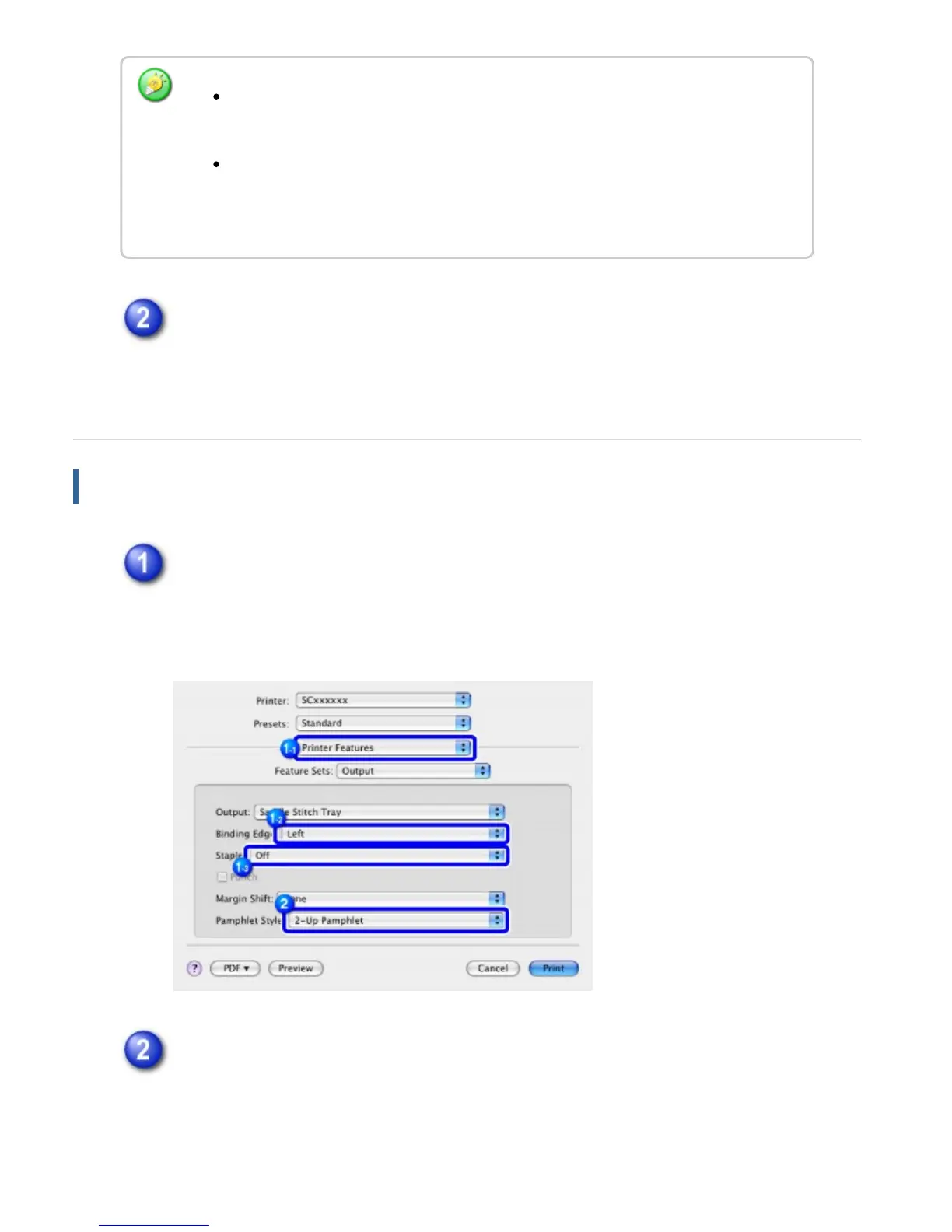
Select [Printer Features] and select "Binding Edge".
The [2 Staples] option in the "Staple" menu should be selected when a saddle
finisher is installed.
Select [Tiled Pamphlet] or [2-Up Pamphlet].
When [Multiple Pamphlet Style (Actual Size)] is selected, paper twice the size
specified in the application is used for printing.
When [Multiple Pamphlet Style (2-Up)] is selected, the paper size specified in the
application is reduced as done in the 2-Up mode, and paper of the size specified
in the application is used for printing.
USER'S MANUAL | MX-M365N/MX-M465N/MX-M565N USER'S ... http://siica.sharpusa.com/portals/0/downloads/Manuals/MX-M365N-M...
438 of 1441 3/17/2016 7:14 AM



 To Next Page