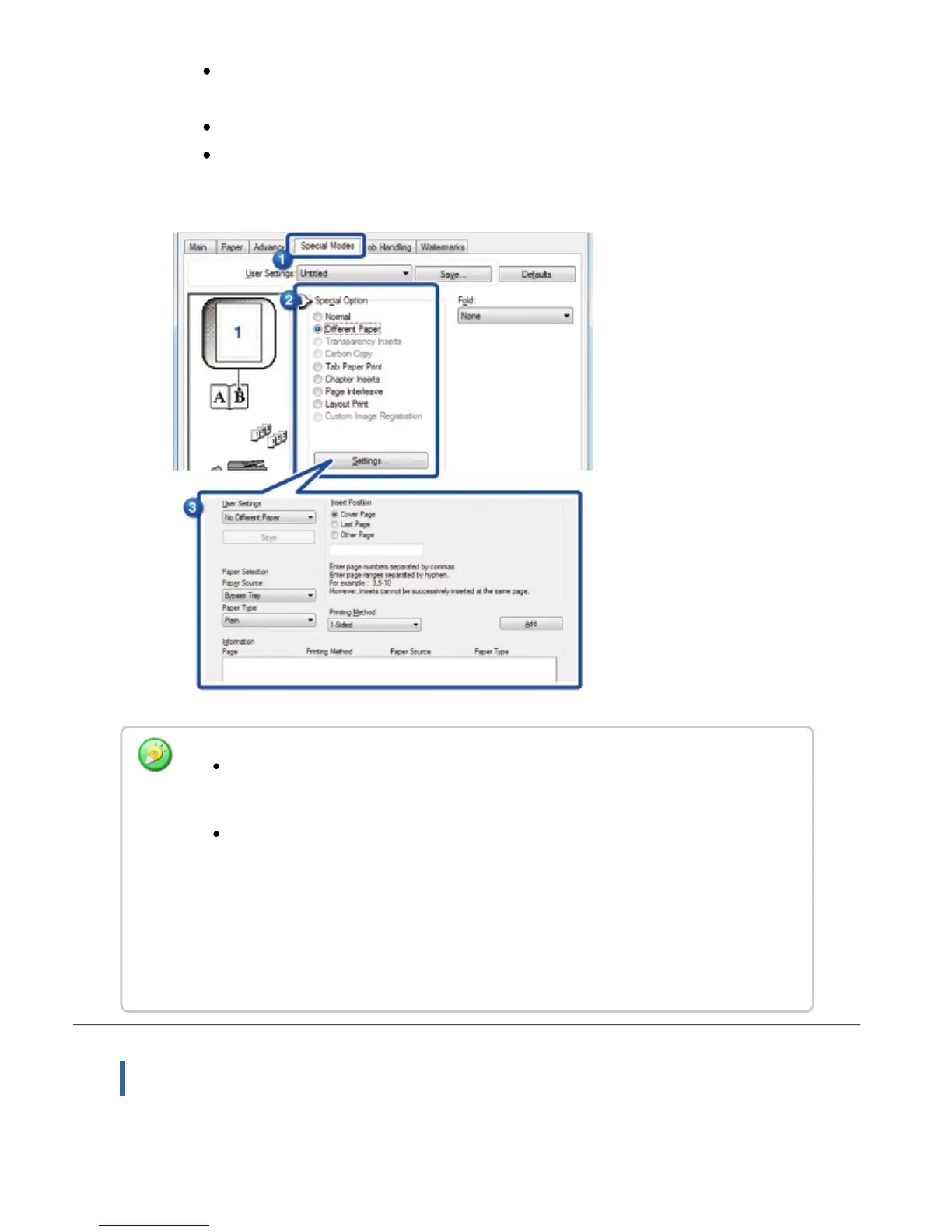
Select the insertion position, paper source, and printing method from the
corresponding menus.
Click the [Add] button and your settings will appear in "Information".
When you have finished selecting settings, click the [Save] button in
"Custom Settings" to save the settings.
Macintosh
When [Bypass Tray] is selected in "Paper Source", be sure to select the "Paper
Type" and load that type of paper in the bypass tray.
When [Other Page] is selected for "Insert Position", specify the insert position by
directly entering a page number. However, inserts cannot be successively
inserted at the same page. When "Printing Method" is set to [2-Sided Print], the
specified page and the next page after it will be printed on the front and reverse
side of the paper, and thus an insert setting at a page printed on the reverse side
will not be effective.
USER'S MANUAL | MX-M365N/MX-M465N/MX-M565N USER'S ... http://siica.sharpusa.com/portals/0/downloads/Manuals/MX-M365N-M...
463 of 1441 3/17/2016 7:14 AM



 To Next Page