CONNECTING AN EXTENSION TELEPHONE
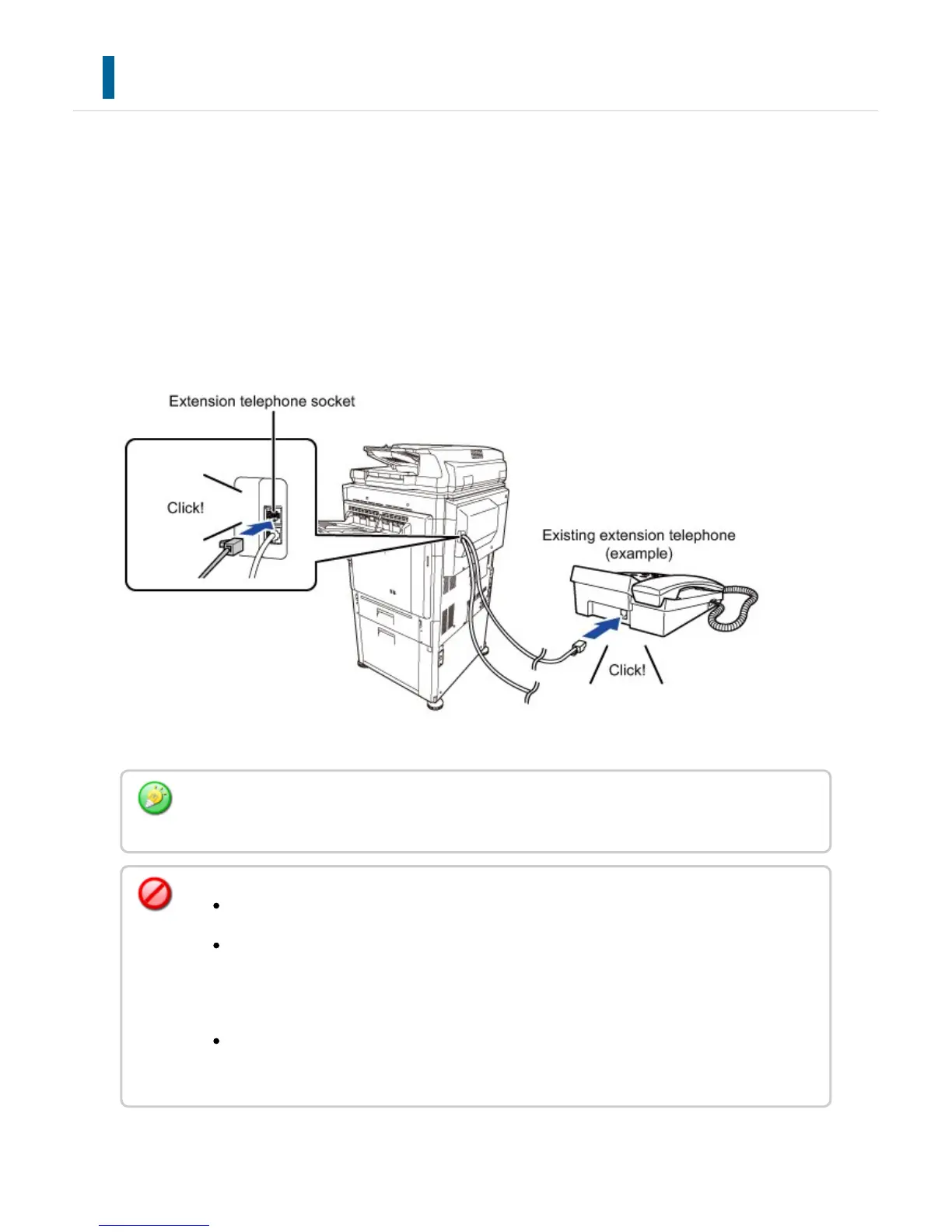
You can connect an existing telephone to the machine.
The telephone can be used for voice calls and to start fax reception on the machine.
Connect the extension telephone as shown below. As an example, you can make a phone
call using the existing phone, speak to the other party, and then press the [START] key to
fax an original that has been placed to that party. You can also press the [START] key
when an original is not placed to receive a fax. After connecting an extension telephone,
configure the "External Telephone Setting" in setting mode.
Enable the "Tel/Fax Auto Change" function. This is useful as the telephone or fax operation
is selected automatically according to the calling.
You cannot send a fax from your telephone.
You can connect a telephone with a modular cable plug to your machine. Also, use
the two-wire cable for telephone connection. If another type of cable is used, the
telephone may not operate normally.
If you have a problem in telephone cable connection, contact your dealer or nearest
"SHARP Service Department".
USER'S MANUAL | MX-M365N/MX-M465N/MX-M565N USER'S ... http://siica.sharpusa.com/portals/0/downloads/Manuals/MX-M365N-M...
699 of 1441 3/17/2016 7:14 AM



 To Next Page