SPECIFYING A NETWORK FOLDER
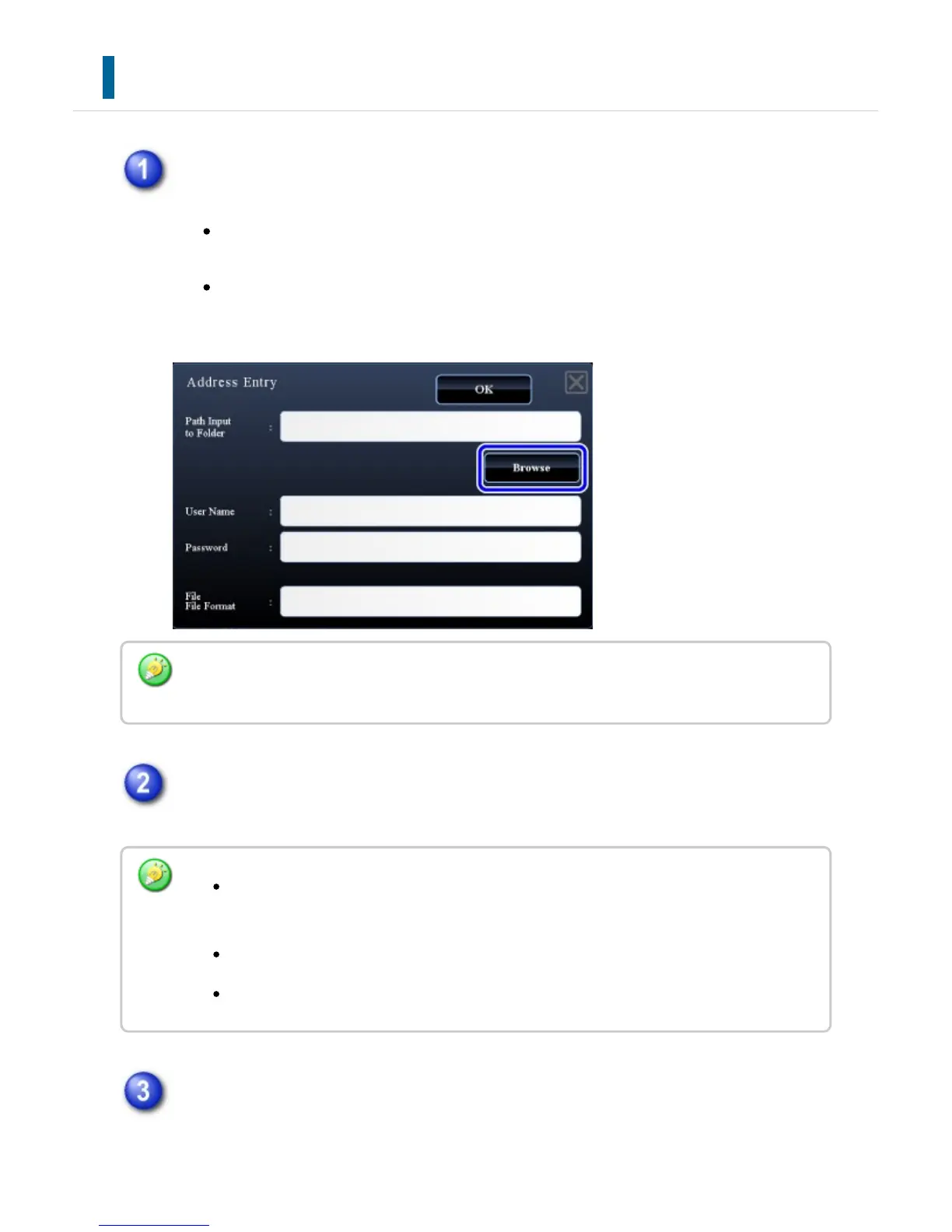
Tap the [Browse] key in the network folder entry screen.
To directly enter a folder, tap the [Path Imput to Folder] key. The soft
keyboard is displayed.
If a user name and password are required, check with the administrator of the
server and enter the user name and password.
Tap the key of the workgroup that you wish to access.
Tap the key of the server or computer that you wish to access.
If a screen appears prompting you to enter a user name and password, check with
your server administrator and enter the appropriate user name and password.
If a user authentication function other than authentication by user number is enabled, the
login name of the current user is automatically entered in the user name field.
Tap the [Search] key and enter a keyword to search for a workgroup, server, or
network folder.
Up to 100 workgroups, 100 servers, and 100 network folders are displayed.
Tap the [Cancel] key to return to the screen of step 1.
USER'S MANUAL | MX-M365N/MX-M465N/MX-M565N USER'S ... http://siica.sharpusa.com/portals/0/downloads/Manuals/MX-M365N-M...
731 of 1441 3/17/2016 7:14 AM



 To Next Page