RETRIEVING A DESTINATION FROM AN ADDRESS BOOK
VIEWING A LIST OF THE SELECTED DESTINATIONS
USING A SEARCH NUMBER TO RETRIEVE A DESTINATION
ENTERING AN ADDRESS MANUALLY
SPECIFYING A NETWORK FOLDER
RETRIEVING A DESTINATION FROM A GLOBAL ADDRESS BOOK
USING A TRANSMISSION LOG TO RESEND
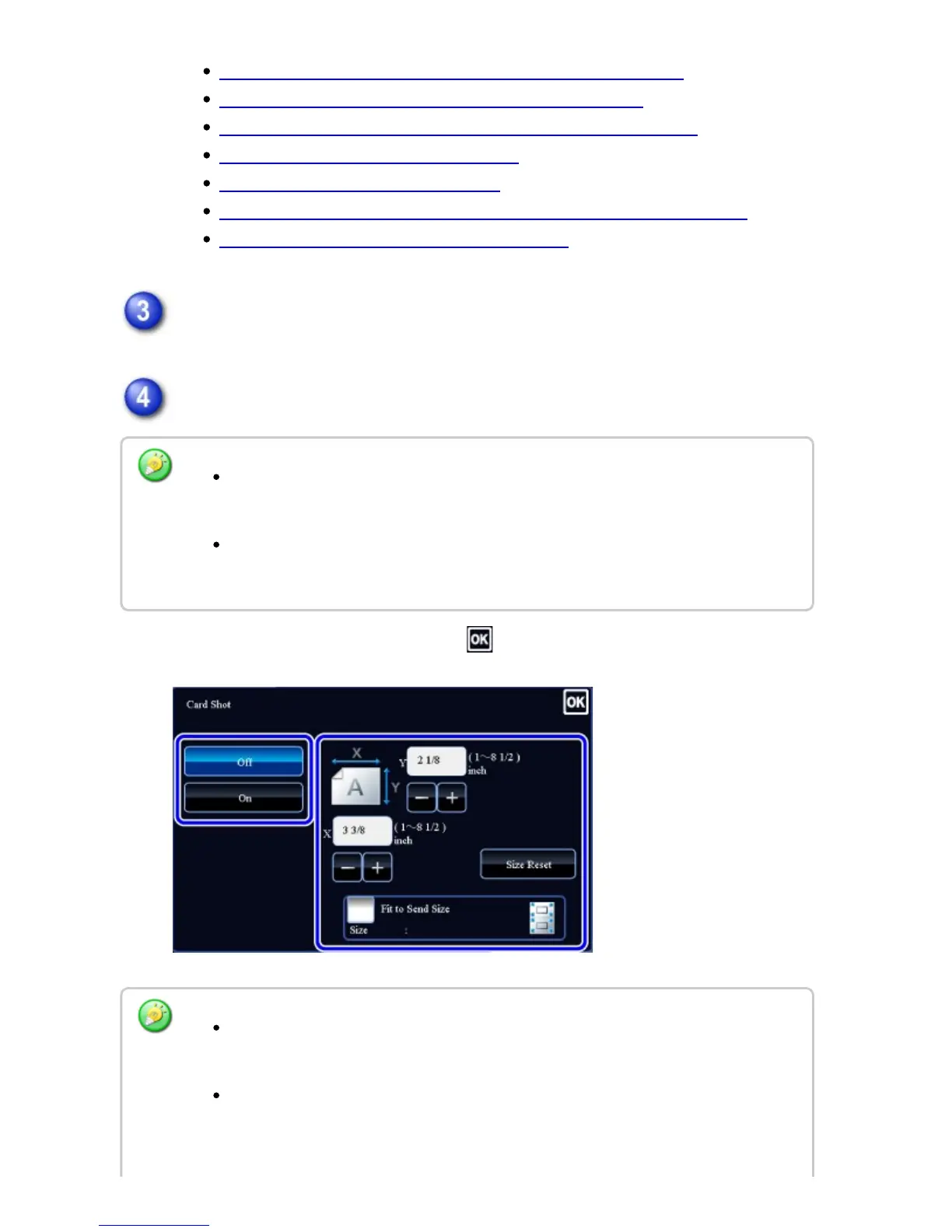
Tap the [Others] key, and tap the [Card Shot] key.
Tap the [On] key, and specify the original size as required.
After the settings are completed, tap and [Back] keys in sequence.
Tap the areas displaying width and height sizes respectively, and enter the sizes
using the numeric keys.
To quickly set the size, first specify a value close to the desired ratio value by the
numeric keys, then tap [-] or [+] for adjustment .
To enlarge or reduce the images to fit the paper based on the entered original
size, tap the [Fit to Send Size] key.
After selecting Card Shot, tap the [Original] key in the base screen to change the
original scan size or the send size. In this case, the screen of this step appears
when you tap the scan size key. For the procedure for setting the send size, see
USER'S MANUAL | MX-M365N/MX-M465N/MX-M565N USER'S ... http://siica.sharpusa.com/portals/0/downloads/Manuals/MX-M365N-M...
798 of 1441 3/17/2016 7:14 AM



 To Next Page