4-94
FACSIMILE
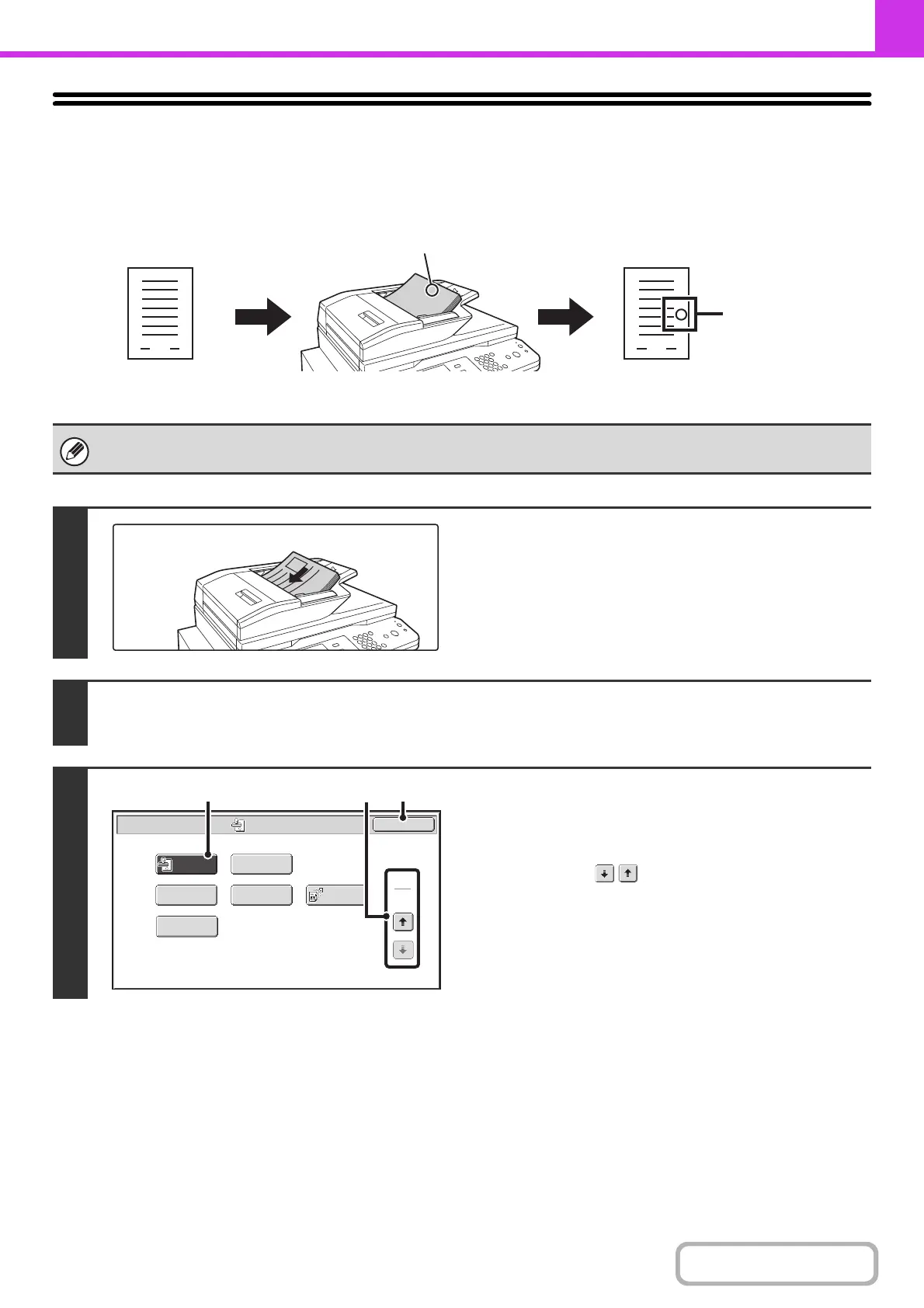
STAMPING SCANNED ORIGINALS (Verif. Stamp)
This function stamps each original that is scanned using the automatic document feeder, allowing you to verify that all
originals were correctly scanned.
To use this function, the optional stamp unit must be installed.
1
Insert the originals face up in the
document feeder tray.
2
Enter the destination fax number.
☞
ENTERING DESTINATIONS (page 4-16)
3
Select "Verif. Stamp".
(1) Touch the [Special Modes] key.
☞ SPECIAL MODES (page 4-70)
(2) Touch the keys to switch through the
screens.
(3) Touch the [Verif. Stamp] key so that it is
highlighted.
(4) Touch the [OK] key.
An "O" mark is
stamped
in fluorescent
pink.
Originals
are
scanned
Position of stamp
Originals
Verif.
Stamp
Fax/Special Modes
OK
2
2
Transaction
Report
Own Name
Select
Sending
Line
Memory Box
Polling
(4)
(3)
(2)



 To Next Page