71
SENDING A FAX
The basic procedure for sending faxes is explained below.
In fax mode, colour originals are sent as black and white images.
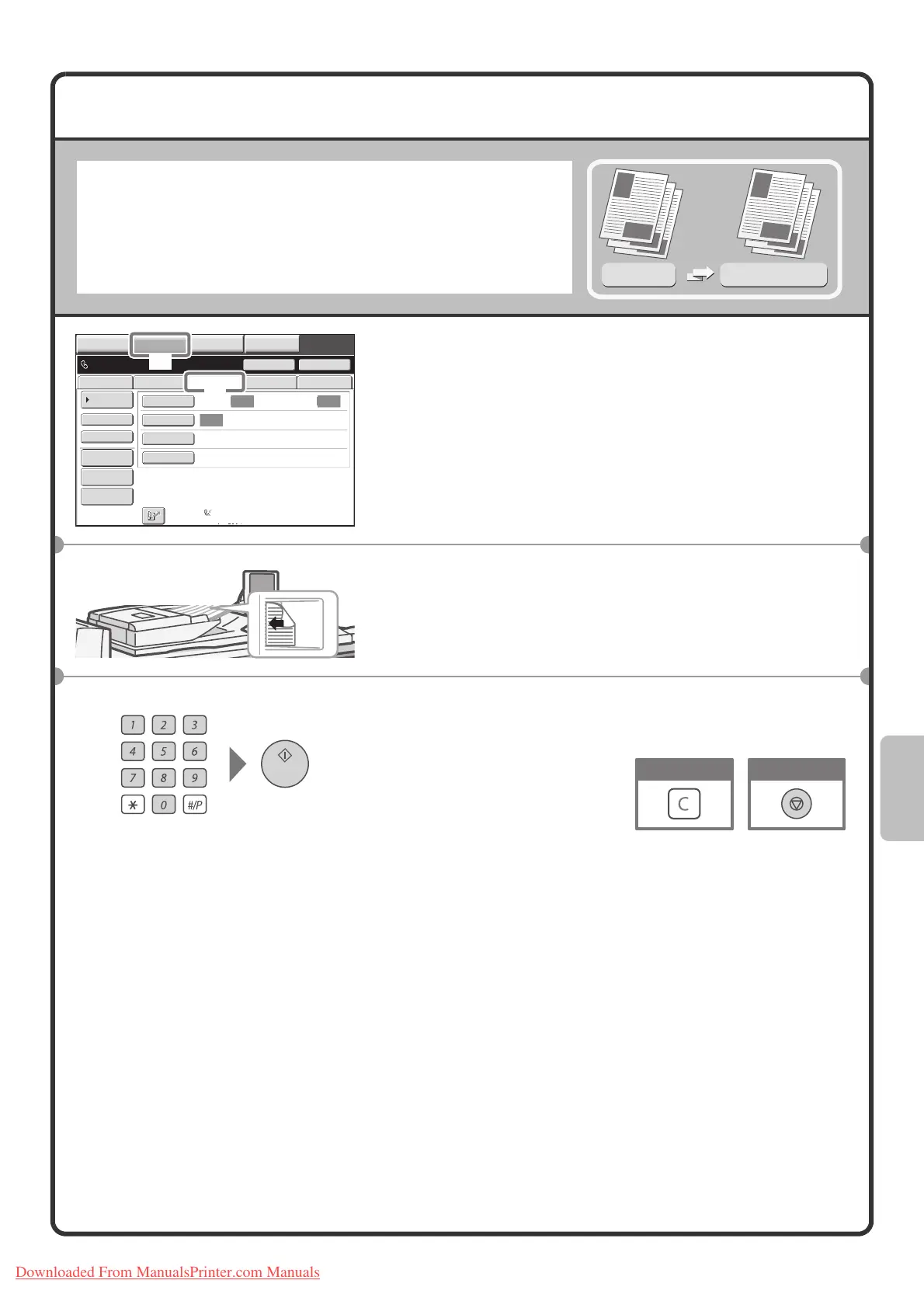
1 Select settings in the touch panel.
(1) Touch the [IMAGE SEND] key.
(2) Touch the [Fax] tab.
The base screen of fax mode appears.
2 Place the originals.
When using the document glass, place the original with the
side to be scanned face down.
3 Enter the fax number of the receiving fax
machine and press the [START] key.
Original
Transmission result
Transmission
Auto Auto
Auto
File
Quick File
Address Review
Direct TX
Sub Address
Address Book
Data EntryFaxInternet Fax USB Mem. Scan
Special Modes
Resolution
Exposure
Original
Scan:
Scan
Send:
Standard
Auto Reception
Fax Memory:100%
Speaker
Ready to send.
Resend
IMAGE SEND
DOCUMENT
FILING
MANUAL
FINISHING
COPY
(2)
(1)
The side to be scanned
must be face up!
Cancel scanningCorrect a mistake
Downloaded From ManualsPrinter.com Manuals


 To Next Page