EasyManua.ls Logo

Sharp MZ-700 - Page 119

Sharp MZ-700
213 pages
Print Icon
To Next Page IconTo Next Page
To Previous Page IconTo Previous Page
Loading...
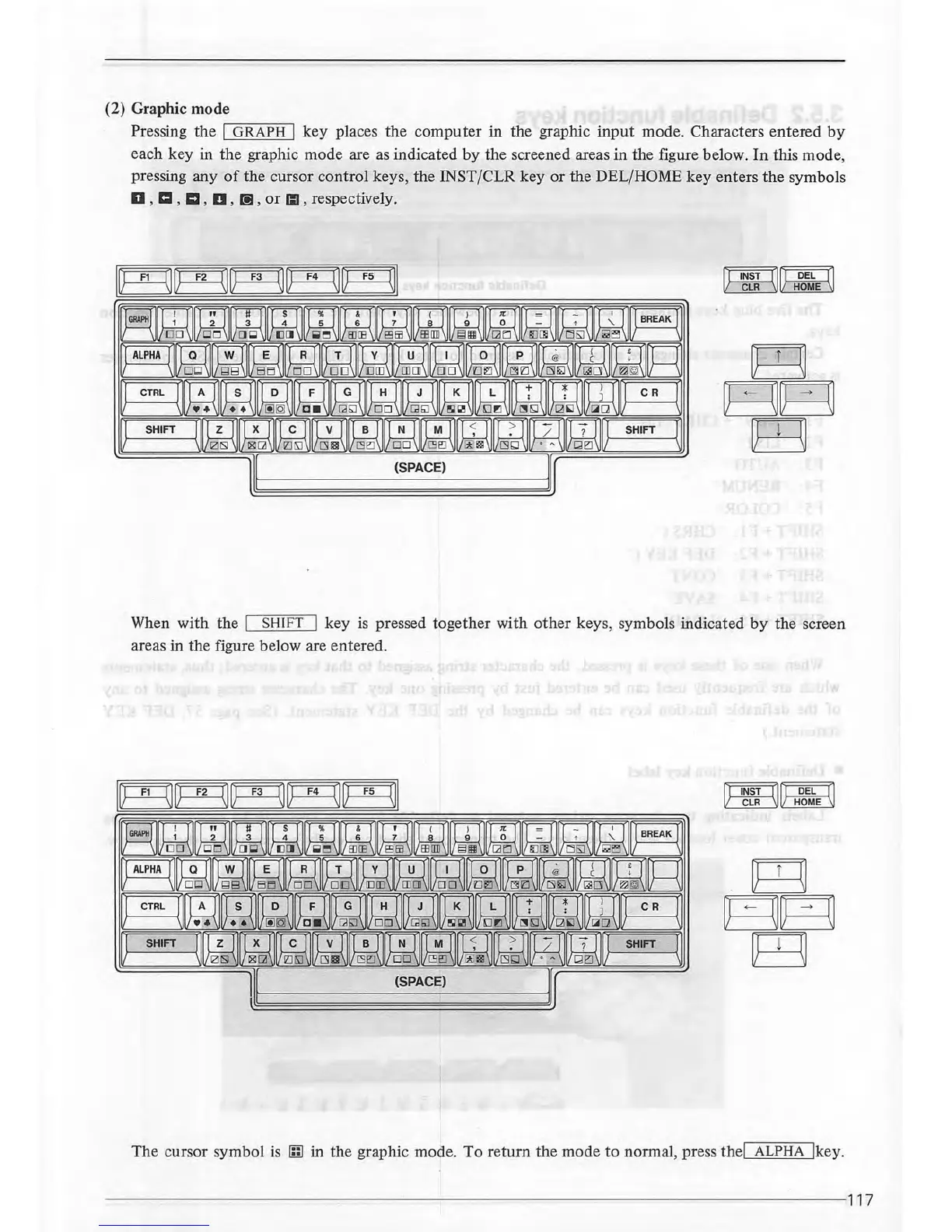
(2) Graphic mode
Pressing the
'I
G=R-:-A~P-:-:H-.1
key places the
computer
in
the graphic
input
mode. Characters entered
by
each key in the graphic
mode
are
as
indicated
by
the screened areas
in
the figure below.
In
this mode,
pressing any
of
the cursor control keys, the INST /CLR key
or
the DEL/HOME
key
enters the symbols
D ,
ICI
, m , D ,
[!]
,
or
Ill , respectively.
rFINsT'11
rFDEFT1
~~
When
with
the I SHIFT I key
is
pressed together with
other
keys, symbols indicated
by
the screen
areas in
the
figure below are entered.
~[Ad
CLR
HOME
The cursor symbol is
1nl
in the graphic mode.
To
return
the mode
to
normal, press thel ALPHA lkey.
------------
--------------
~-----------------------------------------117

Other manuals for Sharp MZ-700

Related product manuals