A31845,SUK R22AT/24AT O/M
9
NUMBER
POWER
%
2
NUMBER
POWER
%
1
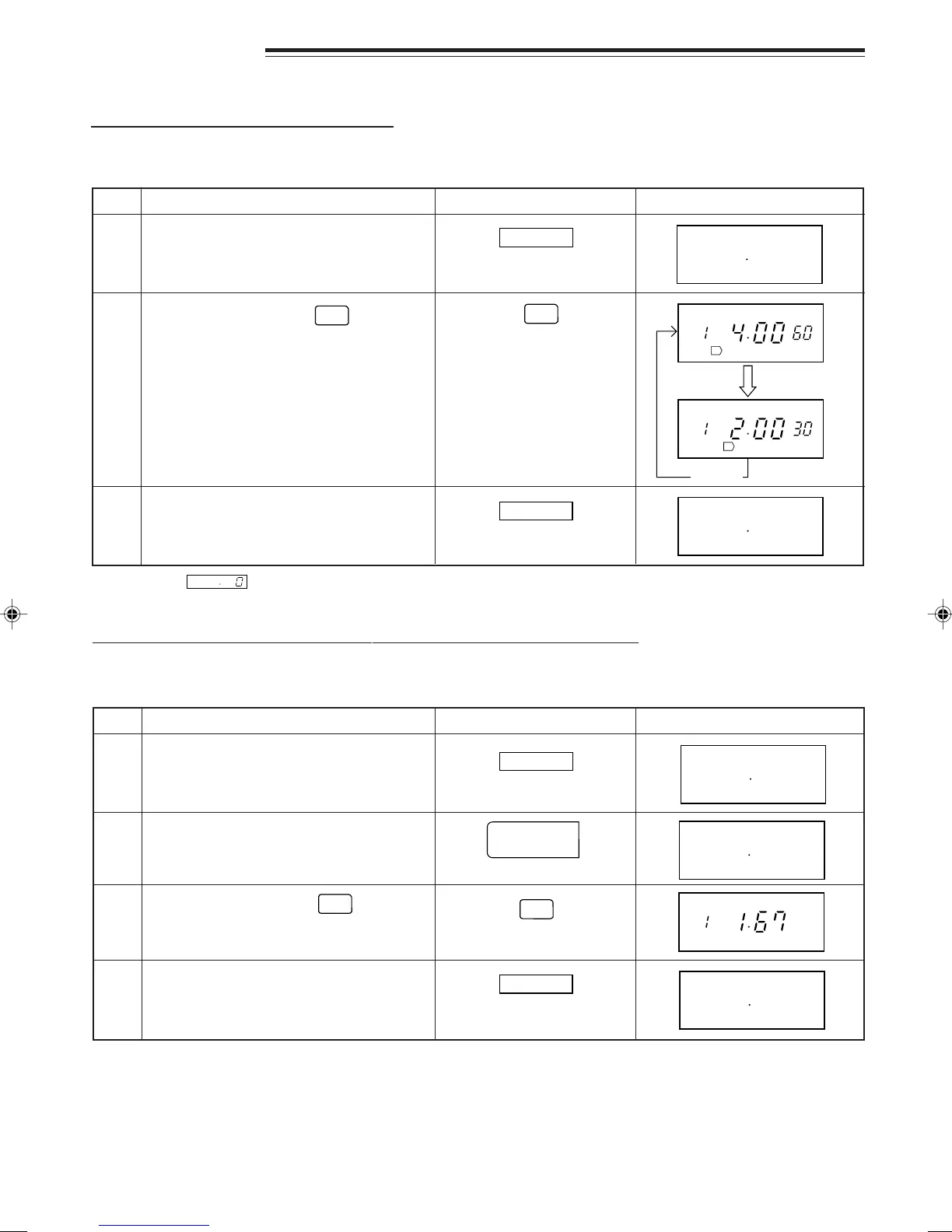
MEMORY CHECK
Step
Action
2
Select check mode.
1
Cancel check mode.3
CHECKING THE MAGNIFICATION FACTOR FOR DOUBLE QUANTITY
* Example: If you want to know the magnification factor for double quantity in MEMORY 1. (1.67 is
programmed.)
Step
Action
1
2
3
Select double quantity cooking mode.
Select check mode.
Cancel check mode.4
Note: Magnification factor 1.80 for the double quantity is stored in all memories unless changed.
You can check the information programmed into the memory.
CHECKING TIME AND POWER LEVEL
* Example: If you want to know the information that you have programmed into memory 1, this memory has been
programmed for 4 minutes at 60% as the 1st sequence and 2 minutes at 30% as the 2nd sequence.
DisplayPress pad
CHECK
CHECK
CHECK
DisplayPress pad
CHECK
NUMBER
CHECK
DOUBLE
NUMBER
CHECK
Select memory number.
1
Note: When is displayed at Step 2, the memory is not set.
Select memory number.
1
Repeat
Untitled-4 04.1.9, 8:17 PM9


 To Next Page