EasyManua.ls Logo

Sharp R-961 (W) - Component Replacement and Adjustment Procedure

Sharp R-961 (W)
52 pages
Print Icon
To Next Page IconTo Next Page
To Previous Page IconTo Previous Page
Loading...
COMPONENT
REPLACEMENT
AND
ADJUSTMENT
PROCEDURE
adhesive
on
the
contro!
panel
frame
surfaces
completely
with
alcohol
and
so
on.
.
When
attaching
the
key
unit
to
the
control
panel
frame,
adjust
the
upper
edge
and
right
edge
of
the
key
unit
tothe
MAGNETRON
REMOVAL
1.
2.
3.
4.
5.
6.
CARRY
OUT
3D
CHECKS.
Disconnect
the
H.V. wire
A
and
filament
lead
of
the
transformer
from
the
magnetron.
Remove
the
one
(1)
screw
holding
the
chassis
support
to
the
magnetron.
Remove
the
one
(1)
screw
holding
the
magnetron
guide
to
the
magnetron.
Remove
the
magnetron
guide
from
the
magnetron.
Carefully
remove
four
(4)
screws
holding
magnetron
to
waveguide.
FAN
MOTOR
REPLACEMENT
REMOVAL
1.
2.
3.
2
N
CARRY
OUT
3D
CHECKS.
Disconnect
the
wire
leads
from
the
fan
motor
and
the
thermal
cut-out
(FAN).
Remove
the
one
(1)
screw
holding
the
damper
mounting
angle
to
the
chassis
support.
Removethe
four
(4)
screws
holding
the
chassis
support
to
the
oven
cavity,
fan
duct,
magnetron
and
back
plate.
Release
the
chassis
support
from
the
oven.
Remove
the
two
(2)
screws
holding
the
fan
duct
to
the
waveguide.
Remove
the
fan
duct
from
the
oven.
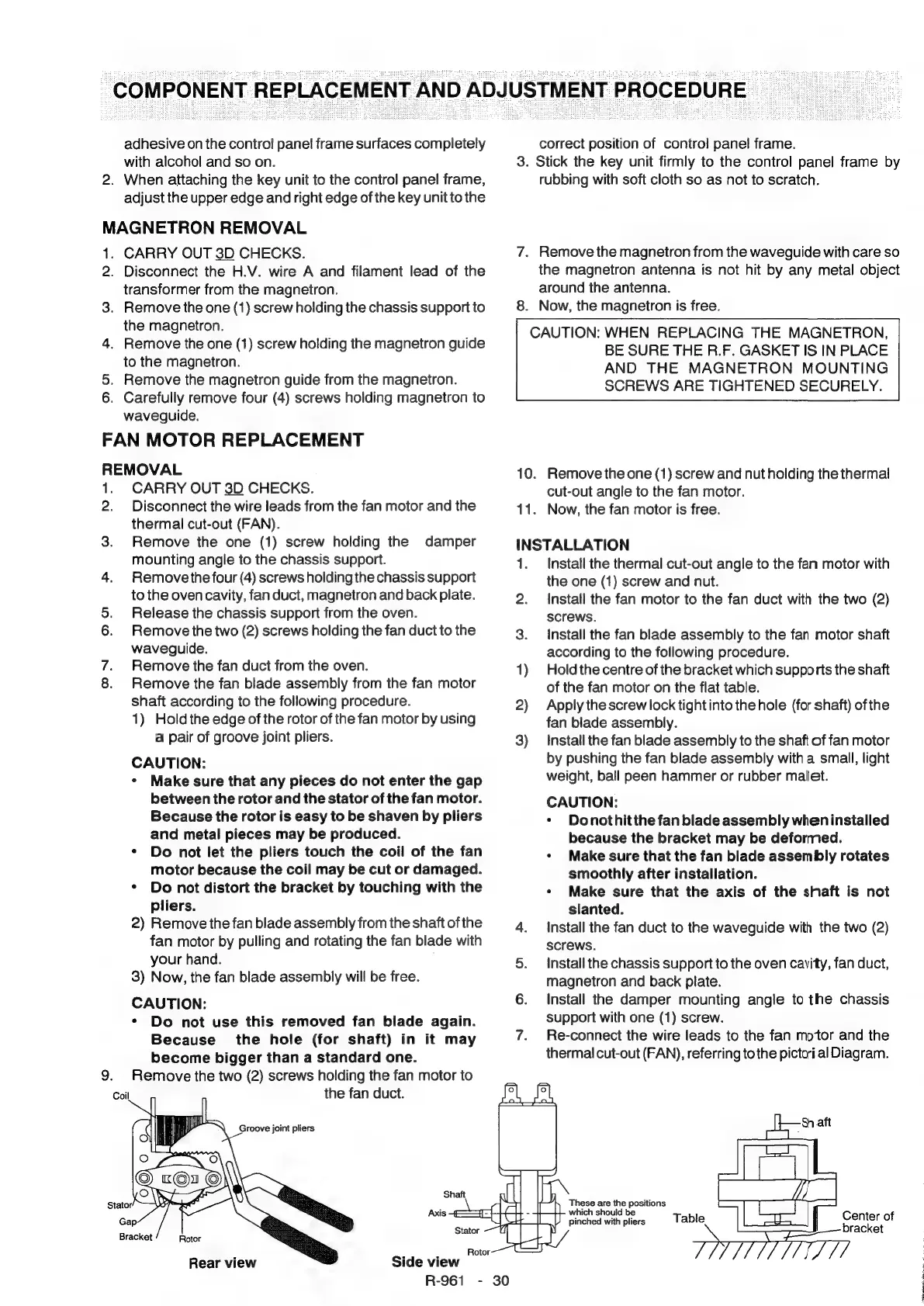
Remove
the fan
blade
assembly
from
the fan
motor
shaft
according
to
the
following
procedure.
1)
Hold
the
edge
of
the
rotor
of
the
fan
motor
by
using
a
pair
of
groove
joint
pliers.
CAUTION:
¢
Make
sure
that
any
pieces
do
not
enter
the
gap
between
the
rotor
and
the
stator
of
the
fan
motor.
Because
the
rotor
is
easy
to
be
shaven
by
pliers
and
metal
pieces
may
be
produced.
*
Do
not
let
the
pliers
touch
the
coil
of
the
fan
motor
because
the
coil
may
be
cut
or
damaged.
*
Do
not
distort
the
bracket
by
touching
with
the
pliers.
2)
Remove
the
fan
blade
assembly
from
the
shaft
of
the
fan
motor
by
pulling
and
rotating
the
fan
blade
with
your
hand.
3)
Now,
the fan
blade
assembly
will
be
free.
CAUTION:
*
Do
not
use
this
removed
fan
blade
again.
Because
the
hole
(for
shaft)
in
it
may
become
bigger
than
a
standard
one.
Remove
the
two
(2)
screws
holding
the
fan
motor
to
the
fan
duct.
Rotor
Side
view
R-961
-
Rear
view
3.
correct
position
of
control
panel
frame.
Stick
the
key
unit
firmly
to
the
control
panel
frame
by
rubbing
with
soft
cloth
so
as
not
to
scratch.
.
Remove
the
magnetron
from
the
waveguide
with
care
so
the
magnetron
antenna
is
not
hit
by
any
metal
object
around
the
antenna.
.
Now,
the
magnetron
is
free.
CAUTION:
WHEN
REPLACING
THE
MAGNETRON,
BE
SURE
THE
R.F.
GASKET
IS
IN
PLACE
AND
THE
MAGNETRON
MOUNTING
SCREWS
ARE
TIGHTENED
SECURELY.
10.
Remove
the
one
(1)
screw
and
nut
holding
the
thermal
cut-out
angle
to
the
fan
motor.
11.
Now,
the
fan
motor
is
free.
INSTALLATION
1.
Install
the
thermal
cut-out
angle
to
the
fan
motor
with
the
one
(1)
screw
and
nut.
2.
Install
the
fan
motor
to
the
fan
duct
with
the
two
(2)
Screws.
3.
Install
the
fan
blade
assembly
to
the
fan
motor
shaft
according
to
the
following
procedure.
1)
Holdthe
centre
of
the
bracket
which
supports
the
shaft
of
the
fan
motor
on
the
flat
table.
2)
Applythescrewlock
tight
into
the
hole
(for
shaft)
of
the
fan
blade
assembly.
3)
Install
the
fan
blade
assembly
to
the
shaft
of
fan
motor
by
pushing
the
fan
blade
assembly
with
a
small,
light
weight,
ball
peen
hammer
or
rubber
malet.
CAUTION:
*
Donothitthe
fan
blade
assembly
when
installed
because
the
bracket
may
be
deformed.
¢
Make
sure
that
the
fan
blade
assembly
rotates
smoothly
after
installation.
¢
Make
sure
that
the
axis
of
the
shaft
is
not
slanted.
4.
Install
the
fan
duct
to
the
waveguide
with
the
two
(2)
screws.
5.
Install
the
chassis
support
to
the
oven
cavity,
fan
duct,
magnetron
and
back
plate.
6.
Install
the
damper
mounting
angle
to
the
chassis
support
with
one
(1)
screw.
Re-connect
the
wire
leads
to
the
fan
motor
and
the
thermal
cut-out
(FAN),
referring
to
the
pictcri
al
Diagram.
ih
ie
ae
iy
positions
which
should
be
pinched
with
pliers
Table
Center
of
bracket
Pre

Related product manuals