EasyManua.ls Logo

Sharp R-961 (W) - Page 33

Sharp R-961 (W)
52 pages
Print Icon
To Next Page IconTo Next Page
To Previous Page IconTo Previous Page
Loading...
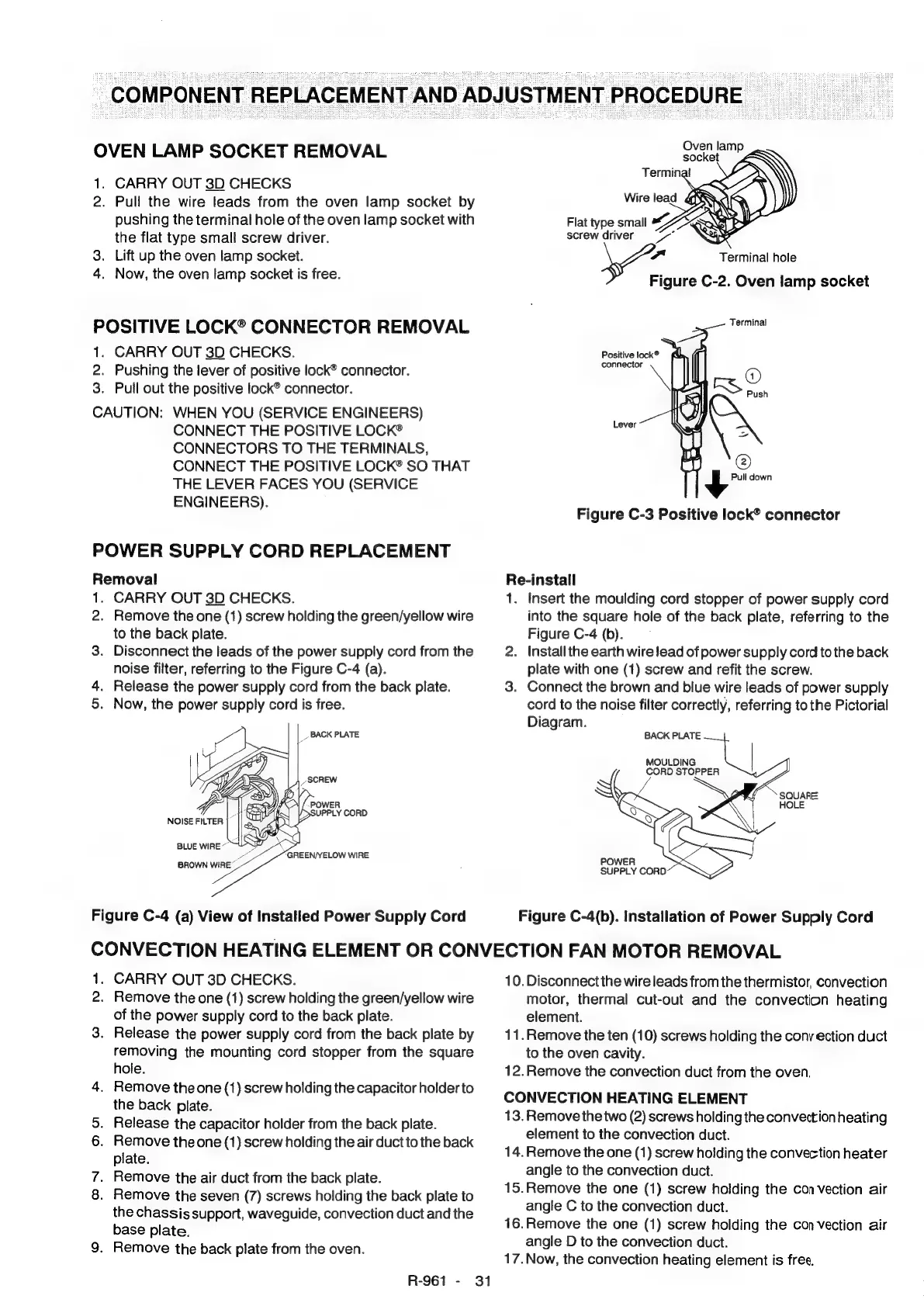
COMPONENT
REPLACEMENT
AND
ADJUSTMENT
PROCEDURE
OVEN
LAMP
SOCKET
REMOVAL
1.
CARRY
OUT
3D
CHECKS
2.
Pull
the
wire
leads
from
the
oven
lamp
socket
by
pushing
the
terminal
hole
of
the
oven
lamp
socket
with
the
flat
type
small
screw
driver.
3.
Lift
up
the
oven
lamp
socket.
4.
Now,
the
oven
lamp
socket
is
free.
POSITIVE
LOCK®
CONNECTOR
REMOVAL
1.
CARRY
OUT
3D
CHECKS.
2.
Pushing
the
lever
of
positive
lock®
connector.
3.
Puil
out
the
positive
lock®
connector.
CAUTION:
WHEN
YOU
(SERVICE
ENGINEERS)
CONNECT
THE
POSITIVE
LOCK®
CONNECTORS
TO
THE
TERMINALS,
CONNECT
THE
POSITIVE
LOCK®
SO
THAT
THE
LEVER
FACES
YOU
(SERVICE
ENGINEERS).
POWER
SUPPLY
CORD
REPLACEMENT
Removal
1.
CARRY
OUT
3D
CHECKS.
2.
Remove
the
one
(1)
screw
holding
the
green/yellow
wire
to
the
back
plate.
3.
Disconnect
the
leads
of
the
power
supply
cord
from
the
noise
filter,
referring
to
the
Figure
C-4
(a).
4.
Release
the
power
supply
cord
from
the
back
plate.
5.
Now,
the
power
supply
cord
is
free.
_
BACK
PLATE
SCREW
POWER
VY
>SUPPLY
CORD
BLUE
WIRE~™
a
GREEN/YELOW
WIRE
BROWN
WIRE
Figure
C-4
(a)
View
of
Installed
Power
Supply
Cord
Oven
lamp
socket
Terminal
hole
Figure
C-2.
Oven
lamp
socket
Terminal
Positive
lock®
connector
\
mx,
@
Push
Lever
@)
S$
Pull
down
Figure
C-3
Positive
lock®
connector
Re-install
1.
Insert
the
moulding
cord
stopper
of
power
supply
cord
into
the
square
hole
of
the
back
plate,
referring
to
the
Figure
C-4
(b).
2.
Installthe
earth
wire lead
of
power
supply
cord
to
the
back
plate
with
one
(1)
screw
and
refit
the
screw.
3.
Connect
the
brown
and
blue
wire
leads
of
power
supply
cord
to
the
noise
filter
correctly,
referring
to
the
Pictorial
Diagram.
BACK
PLATE
MOULDING
|
CORD
STOPPER
SQUARE
HOLE
Figure
C-4(b).
Installation
of
Power
Supply
Cord
CONVECTION
HEATING
ELEMENT
OR
CONVECTION
FAN
MOTOR
REMOVAL
1.
CARRY
OUT
3D
CHECKS.
2.
Remove
the
one
(1)
screw
holding
the
green/yellow
wire
of
the
power
supply
cord
to
the
back
plate.
3.
Release
the
power
supply
cord
from
the
back
plate
by
removing
the
mounting
cord
stopper
from
the
square
hole.
4.
Remove
the
one
(1)
screw
holding
the
capacitor
holder
to
the
back
plate.
5.
Release
the
capacitor
holder
from
the
back
plate.
6.
Remove
the
one
(1)
screw
holding
the
air
duct
to
the
back
plate.
7.
Remove
the
air
duct
from
the
back
plate.
8.
Remove
the
seven
(7)
screws
holding
the
back
plate
to
the
chassis
support,
waveguide,
convection
duct
and
the
base
plate.
9.
Remove
the
back
plate
from
the
oven.
R-961
-
31
10.
Disconnect
the
wire
leads
from
the
thermistor,
convection
motor,
thermal
cut-out
and
the
convection
heating
element.
11.Remove
the
ten
(10)
screws
holding
the
cony
ection
duct
to
the
oven
cavity.
12.Remove
the
convection
duct
from
the
oven,
CONVECTION
HEATING
ELEMENT
13.
Remove
the
two
(2)
screws
holding
the
convection
heating
element
to
the
convection
duct.
14.
Remove
the
one
(1)
screw
holding
the
convection
heater
angle
to
the
convection
duct.
15.Remove
the
one
(1)
screw
holding
the
convection
air
angle
C
to
the
convection
duct.
16.Remove
the
one
(1)
screw
holding
the
convection
air
angle
D
to
the
convection
duct.
17.Now,
the
convection
heating
element
is
free.

Related product manuals