EasyManua.ls Logo

Sharp SA-201H - Page 10

Sharp SA-201H
20 pages
Print Icon
To Next Page IconTo Next Page
To Previous Page IconTo Previous Page
Loading...
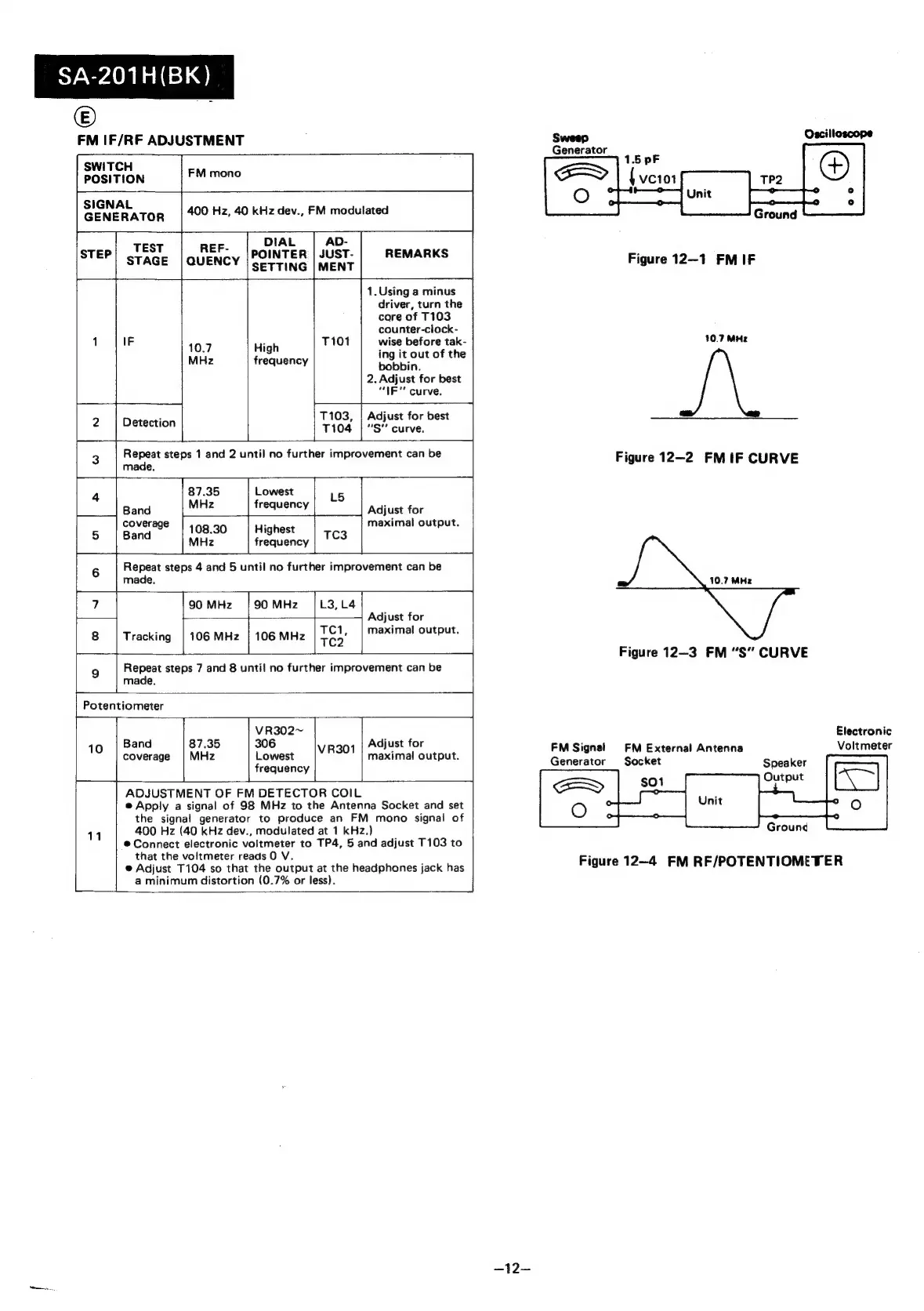
SA-201H(BK)
©
FM
IF/RF
ADJUSTMENT
SWITCH
POSITION
FM
mono
eee
naioe
400
Hz,
40
kHz
dev.,
FM
modulated
DIAL
AD-
TEST
REF-
STEP
POINTER
|
JUST-
REMARKS
STAGE
|QUENCY
SETTING
|
MENT
1.
Using
a
minus
driver,
turn
the
core
of
T103
counter-clock-
16.7
av
|
1189)
|r
atin
ator
eke
MHz
frequency
bobbin.
2.
Adjust
for
best
“IE
curve.
:
T103,
|
Adjust
for
best
Detection
7104
|S"
curve.
L
Repeat
steps
1
and
2
until
no
further
improvement
can
be
made.
acs,
a
87.35
Lowest
Band
MHz
frequency
Adjust
for
coverage
108.30
High
maximal
output.
f
ighest
Band
MHz
frequency
TC3
4
Repeat
steps
4
and
5
until
no
further
improvement
can
be
made.
Poten
10
tiometer
90MHz
|90MHz
|L3,L4
TCi,
Repeat
steps
7
and
8
until
no
further
improvement
can
be
made.
Adjust
for
maxima!
output.
Tracking
VR302~
306
Lowest
frequency
Band
coverage
Adjust
for
maximal
output.
11
ADJUSTMENT
OF
FM
DETECTOR
COIL
@
Apply
a
signal
of
98
MHz
to
the
Antenna
Socket
and
set
the
signal
generator
to
produce
an
FM
mono
signal
of
400
Hz
(40
kHz
dev.,
modulated
at
1
kHz.)
@
Connect
electronic
voltmeter
to
TP4,
5
and
adjust
T103
to
that
the
voltmeter
reads
0
V.
@
Adjust
T104
so
that
the
output
at
the
headphones
jack
has
a
minimum
distortion
(0.7%
or
less).
—12—
Sweep
Oscilloscope
Generator
|
Ground
Figure
12-1
FMIF
10.7
MHz
Figure
12-2
FMIF
CURVE
10.7
MHz
Figure
12-3
FM
“S”
CURVE
Electronic
FM
Signal
Voltmeter
Generator
FM
External
Antenna
Socket
Figure
12—4
FM
RF/POTENTIOMETER

Related product manuals