EasyManua.ls Logo

Sharp VC-A105B - Page 10

Sharp VC-A105B
71 pages
Print Icon
To Next Page IconTo Next Page
To Previous Page IconTo Previous Page
Loading...
Broadcas
ah
Yo.
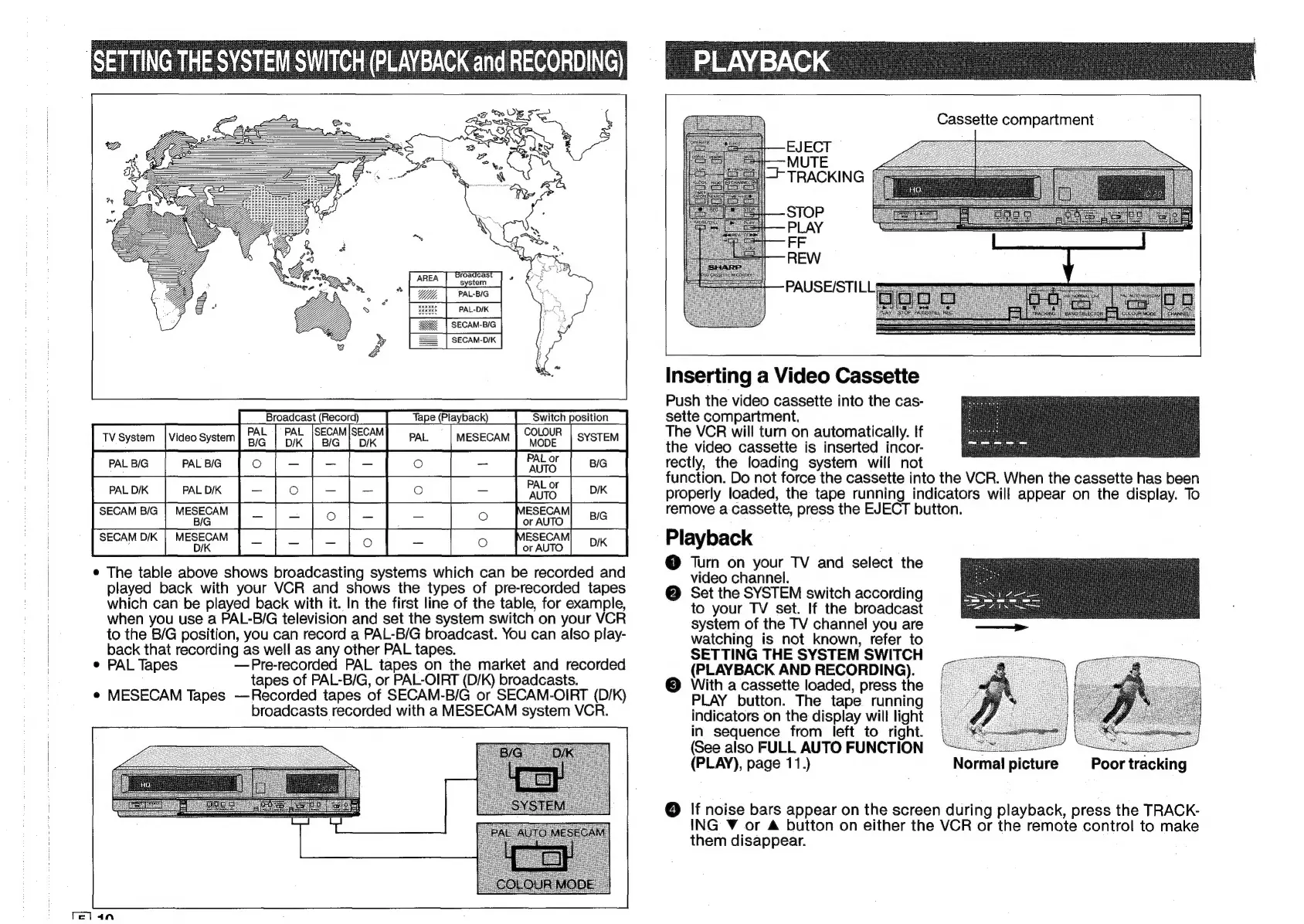
PAL-BIG
)
>
PAL-D/K
SECAM-B/G
SECAM-D/K
Broadcast
(Record)
PAL
|
PAL
|SECAM|SECAM
COLOUR
PAL
or
mac
[mee
[o[-[-[-]
©
|
-
[as
|
2
|
PAL
or
muon
[rwox
[—[o[-[-[
o
[
|
ahs [om
|
SECAM
BIG
|
MESECAM
ESECAM
pig
BIG
or
AUTO
SECAM
D/K
|
MESECAM
ESECAM
yx
;
D/K
or
AUTO
e
The
table
above
shows
broadcasting
systems
which
can
be
recorded
and
played
back
with
your
VCR
and
shows
the
types
of
pre-recorded
tapes
which
can
be
played
back
with
it.
In
the
first
line
of
the
table,
for
example,
when
you
use
a
PAL-B/G
television
and
set
the
system
switch
on
your
VCR
to
the
B/G
position,
you
can
record
a
PAL-B/G
broadcast.
You
can
also
play-
back
that
recording
as
well
as
any
other
PAL
tapes.
e
PAL
Tapes
—Pre-recorded
PAL
tapes
on
the
market
and
recorded
tapes
of
PAL-B/G,
or
PAL-OIRT
(D/K)
broadcasts.
#
MESECAM
Tapes
—Recorded
tapes
of
SECAM-B/G
or
SECAM-OIRT
(D/K)
broadcasts
recorded
with
a
MESECAM
system
VCR.
clan
Cassette
compartment
i
fc
MUTE
i
TRACKING
[
STOP
PLAY
FF
REW
PAUSE/STILL*
Inserting
a
Video
Cassette
Push
the
video
cassette
into
the
cas-
sette
compartment.
The
VCR
will
turn
on
automatically.
If
the
video
cassette
is
inserted
incor-
rectly,
the
loading
system
will
not
function.
Do
not
force
the
cassette
into
the
VCR.
When
the
cassette
has
been
properly
loaded,
the
tape
running
indicators
will
appear
on
the
display.
To
remove
a
cassette,
press
the
EJECT
button.
Playback
@
Turn
on
your
TV
and
select
the
video
channel.
@
Set
the
SYSTEM
switch
according
to
your
TV
set.
If
the
broadcast
system
of
the
TV
channel
you
are
watching
is
not
known,
refer
to
SETTING
THE
SYSTEM
SWITCH
(PLAYBACK
AND
RECORDING).
©
With
a
cassette
loaded,
press
the
PLAY
button.
The
tape
running
indicators
on
the
display
will
light
in
sequence
from
left
to
right.
(See
also
FULL.
AUTO
FUNCTION
:
:
(PLAY),
page
11.)
Normal!
picture
Poor
tracking
@
|f
noise
bars
appear
on
the
screen
during
playback,
press
the
TRACK-
ING
V
or
A
button
on
either
the
VCR
or
the
remote
control
to
make
them
disappear.

Related product manuals