EasyManua.ls Logo

Sharp VC-A105B - Page 11

Sharp VC-A105B
71 pages
Print Icon
To Next Page IconTo Next Page
To Previous Page IconTo Previous Page
Loading...
@
To
stop
playback,
press
the
STOP
button.
When
the
tape
ends,
the
VCR
will
automatically
rewind
the
tape
to
the
beginning,
eject
the
cassette,
and
turn
the
power
off.
NOTES:
e
This
machine
is
not
suitable
for
the
playback
of
tapes
recorded
at
LP
(Long
Play)
speed
on
other
VCRs.
e
If
the
colour
of
the
recording
is
of
poor
quality,
the
picture
may
turn
black
and
white.
In
this
event,
set
the
COLOUR
MODE
switch
to
the
MESECAM
or
PAL
position.
Normally,
it
should
be
set
to
AUTO.
e
Inserting
a
cassette
tape
or
pressing
both
the
TRACKING
¥
and
&
buttons
at
the
same
time
on
either
the
VCR
or
remote
control
resets
the
tracking
to
the
centre
position.
Video
Search
Use
the
following
procedure
to
quickly
find
the
section
you
want,
while
view-
ing
the
picture.
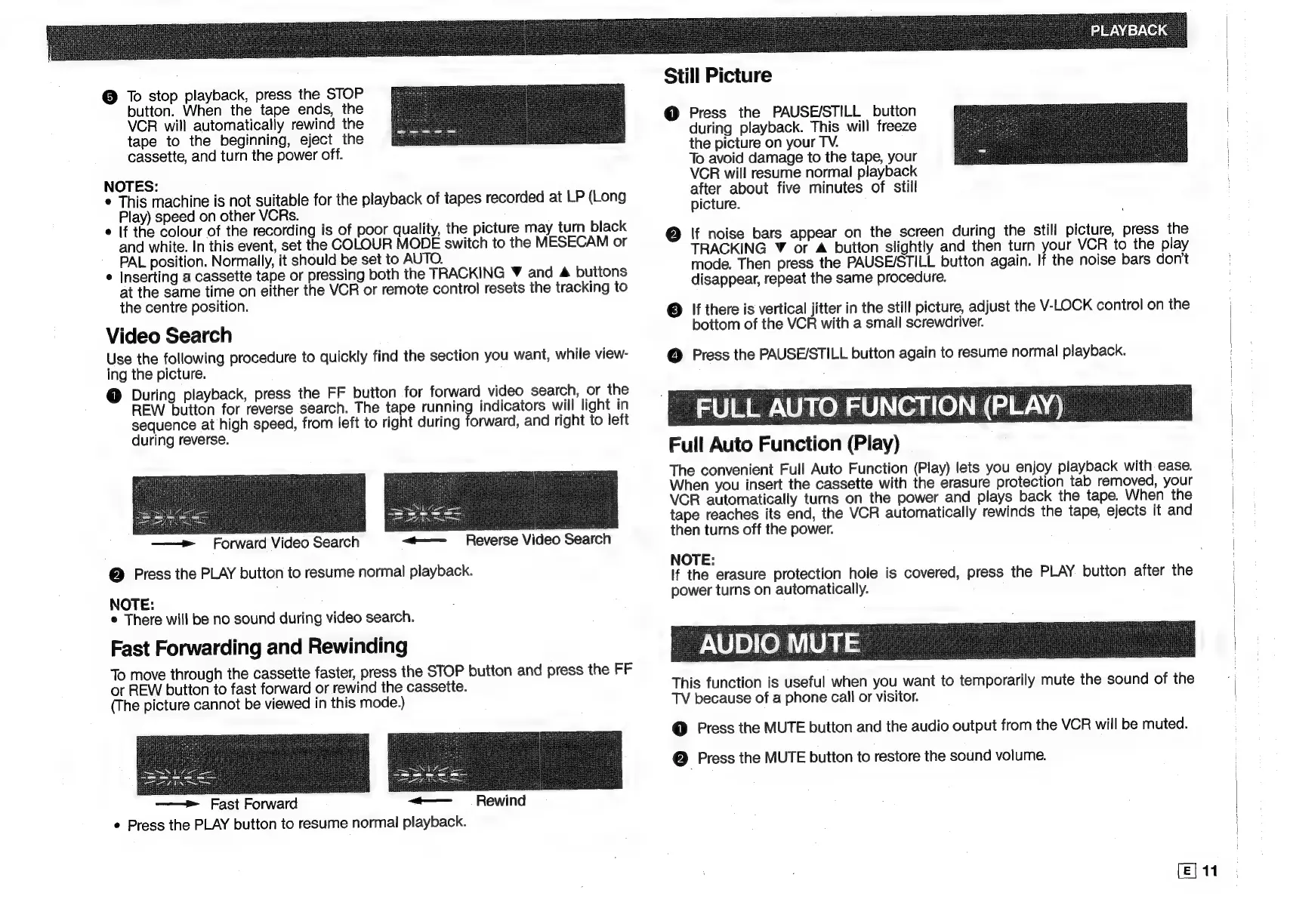
@
During
playback,
press
the
FF
button
for
forward
video
search,
or
the
REW
button
for
reverse
search.
The
tape
running
indicators
will
light
in
sequence
at
high
speed,
from
left
to
right
during
forward,
and
right
to
left
during
reverse.
»
Forward
Video
Search
@
Press
the
PLAY
button
to
resume
normal
playback.
NOTE:
®
There
will
be
no
sound
during
video
search.
Fast
Forwarding
and
Rewinding
To
move
through
the
cassette
faster,
press
the
STOP
button
and
press
the
FF
or
REW
button
to
fast
forward
or
rewind
the
cassette.
(The
picture
cannot
be
viewed
in
this
mode.)
ft
——»
Fast
Forward
Rewind
¢
Press
the
PLAY
button
to
resume
normal
playback.
Still
Picture
@
Press
the
PAUSE/STILL
button
during
playback.
This
will
freeze
the
picture
on
your
TV.
To
avoid
damage
to
the
tape,
your
VCR
will
resume
normal
playback
after
about
five
minutes
of
still
picture.
@
If
noise
bars
appear
on
the
screen
during
the
still
picture,
press
the
TRACKING
Y
or
&
button
slightly
and
then
turn
your
VCR
to
the
play
mode.
Then
press
the
PAUSE/STILL
button
again.
If
the
noise
bars
don’t
disappear,
repeat
the
same
procedure.
@
If
there
is
vertical
jitter
in
the
still
picture,
adjust
the
V-LOCK
control
on
the
bottom
of
the
VCR
with
a
small
screwdriver.
@
Press
the
PAUSE/STILL
button
again
to
resume
normal
playback.
FULL
AUTO
FUNCTION
(PLAY)
Full
Auto
Function
(Play)
The
convenient
Full
Auto
Function
(Play)
lets
you
enjoy
playback
with
ease.
When
you
insert
the
cassette
with
the
erasure
protection
tab
removed,
your
VCR
automatically
turns
on
the
power
and
plays
back
the
tape.
When
the
tape
reaches
its
end,
the
VCR
automatically
rewinds
the
tape,
ejects
it
and
then
turns
off
the
power.
NOTE:
If
the
erasure
protection
hole
is
covered,
press
the
PLAY
button
after
the
power
turns
on
automatically.
AUDICU
This
function
is
useful
when
you
want
to
temporarily
mute
the
sound
of
the
TV
because
of
a
phone
call
or
visitor.
@
Press
the
MUTE
button
and
the
audio
output
from
the
VCR
will
be
muted.
(29
Press
the
MUTE
button
to
restore
the
sound
volume.

Related product manuals