EasyManua.ls Logo

Sharp VC-A105B - Page 12

Sharp VC-A105B
71 pages
Print Icon
To Next Page IconTo Next Page
To Previous Page IconTo Previous Page
Loading...
~
RECORDING
A
TV
PROGRAMME
Cassette
Erase
Protection
A
VHS)
cassette
has
a
removable
tab
to
prevent
Erasure
protection
tab
accidental
erasure
of
recorded
material.
Removing
the tab
prevents
recording.
To
record
on
a
video
cas-
sette
with
the tab
removed,
place
adhesive
tape
over
CH
the
tab
opening.
Recording
a
TV
Programme
@
Turn
on
your
TV
and
select
the
video
channel.
@
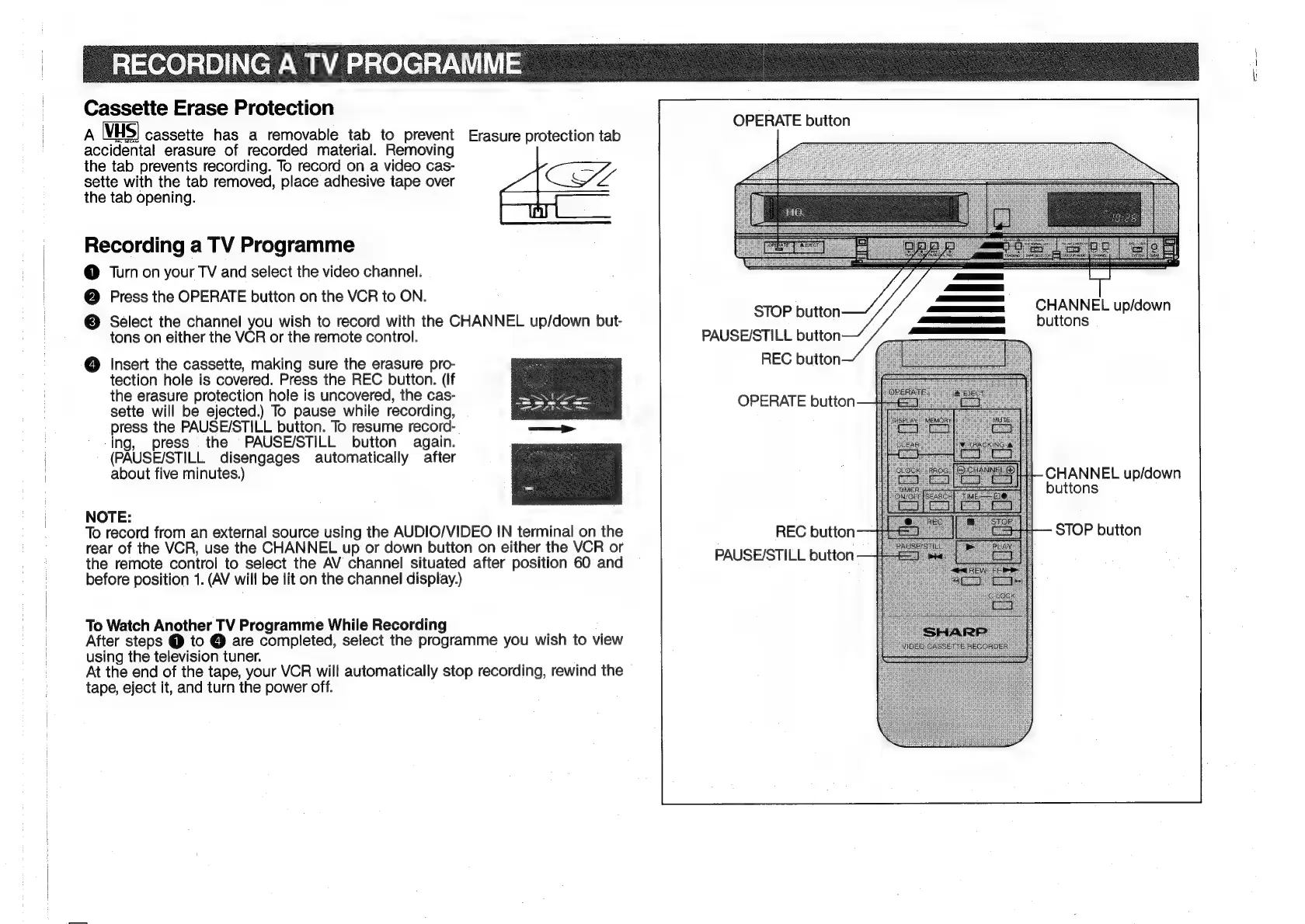
Press
the
OPERATE
button
on
the
VCR
to
ON.
©
Select
the
channel
you
wish
to
record
with
the
CHANNEL
up/down
but-
tons
on
either
the
VCR
or
the
remote
control.
@
Insert
the
cassette,
making
sure
the
erasure
pro-
tection
hole
is
covered.
Press
the
REC
button.
(If
the
erasure
protection
hole
is
uncovered,
the
cas-
sette
will
be
ejected.)
To
pause
while
recording,
press
the
PAUSE/STILL
button.
To
resume
record-
-ing,
press
the
PAUSE/STILL
button
again.
(PAUSE/STILL
disengages
automatically
after
about
five
minutes.)
NOTE:
To
record
from
an
external
source
using
the
AUDIO/VIDEO
IN
terminal
on
the
rear
of
the
VCR,
use
the
CHANNEL
up
or
down
button
on
either
the
VCR
or
the
remote
control
to
select
the
AV
channel
situated
after
position
60
and
before
position
1.
(AV
will
be
lit
on
the
channel
display.)
To
Watch
Another
TV
Programme
While
Recording
After
steps
@
to
@
are
completed,
select
the
programme
you
wish
to
view
using
the
television
tuner.
At
the
end
of
the
tape,
your
VCR
will
automatically
stop
recording,
rewind
the
tape,
eject
it,
and
turn
the
power
off.
OPERATE
button
STOP
button
PAUSE/STILL
button
REC
button
OPERATE
button
REC
button
PAUSE/STILL
button
CHANNEL
up/down
buttons
CHANNEL
up/down
buttons
STOP
button

Related product manuals