EasyManua.ls Logo

Sharp VC-A105B - Page 13

Sharp VC-A105B
71 pages
Print Icon
To Next Page IconTo Next Page
To Previous Page IconTo Previous Page
Loading...
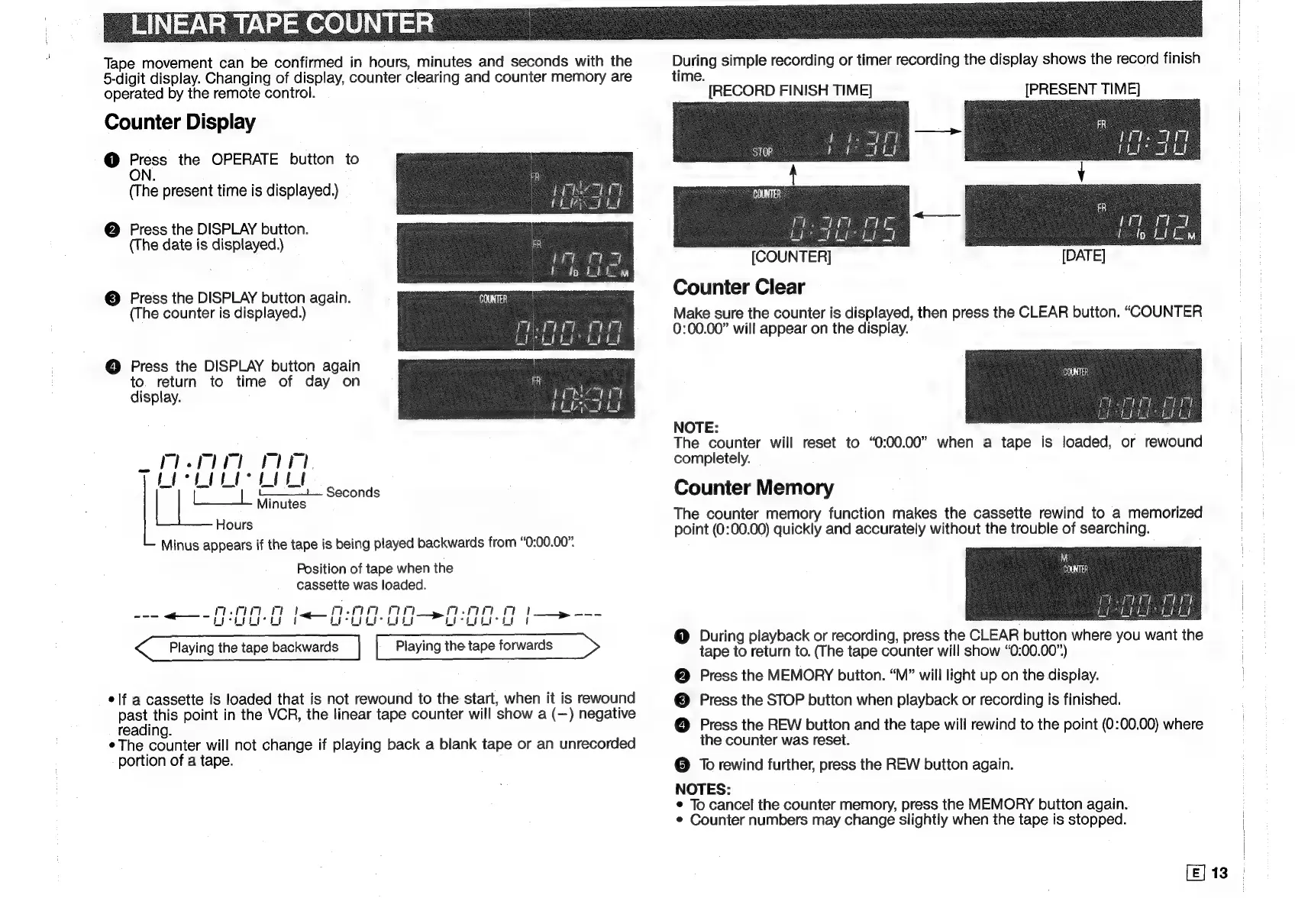
Tape
movement
can
be
confirmed
in
hours,
minutes
and
seconds
with
the
5-digit
display.
Changing
of
display,
counter
clearing
and
counter
memory
are
operated
by
the
remote
control.
Counter
Display
1)
aie
the
OPERATE
button
to
N
(T
he
present
time
is
displayed.)
@
Press
the
DISPLAY
button.
(The
date
is
displayed.)
©
Press
the
DISPLAY
button
again.
(The
counter
is
displayed.)
@
Press
the
DISPLAY
button
again
to.
return
to
time
of
day
on
display.
Minus
appears
if
the
tape
is
being
played
backwards
from
“0:00.00”.
Position
of
tape
when
the
cassette
was
loaded.
~,
ae
I
ag
mr
oe.
pare
.
Licker
uy
AEA
OO
ee
Playing
the
tape
backwards
|
Playing
the
tape
forwards
>
elf
a
cassette
is
loaded
that
is
not
rewound
to
the
start,
when
it
is
rewound
pee
point
in
the
VCR,
the
linear
tape
counter
will
show
a
(—)
negative
reading.
¢
The
counter
will
not
change
if
playing
back
a
blank
tape
or
an
unrecorded
portion
of
a
tape.
During
simple
recording
or
timer
recording
the
display
shows
the
record
finish
time.
[RECORD
FINISH
TIME]
[PRESENT
TIME]
ae
oe
Dee
[COUNTER]
Counter
Clear
Make
sure
the
counter
is
displayed,
then
press
the
CLEAR
button.
“COUNTER
0:00.00”
will
appear
on
the
display.
NOTE:
The
counter
will
reset
to
“0:00.00”
when
a
tape
is
loaded,
or
rewound
completely.
Counter
Memory
The
counter
memory
function
makes
the
cassette
rewind
to
a
memorized
point
(0:00.00)
quickly
and
accurately
without
the
trouble
of
searching.
@
During
playback
or
recording,
press
the
CLEAR
button
where
you
want
the
tape
to
return
to.
(The
tape
counter
will
show
“0:00.00”)
@
Press
the
MEMORY
button.
“M”
will
light
up
on
the
display.
©
Press
the
STOP
button
when
playback
or
recording
is
finished.
@
Press
the
REW
button
and
the
tape
will
rewind
to
the
point
(0:00.00)
where
the
counter
was
reset.
;
@
To
rewind
further,
press
the
REW
button
again.
NOTES:
©
To
cancel
the
counter
memory,
press
the
MEMORY
button
again.
¢
Counter
numbers
may
change
slightly
when
the
tape
is
stopped.
[E]
13

Related product manuals