EasyManua.ls Logo

Sharp VC-A105B - Page 15

Sharp VC-A105B
71 pages
Print Icon
To Next Page IconTo Next Page
To Previous Page IconTo Previous Page
Loading...
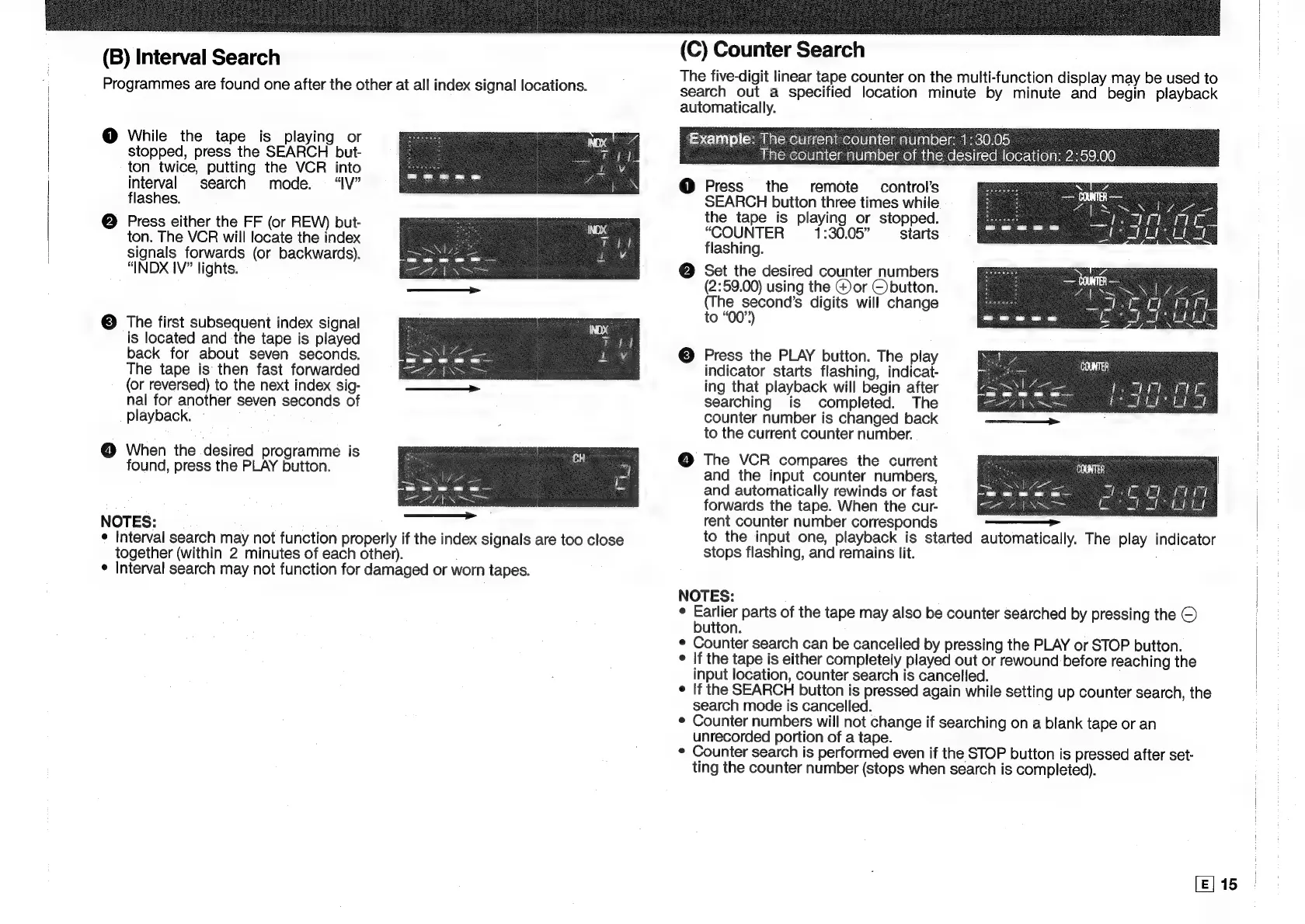
(B)
Interval
Search
Programmes
are
found
one
after
the
other
at
all
index
signal
locations.
@
While
the
tape
is
playing
or
stopped,
press
the
SEARCH
but-
ton
twice,
putting
the
VCR
into
interval
search
mode.
“IV”
flashes.
@
Press
either
the
FF
(or
REW)
but-
ton.
The
VCR
will
locate
the
index
signals
forwards
(or
backwards).
“INDX
IV”
lights.
©
The
first
subsequent
index
signal
is
located
and
the
tape
is
played
back
for
about
seven
seconds.
The
tape
is
then
fast
forwarded
(or
reversed)
to
the
next
index
sig-
nal
for
another
seven
seconds
of
playback.
@
When
the
desired
programme
is
found,
press
the
PLAY
button.
NOTES:
¢
Interval
search
may
not
function
properly
if
the
index
signals
are
too
close
together
(within
2
minutes
of
each
other).
¢
Interval
search
may
not
function
for
damaged
or
worn
tapes.
(C)
Counter
Search
The
five-digit
linear
tape
counter
on
the
multi-function
display
may
be
used
to
search
out
a
specified
location
minute
by
minute
and
begin
playback
automatically.
Example:
The
current
counter
number:
1:30.05
The
counter
number
of
the
desired
location:
2:59.00
@
Press
the
remote
control's
SEARCH
button
three
times
while
the
tape
is
playing
or
stopped.
“COUNTER
1:30.05”
starts
flashing.
@
Set
the
desired
counter
numbers
(2:59.00)
using
the
@)or
©button.
(The
second’s
digits
will
change
to
“00”)
©
Press
the
PLAY
button.
The
play
indicator
starts
flashing,
indicat-
ing
that
playback
will
begin
after
searching
is
completed.
The
counter
number
is
changed
back
to
the
current
counter
number.
@
The
VCR
compares
the
current
and
the
input
counter
numbers,
and
automatically
rewinds
or
fast
forwards
the
tape.
When
the
cur-
rent
counter
number
corresponds
to
the
input
one,
playback
is
started
automatically.
The
play
indicator
stops
flashing,
and
remains
lit.
NOTES:
°
ee
parts
of
the
tape
may
also
be
counter
searched
by
pressing
the
©
utton.
¢
Counter
search
can
be
cancelled
by
pressing
the
PLAY
or
STOP
button.
°
If
the
tape
is
either
completely
played
out
or
rewound
before
reaching
the
input
location,
counter
search
is
cancelled.
¢
If
the
SEARCH
button
is
pressed
again
while
setting
up
counter
search,
the
search
mode
is
cancelled.
¢
Counter
numbers
will
not
change
if
searching
on
a
blank
tape
or
an
unrecorded
portion
of
a
tape.
¢
Counter
search
is
performed
even
if
the
STOP
button
is
pressed
after
set-
ting
the
counter
number
(stops
when
search
is
completed).
[E]
15

Related product manuals