EasyManua.ls Logo

Sharp VC-A105B - Page 16

Sharp VC-A105B
71 pages
Print Icon
To Next Page IconTo Next Page
To Previous Page IconTo Previous Page
Loading...
RECORDING
WITH
THE
TIMER
OPERATE
button
Timer
setting
buttons
[El
16
@/
©
buttons
STOP
button
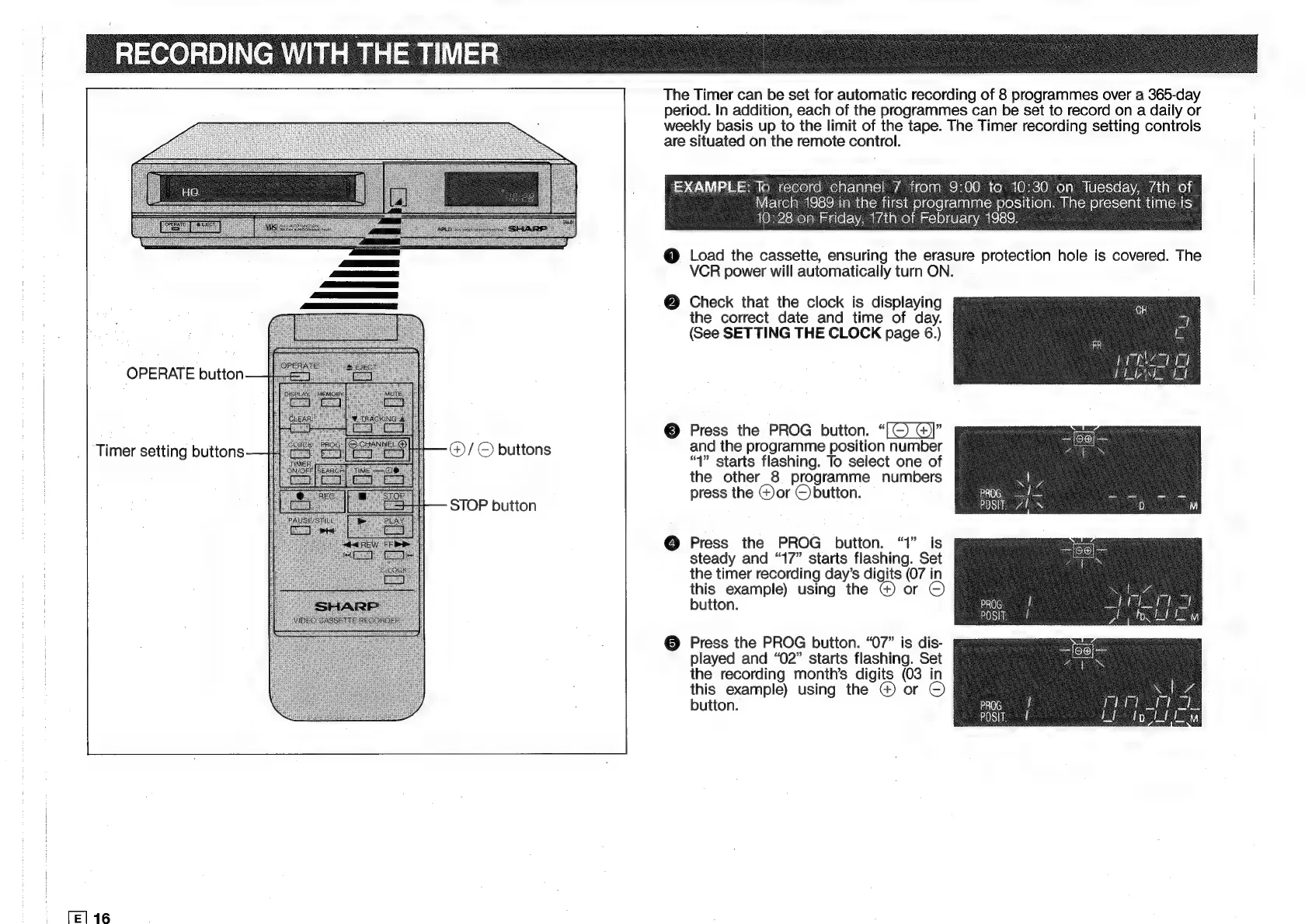
The
Timer
can
be
set
for
automatic
recording
of
8
programmes
over
a
365-day
period.
In
addition,
each
of
the
programmes
can
be
set
to
record
on
a
daily
or
weekly
basis
up
to
the
limit
of
the
tape.
The
Timer
recording
setting
controls
are
situated
on
the
remote
control.
EXAMPLE:
To
Rocrelroh
caetalcl
72
icoitel
Chee)
co)
10)-6.0)
celal
Tuesday,
Tth
of
IETeele
at's)
fa
tnteu
desis
eleeeiclaslans:
lest
tlege
The
Joe
time
is
10:28
on
Friday,
17th
of
February
1989.
@
Load
the
cassette,
ensuring
the
erasure
protection
hole
is
covered.
The
VCR
power
will
automatically
turn
ON.
Check
that
the
clock
is
displaying
the
correct
date
and
time
of
day.
(See
SETTING
THE
CLOCK
page
6.)
Press
the
PROG
button.
“[©
@)]”
and
the
programme
position
number
“1”
starts
flashing.
To
select
one
of
the
other
8
programme
numbers
press
the
Gor
©
button.
Press
the
PROG
button.
“1”
is
steady
and
“17”
starts
flashing.
Set
the
timer
recording
day’s
digits
(07
in
this
example)
using
the
@)
or
button.
Press
the
PROG
button.
“07”
is
dis-
played
and
“02”
starts
flashing.
Set
the
recording
month's
digits
(03
in
this
example)
using
the
@
or
©
button.
Ny
prog
1
Posi,
zi
xn

Related product manuals