EasyManua.ls Logo

Sharp VC-A105B - Page 19

Sharp VC-A105B
71 pages
Print Icon
To Next Page IconTo Next Page
To Previous Page IconTo Previous Page
Loading...
_
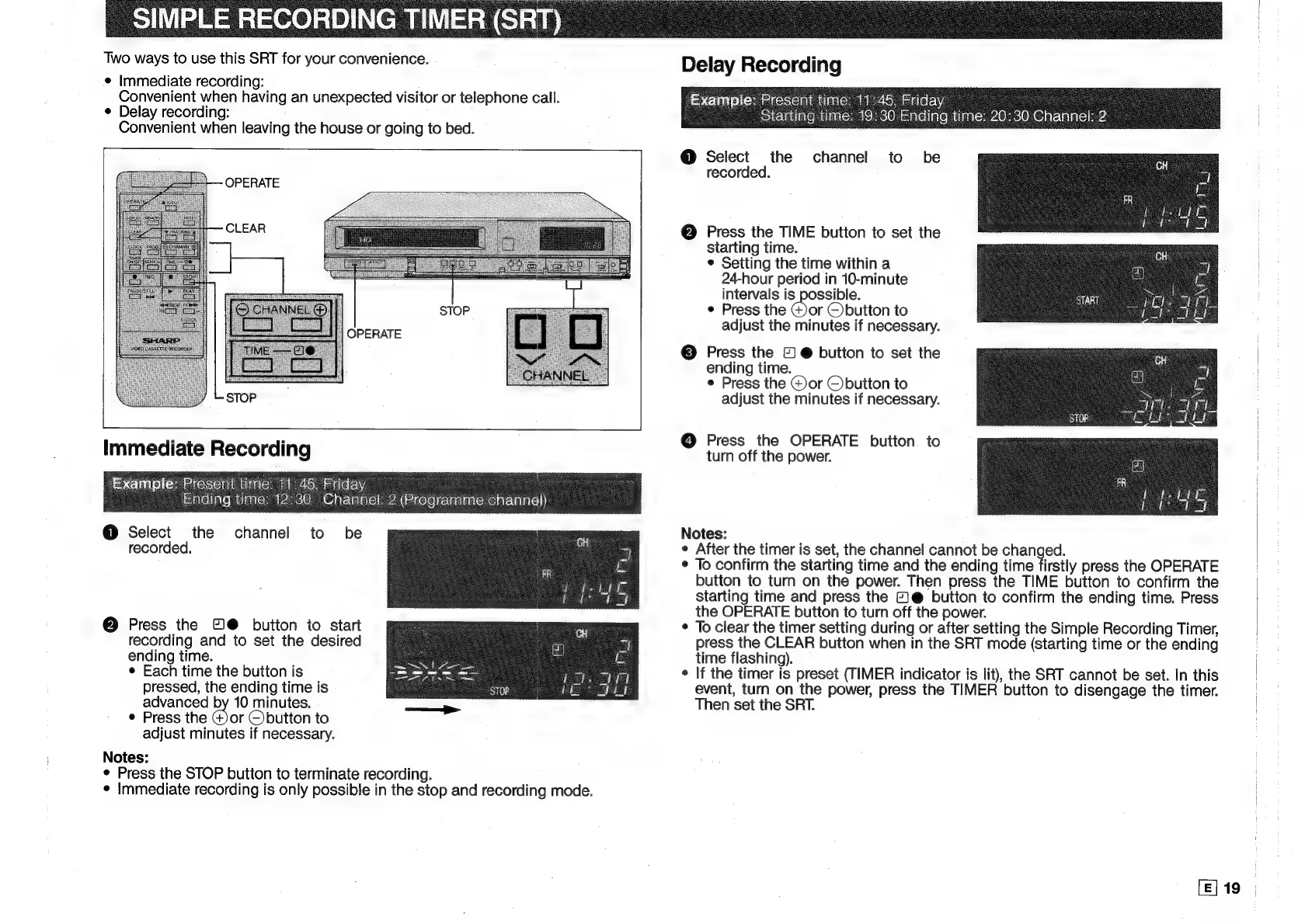
SIMPLE
RECORDING
TIMER
(SR
Two
ways
to
use
this
SRT
for
your
convenience.
©
Immediate
recording:
Convenient
when
having
an
unexpected
visitor
or
telephone
call.
¢
Delay
recording:
Convenient
when
leaving
the
house
or
going
to
bed.
OPERATE
OPERATE
Immediate
Recording
Example:
Present
time:
11:45,
Friday
4
stale)
ate}
iagicn
ay4acci8)
(Gar
\alalcihea((eicere|c-\aalagicye
eral
i!)
@
Select
the
channel
to
be
recorded.
@
Press
the
©@
button
to
start
recording
and
to
set
the
desired
ending
time.
¢
Each
time
the
button
is
pressed,
the
ending
time
is
advanced
by
10
minutes.
¢
Press
the
@or
©button
to
adjust
minutes
if
necessary.
Notes:
¢
Press
the
STOP
button
to
terminate
recording.
¢
Immediate
recording
is
only
possible
in
the
stop
and
recording
mode.
Delay
Recording
Example:
Present
time:
11
145,
Friday
Starting
time:
19:30
Ending
time:
20:30
Channel:
2
@
Select
the
channel
to
be
recorded.
@
Press
the
TIME
button
to
set
the
starting
time.
¢
Setting
the
time
within
a
24-hour
period
in
10-minute
intervals
is
possible.
¢
Press
the
Gor
©button
to
adjust
the
minutes
if
necessary.
©
Press
the
©
@
button
to
set
the
ending
time.
¢
Press
the
@)or
Cbutton
to
adjust
the
minutes
if
necessary.
@
Press
the
OPERATE
button
to
turn
off
the
power.
Notes:
e
After
the
timer
is
set,
the
channel
cannot
be
changed.
*
To
confirm
the
starting
time
and
the
ending
time
firstly
press
the
OPERATE
button
to
turn
on
the
power.
Then
press
the
TIME
button
to
confirm
the
starting
time
and
press
the
©
@
button
to
confirm
the
ending
time.
Press
the
OPERATE
button
to
turn
off
the
power.
¢
To
clear
the
timer
setting
during
or
after
setting
the
Simple
Recording
Timer,
press
the
CLEAR
button
when
in
the
SRT
mode
(starting
time
or
the
ending
time
flashing).
¢
If
the
timer
is
preset
(TIMER
indicator
is
lit),
the
SRT
cannot
be
set.
In
this
event,
turn
on
the
power,
press
the
TIMER
button
to
disengage
the
timer.
Then
set
the
SRT.
[E]
19

Related product manuals