EasyManua.ls Logo

Sharp VC-A105B - Page 20

Sharp VC-A105B
71 pages
Print Icon
To Next Page IconTo Next Page
To Previous Page IconTo Previous Page
Loading...
CHILD-PROOF
LOCK
(C-LOCK)
Any
selected
mode
on
the
VCR
can
be
locked-in
to
prevent
accidental
change
ee
a
ee
ee
to
another
mode
by
simply
pressing
the
C-LOCK
button
on
the
remote
control.
ma
atetc(eiiare
|
@iali(ebs
ea
gele)
ei
mores
ccelsialale
tid
r-\\,ey-(01.¢
All
modes
remain
locked
(including
power-off)
until
the
child-proof
lock
is
dis-
engaged.
However,
the
Full
Auto
Function
will
override
the
child-proof
lock
@
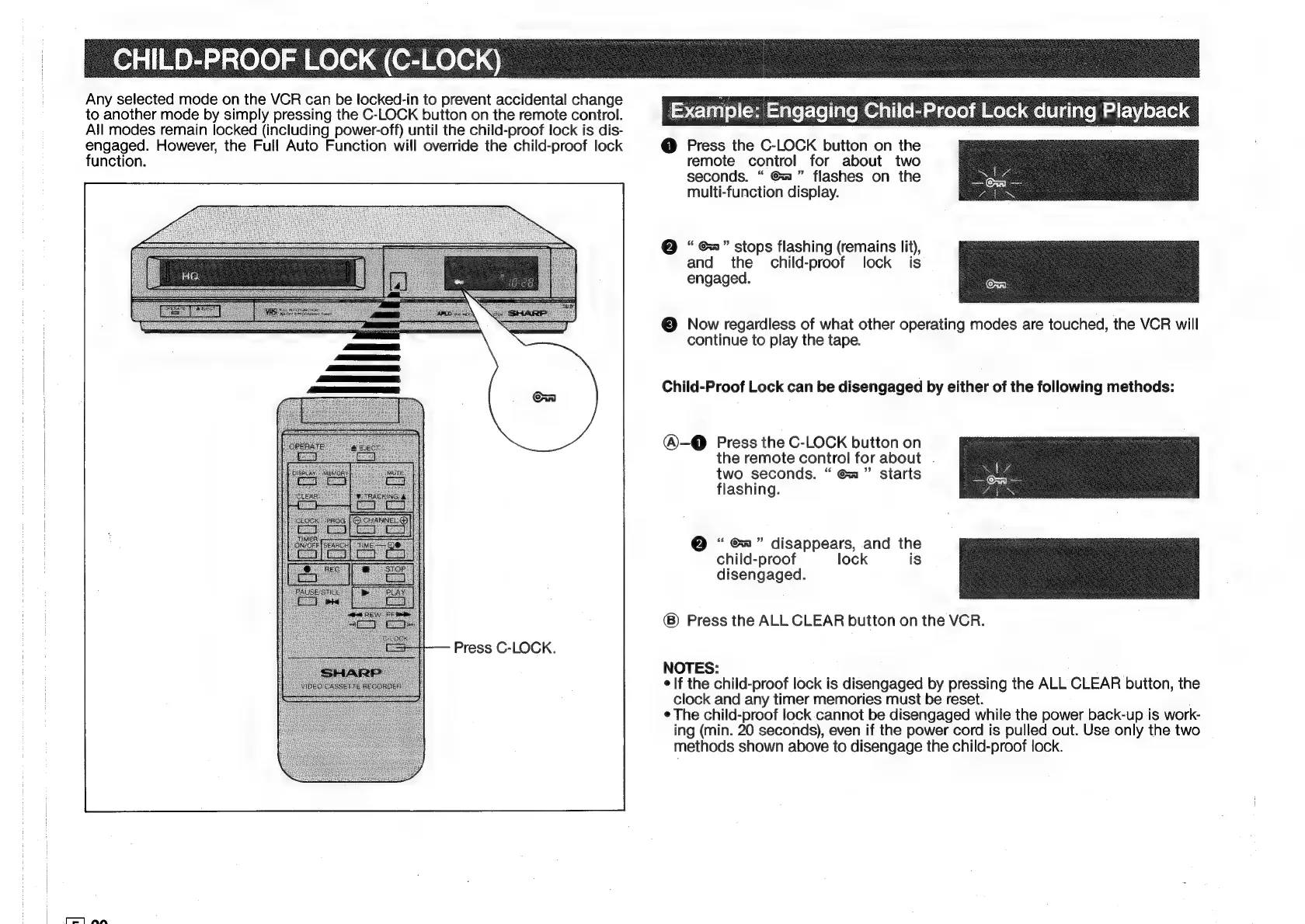
Press
the
C-LOCK
button
on
the
function.
remote
control
for
about
two
seconds.
Ga”
flashes
on
the
multi-function
display.
Example:
@
“¢”
stops
flashing
(remains
lit),
and
the
child-proof
lock
is
engaged.
©
Now
regardless
of
what
other
operating
modes
are
touched,
the
VCR
will
continue
to
play
the
tape.
Child-Proof
Lock
can
be
disengaged
by
either
of
the
following
methods:
@-@
Press
the
C-LOCK
button
on
the
remote
control
for
about
two
seconds.
Ga”
starts
flashing.
@
Ga”
disappears,
and
the
child-proof
lock
is
disengaged.
Press
the
ALL
CLEAR
button
on
the
VCR.
Press
C-LOCK.
NOTES:
e
If
the
child-proof
lock
is
disengaged
by
pressing
the
ALL
CLEAR
button,
the
clock
and
any
timer
memories
must
be
reset.
¢
The
child-proof
lock
cannot
be
disengaged
while
the
power
back-up
is
work-
ing
(min.
20
seconds),
even
if
the
power
cord
is
pulled
out.
Use
only
the
two
methods
shown
above
to
disengage
the
child-proof
lock.
ei
Ar

Related product manuals