EasyManua.ls Logo

Sharp VC-A105B - Page 5

Sharp VC-A105B
71 pages
Print Icon
To Next Page IconTo Next Page
To Previous Page IconTo Previous Page
Loading...
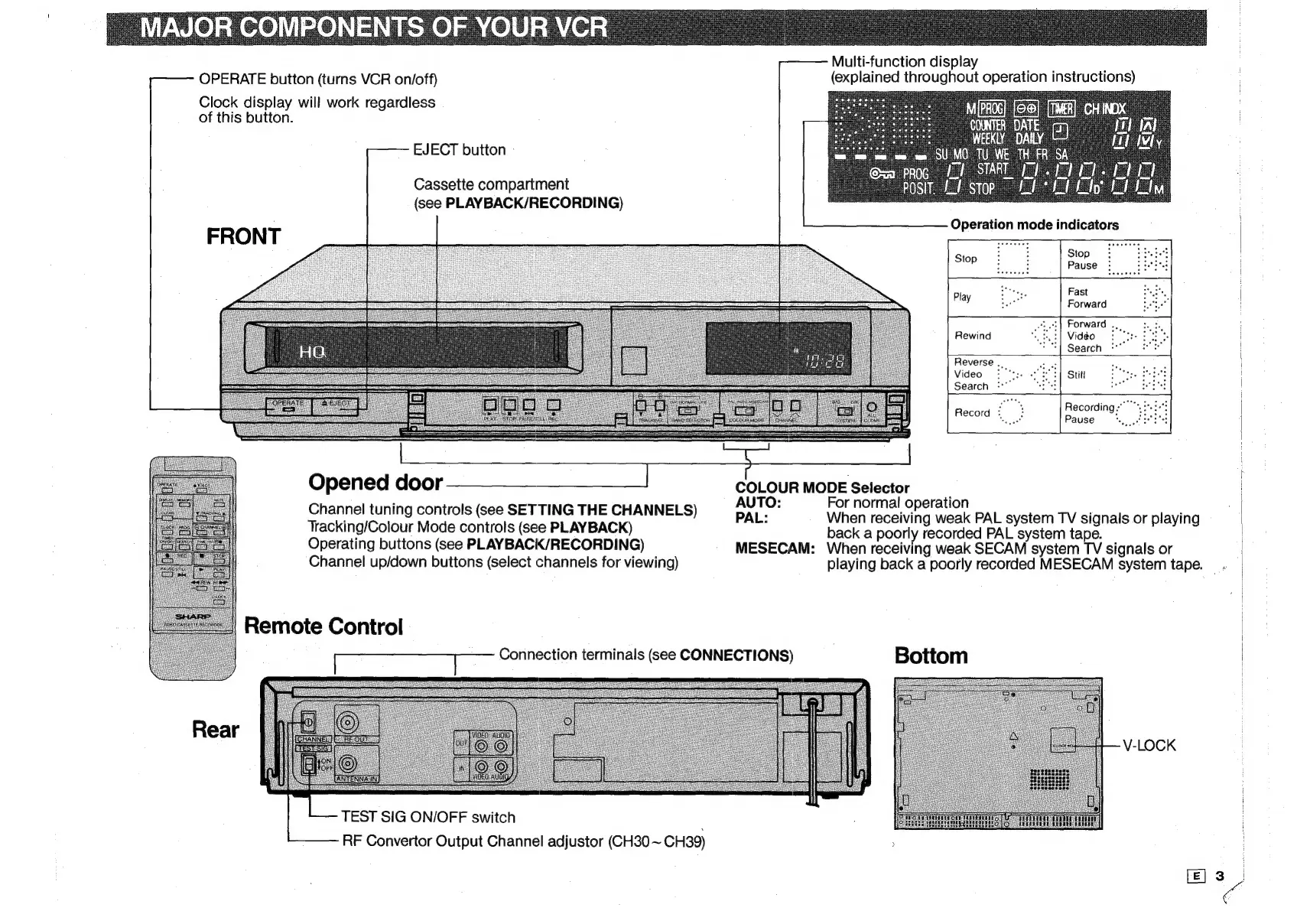
Multi-function
display
OPERATE
button
(turns
VCR
on/off)
(explained
throughout
operation
instructions)
Clock
display
will
work
regardless
of
this
button.
EJECT
button
-
Cassette
compartment
(see
PLAYBACK/RECORDING)
Operation
mode
indicators
~t,
|
]
Stop
Stop
Pause
Fast
Play
he
Forward
=I
Forward
esi,
;
Rewind
Vidéo
|
|
Reverse
.,
gute
ie
Se
0
Video:
"*::
Techno!
PERSIST
cei
Meas
ER
Search
t
Recording."
Pause
mae
Opened
door
COLOUR
MODE
Selector
|
:
AUTO:
or
normal
operation
Channel
tuning
controls
(see
SETTING
THE
CHANNELS)
PAL:
When
receiving
weak
PAL
system
TV
signals
or
playing
Operating
buttons
(see
PLAYBACK/RECORDING)
MESECAM:
When
receiving
weak
SECAM
system
TV
signals
or
Channel
up/down
buttons
(select
channels
for
viewing)
playing
back
a
poorly
recorded
MESECAM
system
tape.
-
Remote
Control
|
Te
aes
ae
Connection
terminals
(see
CONNECTIONS)
Bottom
V-LOCK
TEST
SIG
ON/OFF
switch
;
ens
i
CLUE
RF
Convertor
Output
Channel
adjustor
(CH30
~
CH39)
;

Related product manuals