EasyManua.ls Logo

Sharp VC-A105B - Page 6

Sharp VC-A105B
71 pages
Print Icon
To Next Page IconTo Next Page
To Previous Page IconTo Previous Page
Loading...
AVD
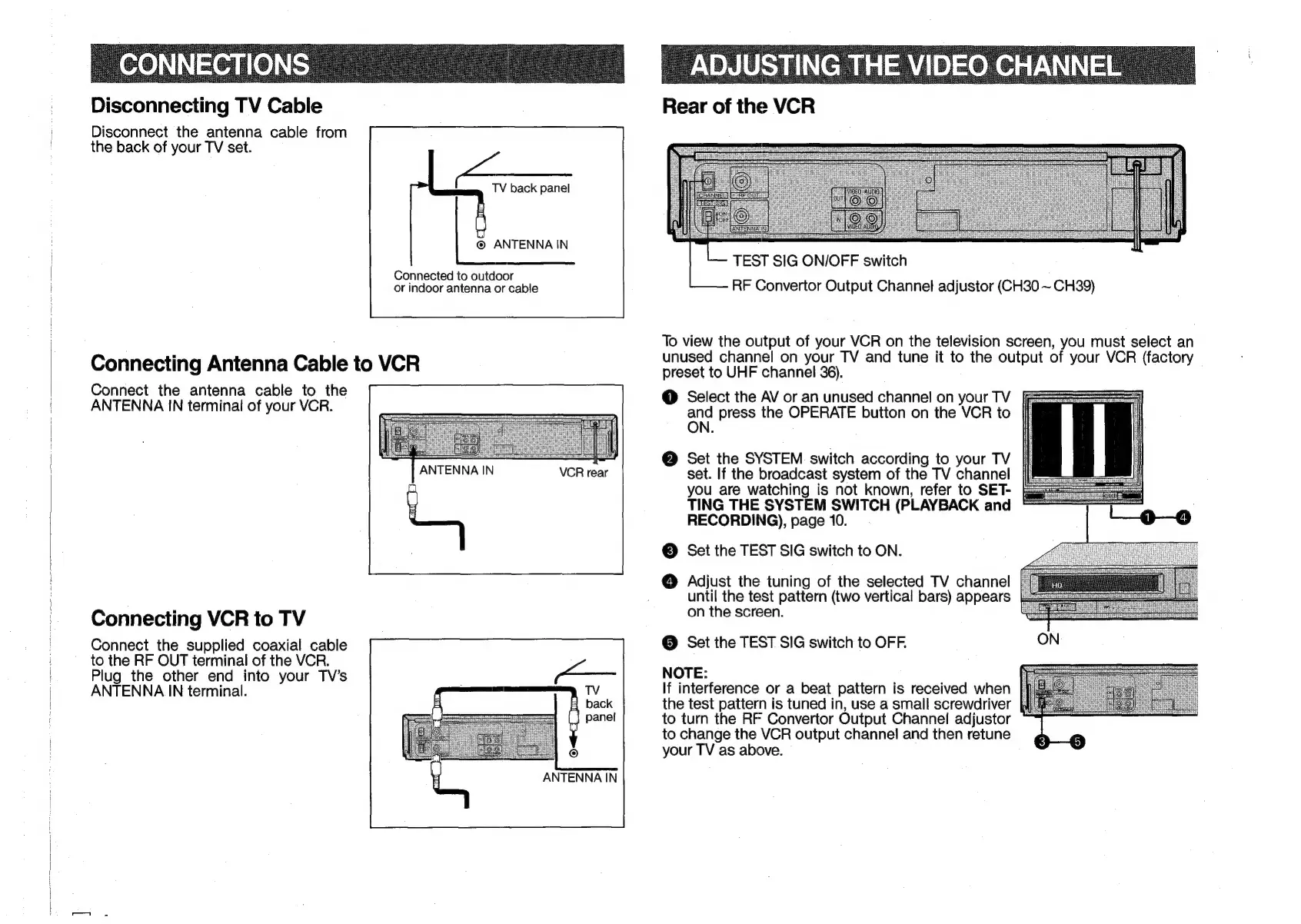
Disconnecting
TV
Cable
Disconnect
the
antenna
cable
from
the
back
of
your
TV
set.
f
TV
back
panel
©
ANTENNA
IN
Connected
to
outdoor
or
indoor
antenna
or
cable
Connecting
Antenna
Cable
to
VCR
Connect
the
antenna
cable
to
the
ANTENNA
IN
terminal
of
your
VCR.
ANTENNA
IN
VCR
rear
Connecting
VCR
to
TV
Connect
the
supplied
coaxial
cable
to
the
RF
OUT
terminal
of
the
VCR.
Plug
the
other
end
into
your
TV’s
ANTENNA
IN
terminal.
ANTENNA
IN
Rear
of
the
VCR
CTESTSi
TEST
SIG
ON/OFF
switch
RF
Convertor
Output
Channel
adjustor
(CH30
~
CH39)
To
view
the
output
of
your
VCR
on
the
television
screen,
you
must
select
an
unused
channel
on
your
TV
and
tune
it
to
the
output
of
your
VCR
(factory
preset
to
UHF
channel
36).
@
Select
the
AV
or
an
unused
channel
on
your
TV
au
press
the
OPERATE
button
on
the
VCR
to
@
Set
the
SYSTEM
switch
according
to
your
TV
set.
If
the
broadcast
system
of
the
TV
channel
you
are
watching
is
not
known,
refer
to
SET-
TING
THE
SYSTEM
SWITCH
(PLAYBACK
and
RECORDING),
page
10.
©
Set
the
TEST
SIG
switch
to
ON.
@
Adjust
the
tuning
of
the
selected
TV
channel
until
the
test
pattern
(two
vertical
bars)
appears
on
the
screen.
©
Set
the
TEST
SIG
switch
to
OFF.
NOTE:
If
interference
or
a
beat
pattern
is
received
when
the
test
pattern
is
tuned
in,
use
a
small
screwdriver
to
turn
the
RF
Convertor
Output
Channel
adjustor
to
change
the
VCR
output
channel
and
then
retune
your
TV
as
above.

Related product manuals