EasyManua.ls Logo

Sharp VC-A105B - Page 8

Sharp VC-A105B
71 pages
Print Icon
To Next Page IconTo Next Page
To Previous Page IconTo Previous Page
Loading...
SETTING
THE
CHANNELS
_
When
the
SYSTEM
switch
is
in
the
B/G
position,
your
VCR
can
receive
VHF
channels
2
to
12,
CATV
channels
($1
to
S20)
and
UHF
channels
21
to
69.
When
the
SYSTEM
switch
is
in
the
D/K
position,
your
VCR
can
receive
VHF
channels
R1
to
R12
and
UHF
channels
21
to
69.
Your
VCR
has
60
presettable
Sseele
each
of
which
can
be
preset
to
receive
one
of
the
above
TV
chan-
nels
at
a
time.
If
the
picture
is
not
clear,
or
if
you
want
a
channel
different
from
the
one
preset,
reset
the
channels
as
follows.
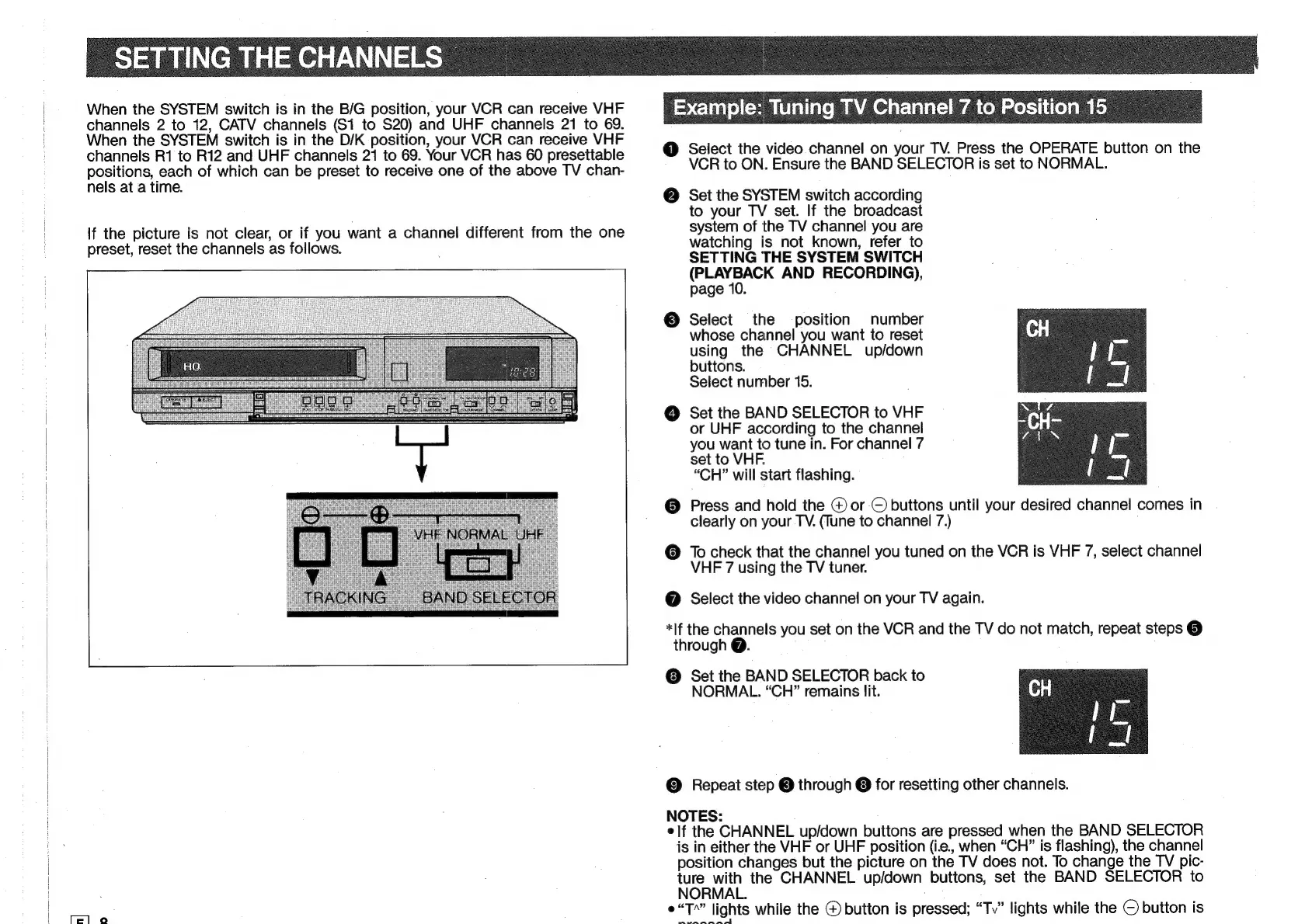
Example:
‘Tuning
TV
Channel
7
to
Position
15
@
Select
the
video
channel
on
your
TV.
Press
the
OPERATE
button
on
the
VCR
to
ON.
Ensure
the
BAND
SELECTOR
is
set
to
NORMAL.
@
Set
the
SYSTEM
switch
according
to
your
TV
set.
If
the
broadcast
system
of
the
TV
channel
you
are
watching
is
not
known,
refer
to
SETTING
THE
SYSTEM
SWITCH
(PLAYBACK
AND
RECORDING),
page
10.
©
Select
the
position
number
whose
channel
you
want
to
reset
using
the
CHANNEL
up/down
buttons.
Select
number
15.
@
Set
the
BAND
SELECTOR
to
VHF
or
UHF
according
to
the
channel
you
want
to
tune
in.
For
channel
7
set
to
VHF.
“CH”
will
start
flashing.
@
Press
and
hold
the
@
or
©
buttons
until
your
desired
channel
comes
in
clearly
on
your
TV.
(Tune
to
channel
7.)
@
To
check
that
the
channel
you
tuned
on
the
VCR
is
VHF
7,
select
channel
VHF
7
using
the
TV
tuner.
@
Select
the
video
channel
on
your
TV
again.
*lf
the
channels
you
set
on
the
VCR
and
the
TV
do
not
match,
repeat
steps
@
through
@.
©
Set
the
BAND
SELECTOR
back
to
NORMAL.
“CH”
remains
lit.
©
Repeat
step
©
through
©
for
resetting
other
channels.
NOTES:
elf
the
CHANNEL
up/down
buttons
are
pressed
when
the
BAND
SELECTOR
is
in
either
the
VHF
or
UHF
position
(i.e2.,
when
“CH”
is
flashing),
the
channel
position
changes
but
the
picture
on
the
TV
does
not.
To
change
the
TV
pic-
ture
with
the
CHANNEL
up/down
buttons,
set
the
BAND
SELECTOR
to
NORMAL.
¢“T*”
lights
while
the
@
button
is
pressed;
“Tv”
lights
while
the
©
button
is
‘ach
tie
i
elke:
pa

Related product manuals