VL-A110U/pp. 026-039; 00/11/21/18:00
G. K. Associates, Tokyo
35
Useful Features
Useful Features
Setting the VIEWCAM to Full
Auto Mode
This VIEWCAM is equipped with auto focus,
auto white balance, and auto exposure
functions. For easy, high-quality camera-
recording, record subjects in Full Auto mode.
If “AUTO” is not displayed even when the
DISPLAY button is pressed, perform the
procedure below to set the VIEWCAM to Full
Auto mode.
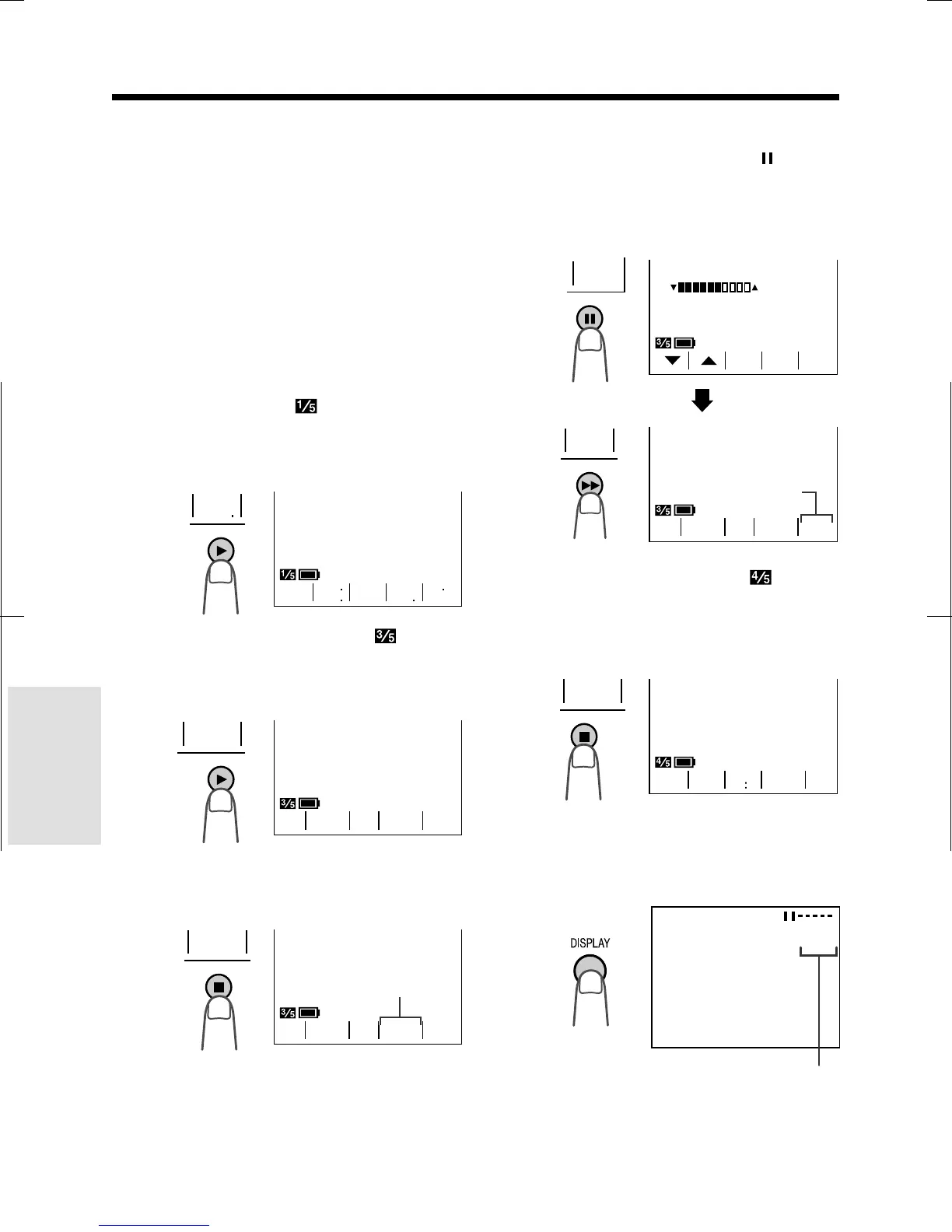
1 In Recording Standby mode, press the
MENU button until
appears. If “PIC.
EFF.” is not displayed above the D
button, press this button until “PIC. EFF.”
appears.
2 Press the MENU button until ap-
pears. If “MAN’L FOCUS” is displayed,
press the D button to change it to
“FOCUS”.
4 If “EXPOSURE” is displayed in yellow,
press the EXPOSURE button (
) to
display the exposure setting screen,
then press the AUTO button (B).
• The exposure setting screen turns off
and “EXPOSURE” returns to blue.
5 Press the MENU button until
appears. If “SCENE MENU” is not
displayed above the A button, press
this button until “SCENE MENU”
appears.
6 Press the DISPLAY button.
• The Operation button indicators
disappear, and “AUTO” is displayed on
the screen.
3 If “WHITE BAL.” is displayed in yellow,
press the WHITE BAL. button
(A).
•“WHITE BAL.” returns to blue.
BAL.
WH I T E
SUREFOCUS
BAL.
WHITE EXPO
Blue
Full Auto mode indicator
FOCUS
MAN’ L
SUREFOCUS
BAL.
WHITE EXPO
B/W
EFF
GAMA
REW
QK
EFF
PIC
EFF
SPORT
TLE
TI
-
TURN
RE
-
16 9
MENU
SCENE
Blue
EXITAUTO
EXPOSURE
SURE
EXPO
SUREFOCUS
BAL.
WHITE EXPO
AUTO










 To Next Page