20
VT-G14
VT-G21
ËË
ËË
Ë
SECAM CHROMA ADJUSTMENT(Continued)
2. SECAM BLACK LEVEL (R-Y/B-Y) and BLACK OFFSET ADJUSTMENT
(I
2
C bus data adjustment)
1. Receive the SECAM colour bar signal.
2. Call the service mode.
3. Select the R-Y black offset mode (R-Y).
4. Connect the oscilloscope to pin (36) (B-Y OUT,
TP802) of IC801.
» Range : 10 mV/div.
» Sweep time : 5 µsec/div. (Use a 10 : 1 probe.)
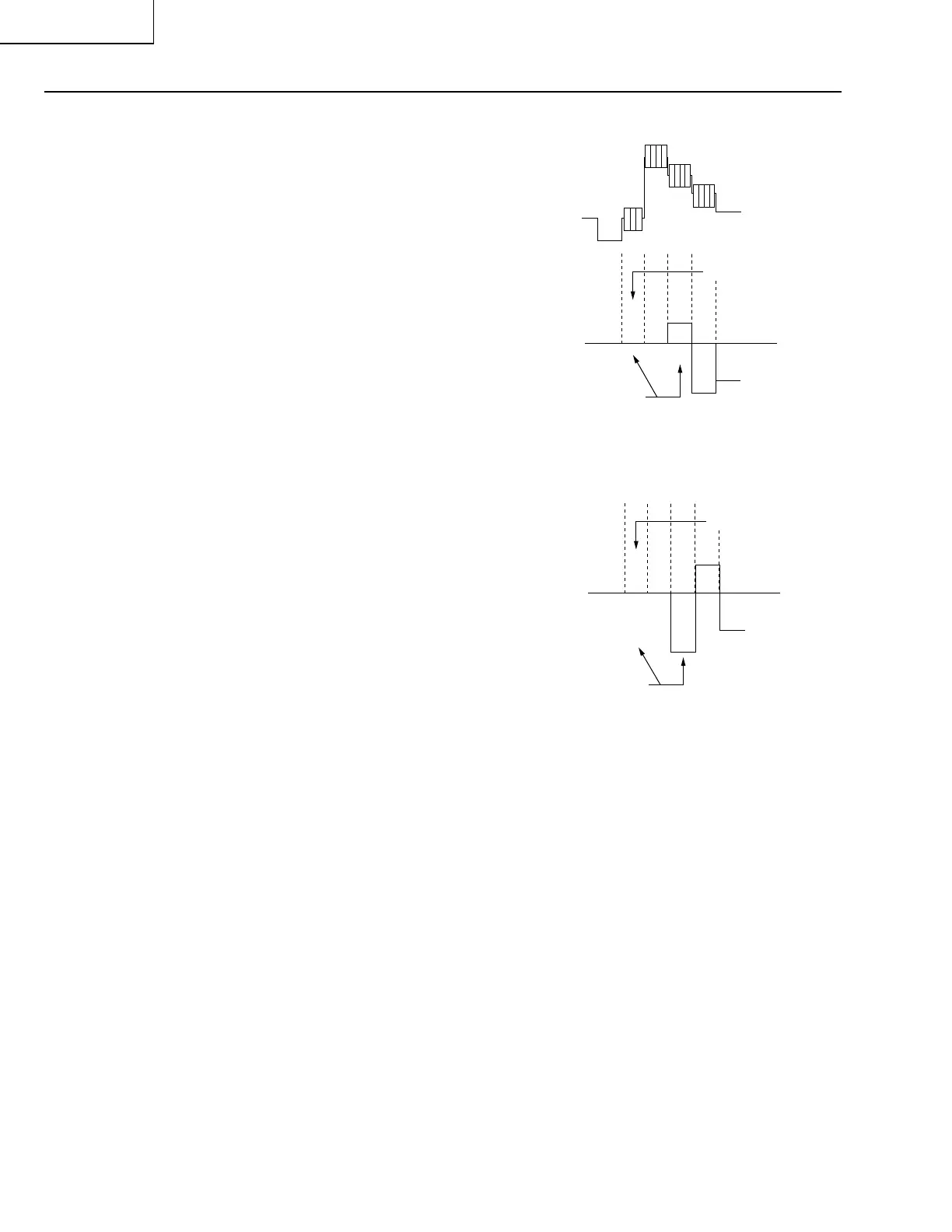
5. Vary the data so that the back porch and the white
level should become at the same level. See
Fig.
10
.
6. Select the B-Y black offset mode (B-Y).
7. Reconnect the oscilloscope to pin (35) (B-Y OUT,
TP801) of IC801. Keep the same conditions as in
Step 4. above.
8. Vary the data so that the back porch and the white
level should become at the same level. See
Fig.
11
.
9. Quit the service mode.
10.Finally adjust the colour control to the MAX and
MIN positions to make sure there is no change in
the background.
Fig.10
Fig.11
YWCY
To be at the same level
Back porch
YWCY
YWCY
To be at the same level
Back porch



 To Next Page