The XEA147BK and XEA147WH are cash registers designed for retail environments, offering a range of functions for sales transactions, reporting, and basic programming.
External View and Components:
The device features a clear Display for showing transaction details and programming prompts. A Mode switch allows users to select different operational modes:
- ن (OFF): Turns the display off, making no operations possible.
- REG (Register): Permits transaction entry, the primary mode for sales.
- S (Correction): Allows corrections after a transaction has been finalized.
- X/Flash (Read Report): Permits printing of sales reports and displaying flash reports.
- Z/PGM (Reset Report/Program): Permits printing and resetting of sales reports, as well as programming the register.
The Printer cover protects the thermal printer mechanism, which is used for printing receipts and reports. Beneath this cover is the paper roll cradle. The Keyboard is laid out with numeric keys (0-9), department keys (1-8), and various function keys. A Drawer is integrated for cash and coin storage. A Cheque slot is provided for processing checks.
For connectivity and data management, the XEA147 includes an AC adapter jack for power, an RS-232 connector (for the XE-A147 model only) for external communication, and an SD card slot for SD type cards (SDHC 4GB to 32GB). A Reset switch (for the XE-A147 model only) is present, but its use is strongly cautioned against unless specifically instructed, as it can damage or delete data.
Keyboard Layout and Key Functions:
The keyboard is designed for efficient operation, with keys grouped by function:
- Numeric keys (0-9): Used for entering prices, quantities, and programming data.
- Department keys (1-8): Used to categorize sales items and apply specific tax rates or descriptions.
- ↑ (Paper feed key): Advances the paper roll.
- /RCPT SW (Multiplication/receipt switch key): Serves a dual purpose for multiplication and toggling receipt printing.
- CL (Clear key): Clears incorrect entries.
- CR (Credit key): Finalizes transactions paid by credit.
- EX (Foreign currency exchange key): Used for foreign currency transactions.
- % (Percent key): Applies percentage calculations.
- #/TM/ST (Non-add code/Time display/Subtotal key): Used for non-add codes, displaying time, and subtotaling transactions.
- PO/VAT (Paid-out/Value added tax key): Used for paid-out transactions and value-added tax functions.
- SHIFT (Shift key): Modifies the function of other keys, particularly for character entry.
- CH (Cheque key): Finalizes transactions paid by cheque.
- ESC/HELP (Escape/Help key): Used to escape from current operations or access help functions.
- ** (Void key):** Voids entries or transactions.
- TL/AT/NS (Total/Amount tender/No sale key): Finalizes cash transactions, tenders amounts, or opens the drawer without a sale.
- RCPT/RA (Receipt print/Received-on-account key): Prints receipts or records received-on-account transactions.
Initial Setup and Preparation:
Before first use, the XEA147 requires careful initialization. This involves placing the unit on a stable surface, connecting the AC adapter (without batteries installed), and turning the mode key to REG. This process clears any previous data and prepares the register for programming. If initialization fails, disconnecting power for at least one minute and retrying is recommended.
Battery Installation and Maintenance:
The XEA147 uses three AA-size alkaline batteries to retain programmed settings and sales data when the unit is switched off or disconnected from power. Failure to install these batteries will result in the loss of all data upon power loss. Batteries are installed in a compartment next to the paper roll cradle. The display will show "L" when batteries are properly installed. The register provides visual warnings for battery status: a "Low Battery" symbol indicates that batteries should be replaced within two days to prevent data loss, while a "Flat Battery/No Battery" symbol signifies immediate replacement is necessary to avoid losing all programmed settings and sales data. When replacing batteries, the unit should remain plugged into AC power to maintain data.
Paper Roll Installation:
The XEA147 uses 57mm wide, thermally sensitized paper rolls with a maximum diameter of 80mm. Installation involves detaching the printer cover, lifting the print roller arm, placing the paper roll in the cradle (ensuring the cut end is straight and facing the correct direction), feeding the paper along the positioning guides, closing the print roller arm until it clicks, cutting off excess paper, and replacing the printer cover. The paper feed key (↑) can be used to confirm proper paper loading.
Programming Features:
The XEA147 offers extensive programming capabilities, accessible by setting the mode key to Z/PGM.
- Setting Time and Date: The time is entered as a four-digit 24-hour format, followed by the #/TM/ST key. The date is entered as a six-digit day-month-year format, also followed by the #/TM/ST key.
- Setting GST Rate: A 10% GST rate can be programmed using a specific sequence involving the #/TM/ST, /RCPT SW, and TL/AT/NS keys.
- Department Taxability: Departments can be set as taxable or non-taxable using a sequence involving #/TM/ST, /RCPT SW, SHIFT, and department keys.
- Receipt Customization:
- GST Text: The letters "GST" can be programmed to print on receipts using a specific character entry sequence involving #/TM/ST, /RCPT SW, and department/function keys.
- Currency Symbol: The "$" symbol can be set to print on receipts using a sequence involving #/TM/ST, /RCPT SW, and TL/AT/NS.
- Business Name and ABN: Up to six lines of business information (e.g., business name, ABN) can be programmed to print on the receipt header. Each line supports up to 30 characters and is entered using a sequence involving #/TM/ST, /RCPT SW, and keyboard entry.
- Rounding Cash Sales: Cash sales amounts can be programmed to round to the nearest 5 cents using a specific sequence involving #/TM/ST, /RCPT SW, and TL/AT/NS.
- Power Save Time: The power save (screen off) time can be adjusted, with a maximum setting of 100 minutes, using #/TM/ST, /RCPT SW, and TL/AT/NS. The default is 30 minutes.
- Electronic Journal (EJ) Management: The display of the "near full" error symbol for the Electronic Journal can be disabled. If disabled, older records in the EJ (which has a 3000-line capacity) will be deleted on a first-in, first-out (FIFO) basis when it becomes full. This is done via a sequence involving #/TM/ST, /RCPT SW, and TL/AT/NS.
- Department Naming: Departments can be assigned descriptive names (up to 12 characters) using a character entry sequence involving #/TM/ST, /RCPT SW, DEPT KEY, and department/function keys. Character entry can be done directly using the letters on the keys or via 3-digit codes (refer to the full manual for details).
Operational Features:
- Making a Sale: Sales are initiated by entering the price in cents, pressing the desired department key, and then pressing TL/AT/NS to finalize the cash sale.
- Corrections:
- Entered Numbers: Incorrect numbers can be cleared using the CL key before pressing the next key.
- Last Entry (Direct Void): The last department entry can be corrected by pressing the key.
- Earlier Entries (Indirect Void): For entries made earlier in a transaction but not yet finalized, the amount to be removed is entered, followed by the key and the relevant department key.
- After Finalization: Corrections after a transaction has been finalized involve turning the mode key to S, entering the amount to be corrected, pressing the department key, and then TL/AT/NS. This removes the amount from the relevant department/PLU and transaction totals, adding it to the Void Mode Transaction totalizer. A Void Mode receipt will print even if receipt printing is off.
- "E 34" Error Resolution: If the "E 34" error appears when finalizing a cash sale, the sale must first be finalized to Credit (CR) or Cheque (CH), or a subtotal void must be performed. Then, with the mode key in Z/PGM, a specific sequence (8 #/TM/ST TL/AT/NS) is entered, and the mode key is returned to REG to clear the error.
- Receipt Printing Control: Receipt printing can be toggled ON or OFF by pressing /RCPT SW when no sale is in progress and the mode key is in REG. The RCPT/RA key can be used to print a receipt after a sale, even if printing is off, or to print only the total if there are more than 40 items.
- Copy Receipts: Copy receipts can be enabled using a programming sequence in Z/PGM mode involving #/TM/ST, /RCPT SW, and TL/AT/NS.
Reporting Features:
The XEA147 provides two main types of sales reports:
- X (Examine) Reports: Read sales data without clearing it from memory.
- Z (Zero) Reports: Read sales data and clear it from memory, preparing the register for the next period.
Both X and Z reports have two levels:
- Daily Reports:
- Daily X Report: Allows examination of daily figures at any time without clearing them. Produced by turning the mode key to X/Flash and pressing TL/AT/NS.
- Daily Z Report: Prints and clears daily figures at the end of the day, adding data to the Period report memory. Produced by turning the mode key to Z/PGM and pressing TL/AT/NS.
- Period Reports:
- Period X Report: Shows sales data for the period up to the last Daily Z report. Produced by turning the mode key to X/Flash and pressing SHIFT then TL/AT/NS.
- Period Z Report: Prints and clears period sales data, preparing for the next period. Produced by turning the mode key to Z/PGM and pressing SHIFT then TL/AT/NS.
This comprehensive set of features makes the XEA147BK and XEA147WH suitable for managing daily sales operations, maintaining accurate records, and customizing the register to specific business needs.

 Need help?
 General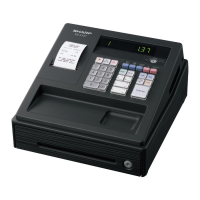

 To Next Page